
Record every warehouse entry and exit with date, product, quantity, and the person in charge. Printable template, daily example, and audits.
Quick Answer: Warehouse inbound and outbound control is the record of everything that enters the inventory (purchases, returns) and everything that leaves (sales, shrinkage, transfers), including date, product, quantity, reason, and responsible party. If you do this daily and reconcile it with physical counts, the system and the shelf will match, and you will detect discrepancies in time.
The problem usually appears mid-week, not at the end of the month. The branch sells well, the cash register reconciliation seems reasonable, and the team swears the product was there. But when checking the shelf or the warehouse, supplies are missing, there are extra items that nobody ordered, and the system says one thing while the sales floor says another. In a coffee shop in Mexico City, that translates into drinks that can no longer be prepared. In a gas station in the State of Mexico, it leads to urgent purchases and tight margins. In a car wash in Nuevo León, it results in poorly controlled chemicals that silently erode profitability.
Managing warehouse inbound and outbound movements is not a minor administrative task. It is the touchpoint that determines whether the business operates with reliable data or with assumptions. And for an SME with multiple branches, that difference is reflected in shortages, shrinkage, poorly planned purchases, improvised transfers, and customers who do not return because "exactly today we ran out."
What is warehouse inbound and outbound control? It is the daily record of everything that enters (purchases, returns, received transfers) and everything that leaves (sales, shrinkage, internal consumption, sent transfers), with date, reason, quantity, and responsible party. It serves to make the inventory in the system match what is actually on the shelf.
Table of Contents
Why Poor Inventory Control Costs You More Than You Think
The Pillars of a Solid Inventory System
Every movement needs context
Fields that must not be omitted
Printable Inbound and Outbound Control Template
Daily Example: A Coffee Shop in Querétaro
Choosing Your Tool to Combat Chaos
When manual tracking still works
When a POS is no longer enough on its own
When an ERP actually makes sense
Inventory Control Systems Comparison
Excel vs. POS: How to Decide
The Operations Manual for Daily Inbound and Outbound Movements
Receiving merchandise without halting operations
Well-registered sales outflows
Inter-branch transfers without losing traceability
Returns and shrinkage without sugarcoating numbers
Audits and Reconciliations That Reveal the Truth
Which type of count is best to use
How to investigate a discrepancy without improvising
Turn Your Warehouse Data Into Profits
Inventory that also helps you sell more
Where loyalty and analytics come in
Frequently Asked Questions About Warehouse Inbound and Outbound Control
What does warehouse inbound control consist of?
How to keep a record of warehouse inbound and outbound movements?
Are warehouse inbound/outbound movements and inventory the same thing?
How often is the inbound and outbound control reviewed?
Does every product need its own SKU?
How to control consignment inventory?
What changes when your supply prices go up frequently?
What is best to do first if everything is messy today?
Can you operate successfully without audits?
Why Poor Inventory Control Costs You More Than You Think
When a business accepts "normal" discrepancies between the system and physical stock, it begins to operate with a fictitious profit. It overbuys to cover errors. It sells less because it thinks it is out of stock. Or worse, it promises product that no longer exists.
In a small business, the impact is noticed quickly. For example, if every week two liters of milk ($28 MXN each) and a pack of cups ($180 MXN) are lost without being registered, that is about $236 MXN weekly, more than $12,000 MXN a year (illustrative figures) that no one sees in the cash register reconciliation.
This explains why the problem appears in very different businesses. A coffee shop in Puebla loses margin when it does not register expired milk or drinks given to staff. A car wash in Baja California gets unbalanced when no one deducts the shampoos, waxes, or microfibers used for service from inventory. A convenience store in Yucatán ties up capital by buying product it already had, but was poorly entered.
Rule of thumb: if inventory is only checked when "something doesn't add up," the business is already late.
The most common mistake is not the lack of a system. It is the lack of operational discipline. Many SMEs do register purchases, but do not document shrinkage, returns, internal consumption, transfers, or adjustments. Thus, inventory stops being a control tool and becomes an incomplete picture.
Well-executed warehouse inbound and outbound tracking protects three things at once:
Real profitability: prevents shrinkage from hiding in urgent purchases or chronic shortages.
Daily operation: reduces stockouts that affect sales and service.
Decision-making: allows buying with criteria, moving merchandise between branches, and detecting where money is leaking.
The Pillars of a Solid Inventory System
A solid inventory does not start with software. It starts with clear definitions and movements entered identically across all branches. When each manager registers "their own way," the problem does not take long to appear.
The basic rule is simple: a standard format with date, type, reason, SKU, quantity, and responsible party, used identically across all shifts. With that, you can already reconstruct what happened with any product.
Every movement needs context
Registering an inbound or outbound movement without a reason is of little use. The system must state what happened and why it happened.
An inbound movement can come from a purchase, customer return, return to the central warehouse, internal production, or count adjustment. An outbound movement can originate from a sale, shrinkage, internal consumption, transfer, or return to a supplier. If all of these are entered as an "adjustment," later no one can read the real history of the inventory.
Common examples:
Coffee shop in Puebla: syrup is spilled. That is not a sale or a generic adjustment. It is known shrinkage.
Boutique in CDMX: a garment disappears from the display and there is no ticket or return. That points to unknown shrinkage.
Gas station in State of Mexico: additives are sent to another station. It is not an outflow due to sale. It is an inter-branch transfer.
Car wash in Nuevo León: the manager uses supplies to redo a poorly executed service. That is operational consumption and must be kept separate.
A reliable inventory does not just count pieces. It explains decisions, errors, and exceptions.
Fields that must not be omitted
The minimum format works best when no one interprets it. It must be the same for all branches and all shifts. A good foundation includes:
Exact date: to reconstruct sequence and detect late entries.
Type of movement: inbound, outbound, transfer, return, or adjustment.
Reason: purchase, sale, shrinkage, internal consumption, transfer, or count.
Responsible party: who received, dispatched, authorized, or corrected.
SKU or internal code: not the name "as the store knows it."
Quantity and unit: piece, liter, kilo, box, package.
Brief observation: only when it helps to investigate later.
When one of those fields is missing, operations get complicated. The error remains invisible until the physical count. That is why it is best to review data entry examples before designing your own templates. This inventory control guide with examples helps ground how to document movements consistently.
Printable Inbound and Outbound Control Template
Copy this table into Excel, Google Sheets, or print it and paste it in the storage room. One sheet per day or per week; one row per movement.
Warehouse Inbound and Outbound Control Form
Business: __________ Branch: __________ Date: //______ Shift Supervisor: __________
Time | Folio | Type (I/O) | Reason | Code / SKU | Product | Unit | Quantity | Stock After | Registered by | Authorized by | Remarks |
|---|---|---|---|---|---|---|---|---|---|---|---|
07:10 | I-0412 | I | Purchase | MIL-WHO-1L | Whole milk 1 L | Liter | 24 | 30 | Ana | Luis | Supplier Invoice 5521 |
11:30 | O-0413 | O | Shrinkage | MIL-WHO-1L | Whole milk 1 L | Liter | 1 | 29 | Ana | Luis | Spilled at the bar |
16:00 | O-0414 | O | Transfer | COF-BEA-1K | Coffee beans 1 kg | Kilo | 2 | 5 | Luis | Luis | To Downtown branch, folio T-88 |
Valid Reasons (use only these):
Inbound (I): purchase, customer return, transfer received, internal production, count adjustment.
Outbound (O): sale, known shrinkage, unknown shrinkage, internal consumption, authorized courtesy, transfer sent, return to supplier.
End of the Day Reconciliation:
Key Product | Initial Stock | + Inbounds | − Outbounds | = Theoretical Stock | Physical Count | Difference | Reviewed by |
|---|---|---|---|---|---|---|---|
If the difference is not zero, do not adjust it immediately: first check the invoices and tickets of the day.
Daily Example: A Coffee Shop in Querétaro
This is what the inbound and outbound control of a single supply, whole milk, looks like on any given Tuesday (illustrative figures):
Time | Movement | Reason | Quantity | Theoretical Stock |
|---|---|---|---|---|
07:00 | Initial stock | Opening count | — | 12 L |
07:10 | Inbound | Purchase from supplier | +24 L | 36 L |
07:00–21:00 | Outbounds | Sales registered in the POS (recipes) | −25 L | 11 L |
11:30 | Outbound | Shrinkage: a pitcher was spilled | −1 L | 10 L |
13:00 | Outbound | Internal consumption: staff drinks | −0.5 L | 9.5 L |
16:00 | Outbound | Transfer to Downtown branch | −2 L | 7.5 L |
21:00 | Closing | Physical count | 6.5 L | Difference: −1 L |
What to do with the 1-liter difference:
Recount the refrigerator and the bar.
Check if there were drinks sold with extra milk that were not charged as extra.
Confirm with the Downtown branch that they received the 2 liters from the transfer.
If it does not appear, register it as unknown shrinkage with a note, and monitor milk closely over the next few days.
For example, if a liter costs $28 MXN, losing one liter a day is about $840 MXN per month in milk alone. That is why the coffee shop counts its critical supplies (milk, coffee, cups) every day and the rest on a weekly rotation.
Choosing Your Tool to Combat Chaos
Not all businesses need the same level of system. The mistake lies in choosing too little for a complex operation, or too much system for an operation that does not yet have basic discipline.
First, look at the reality of the business. Is there a single branch or several? Are perishables managed? Are there recipes, modifiers, or internal consumptions? Are there frequent transfers? Do you need to connect inventory with sales and campaigns? The answer defines the tool.
When manual tracking still works
A spreadsheet can work in a small bakery in Yucatán with few codes, a single location, and receiving controlled by the same person every morning. It also serves as a temporary phase when the business is organizing catalogs, units, and responsible parties.
But it has clear limits. If two people edit at the same time, if there are frequent returns, or if sales go through a separate system, manual tracking starts to produce different versions of reality.
Manual tracking fails quickly when these signs appear:
There are several branches: the file becomes a puzzle of tabs.
There are composite supplies: coffee, milk, lids, and syrups leave together, but they are not always deducted correctly.
Transfers are common: one branch "sends" and the other "receives" at different times.
No one audits changes: data is corrected, but no history is kept.
When a POS is no longer enough on its own
A point-of-sale system with integrated inventory solves a lot for small chains. It is a reasonable solution for three car washes in Baja California or a short network of coffee shops in CDMX. It allows deducting stock with each sale, reviewing stock by branch, and registering purchases with more order.
Even so, it is not always enough. When the operation requires stricter traceability, lot number, expiration date, formal picking, or fine control of a central warehouse, the POS usually falls short. It works well for selling. Not always for governing logistics.
When an ERP actually makes sense
A network of gas stations in the State of Mexico, a food franchise in Nuevo León, or a retail chain with a central warehouse and frequent replenishments already needs a deeper level of system. There, complete visibility matters more than simplicity.
An ERP or a more robust platform helps when the business requires:
Detailed history of movements
Transfers with validation at origin and destination
Control by lot, date, or serial number
Safety stock alerts
Reconciliation between purchases, sales, and warehouse
Integration with marketing or loyalty programs
An option within this type of operation is to centralize commercial and operational information so that inventory does not live in isolation. For example, inventory software with customer data connection can help when the company wants to link stock with campaigns and repeat visits, not just count units.
Inventory Control Systems Comparison
Feature | Manual Method (Excel) | POS System with Inventory | ERP System |
|---|---|---|---|
Operational complexity | Low at start, high as it grows | Medium | High, but more structured |
Scalability | Limited | Suitable for small chains | Suitable for multi-branch |
Traceability | Depends on manual discipline | Partial | More complete |
Inter-branch transfers | Difficult to reconcile | Possible | More controlled |
Shrinkage and returns management | Error-prone | Acceptable | More robust |
Central warehouse control | Impractical | Limited | Suitable |
Sales integration | Manual | Direct | Direct and broader |
Visibility for management | Fragmented | Better | Centralized |
Choosing a tool without standardizing processes only digitalizes the clutter.
The best decision is usually not the most advanced one. It is the one the team can execute well, every day, in all branches.
Excel vs. POS: How to Decide
A quick question for each row. If you answer "yes" to two or more in the POS column, Excel is already costing you more than it saves.
Question | Stay with Excel if... | Switch to a POS with inventory if... |
|---|---|---|
How many branches do you have? | Only one | Two or more, or you plan to open another |
How many products or supplies do you control? | Few, and one person knows them all | Many, with variants or recipes |
Who inputs the data? | Always the same person | Several people and shifts |
How are sales deducted? | You enter them by hand at closing without issue | They are forgotten or get out of sync often |
Do you have frequent transfers or shrinkage? | Almost never | Every week |
Do you need to know what each customer buys? | Not for now | Yes, for promotions or loyalty programs |
Rule of thumb: Excel is useful for organizing the process and learning which reasons and units you use. Once the process is clear and volume grows, a POS avoids double entry because each sale automatically discounts inventory.
The Operations Manual for Daily Inbound and Outbound Movements
The difference between an organized warehouse and a chaotic one is the routine. When the operation defines who receives, who validates, who dispatches, and who authorizes, inventory stops depending on memory and goodwill.
The following logic works well in businesses with multiple locations, from restaurants in Baja California to auto repair shops with spare parts in Monterrey.
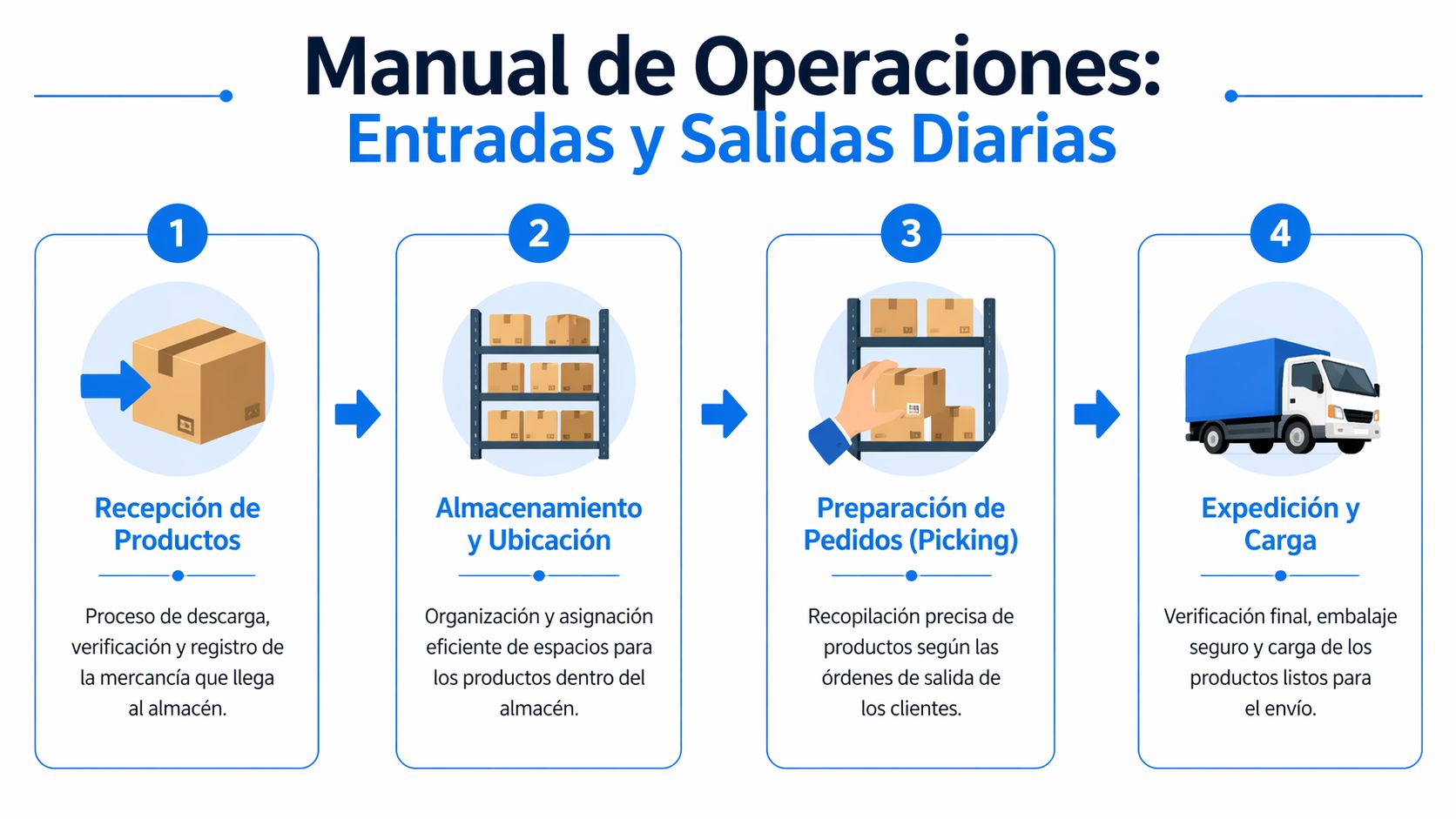
Two habits make the biggest difference: verifying each outbound movement against its document (ticket, voucher, or transfer sheet) and following FIFO (First In, First Out) for perishables.
Receiving merchandise without halting operations
Receiving should not become a pile of unchecked boxes, nor should it be an inspection so slow that it blocks the branch. The most useful workflow separates critical validation from detailed review.
In a seafood restaurant in Baja California, for example, the team first checks visible quantity, packaging condition, temperature, or basic integrity, and then records it. If something does not match, it is noted immediately. Never hours later.
Recommended sequence:
Receive against document: compare what was requested with what was delivered.
Check physical stock before storing: quantity, presentation, lot, or expiration date if applicable.
Register complete inbound movement: with date, SKU, quantity, and responsible party.
Put product away immediately: nothing should be left "pending placement."
Escalate discrepancies the same day: shortage, damage, or partial rejection.
For perishables, FIFO is non-negotiable. First in, first out. If the team puts new boxes in front "because it is easier," shrinkage will happen on its own.
Well-registered sales outflows
The ideal outbound movement starts at the point of sale and discounts inventory in real-time. When the business sells on one side and discounts at the end of the shift, lags, oversights, and forced adjustments appear.
This is especially visible in coffee shops and businesses with recipes. It is not enough to just deduct "a drink." The supplies that compose it must be deducted according to the approved recipe. If there are modifiers, extras, or substitutions, those changes must also affect inventory if they represent different consumption.
Floor criteria: if a sale does not touch inventory, someone will have to invent an adjustment later.
When the company needs to formalize entries, lots, shrinkage, and movements with more discipline, it is best to work with an inventory registry that leaves a clear history of each event, not just the final balance.
Inter-branch transfers without losing traceability
Transfers often damage inventory more than sales because they mix haste, internal trust, and poor documentation. In a workshop in Monterrey, one branch might "lend" parts to another to get a repair done. If the outflow is registered but the inbound is not, one store gets penalized and the other inflated.
The correct flow separates four moments:
Request: the destination branch asks for the SKU, quantity, and reason.
Dispatched: origin warehouse prepares and validates physically.
Formal outbound: deducted at origin with responsible party and folio.
Receipt at destination: received items are confirmed and only then enter local stock.
If the business skips confirmation at destination, ghost transfers appear. The system says the merchandise traveled. The receiving branch says it did not arrive complete. And no one knows where control was lost.
Returns and shrinkage without sugarcoating numbers
Returns should only re-enter inventory after review. Not everything that comes back can be sold again. In a CDMX boutique, a garment might return in good condition and go back to stock. Another might require a discount, cleaning, or write-off.
Something similar happens with shrinkage. If everything ends up as an "adjustment," the business never distinguishes between operational error, damage, expiration, theft, or internal consumption.
It is best to manage simple rules:
Sellable return: re-enters inventory.
Non-sellable return: goes to shrinkage or review area.
Operational shrinkage: damaged, spilled, or expired product.
Unknown shrinkage: missing items with no clear evidence.
Internal consumption: use in operations, testing, or authorized courtesies.
What works is naming each outbound movement correctly. What does not work is hiding it so that it "does not look bad" on the report.
Audits and Reconciliations That Reveal the Truth
The system can look clean and still be lying. That is why physical counts remain part of serious control. They do not serve to punish the team; they serve to discover where the process is breaking down.
Which type of count is best to use
The annual total count is useful for closing and deep cleaning, but it is highly disruptive. In SMEs with daily operations, it is usually more practical to do cycle counts by category, family, or branch. It is also wise to use blind counting on problematic products, where the person counts without seeing the system balance.
An effective routine in an open store can look like this:
Choose a critical family: high movement, high value, or high shrinkage.
Count during lowest traffic hours: without stopping sales.
Freeze movements for a few minutes: to avoid cross-entries.
Compare physical count against system: without adjusting immediately.
Investigate before correcting: the adjustment is the end, not the beginning.
The best count is not the largest one. It is the one that discovers a cause and corrects it.
How to investigate a discrepancy without improvising
When a difference appears, a method is needed. Adjusting and moving on only pushes the problem to the next month. The investigation must search for the exact point where the movement was lost, duplicated, or misclassified.
Useful five-step protocol:
Review the SKU history: recent inbounds, outbounds, transfers, returns, and adjustments.
Confirm unit of measure: many discrepancies arise from boxes recorded as pieces or liters as internal gallons.
Validate physical or digital documents: receipt, ticket, transfer sheet, return.
Interview the shift supervisor: without assuming bad practices from the start.
Correct the root cause: template, authorization, training, location, or operational sequence.
In a convenience store in Puebla, a recurring discrepancy might come from recording combos as if they were loose products. At a gas station, from recording operational consumption at the end of the day instead of at the moment. In a food business, from not separating sellable product from waste.
A good reconciliation leaves a new rule. If it does not leave a rule, it only left fatigue.
Turn Your Warehouse Data Into Profits
When inventory is reliable, it stops being a defensive area and becomes a commercial lever. That is where the conversation changes. It is no longer just about avoiding losses, but about deciding better what to buy, what to move between branches, and what to push with marketing.
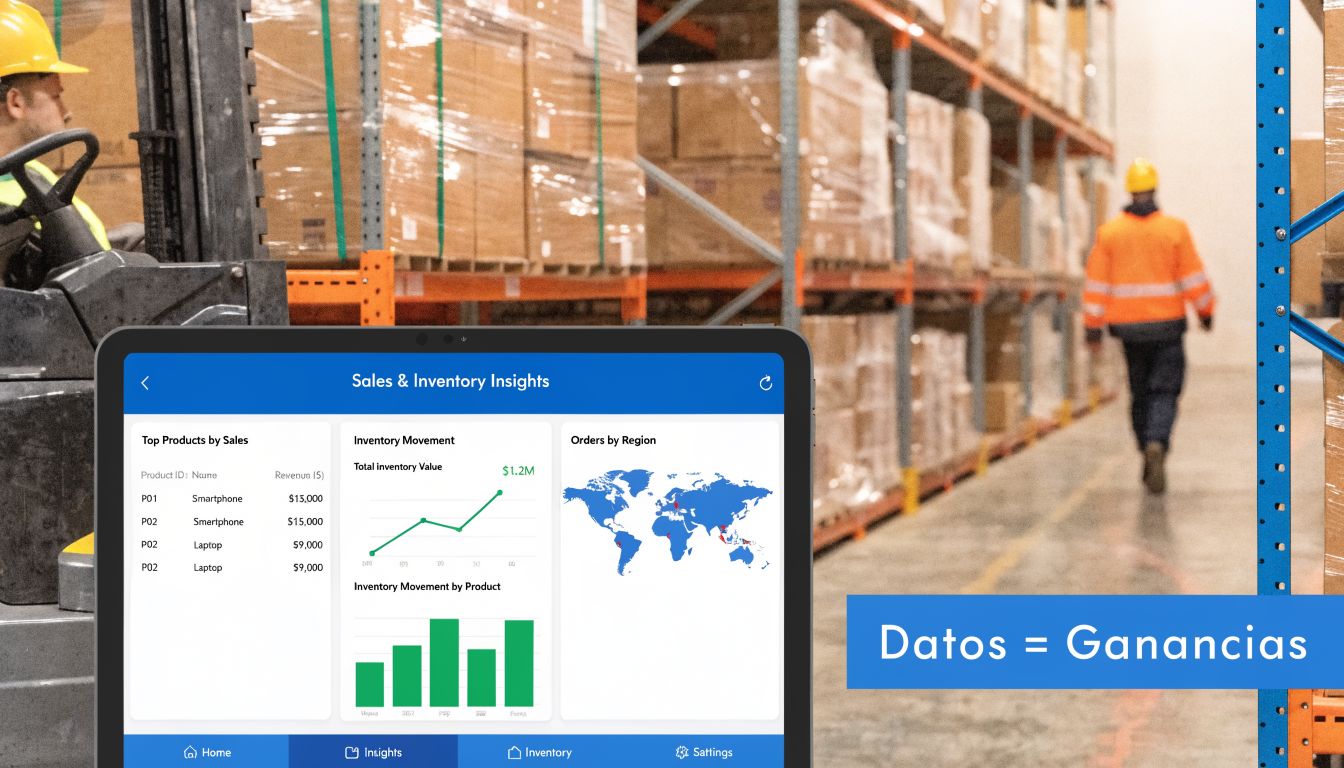
The big gap in many SMEs is the connection between the warehouse and customer loyalty. If marketing does not know what is in stock, they promote products that will run out; if the warehouse does not know what frequent customers buy, they buy uniformly and end up with slow-moving stock.
Inventory that also helps you sell more
In a coffee shop chain in Monterrey, the useful data is not just how many cups are left. What is useful is seeing which products move slowly by branch, which combos sell more on certain days, and where a shortage cuts off repeat sales. In a car wash network, it helps to know which premium package depends on supplies that are running out faster in one area than in another.
This allows for concrete actions:
Move stock before buying more: if a branch in CDMX has slow movement and another in the State of Mexico is close to running out.
Design promotions based on actual inventory: not on intuition.
Reduce stagnant product: with campaigns targeted at customers who already consume related categories.
Prioritize purchases with better turnover: instead of buying the same for all locations.
Where loyalty and analytics come in
When the business connects inventory with a CRM, it stops launching blind campaigns. It can send a reward for products that are actually available, limit promotions in branches with tight stock, or push categories with lower rotation without compromising operations.
That is where platforms that unify customer data, visits, rewards, and inventory movements come in. In operations with multiple branches, Swirvle can centralize that information to link consumption, campaigns, and availability, instead of treating the warehouse and loyalty as separate worlds.
For this to work, management also needs clear dashboards. A good Business Intelligence foundation helps read buying patterns, campaign response, and behavior by branch without getting stuck solely in operational reports.
If marketing promotes what the warehouse cannot supply, the campaign does not sell. It only accelerates customer frustration.
The business that crosses its data well buys with better judgment, promotes with less waste, and responds better to regional changes in demand.
Frequently Asked Questions About Warehouse Inbound and Outbound Control
What does warehouse inbound control consist of?
In reviewing and registering everything that arrives before put-away: comparing against the order or invoice, checking quantity, condition, and expiration date, recording the entry with date, code, quantity, and responsible party, and reporting any shortage or damage on the same day.
How to keep a record of warehouse inbound and outbound movements?
With a single format (like the template above), one row per movement, and a closed list of reasons. Record each movement when it occurs, not at the end of the shift, and close the day by comparing theoretical stock against a count of your critical products.
Are warehouse inbound/outbound movements and inventory the same thing?
Almost. Inbound and outbound movements are the flows; inventory is the resulting balance of those movements. If the movements are well registered, the inventory matches.
How often is the inbound and outbound control reviewed?
Critical or perishable supplies, every day at closing. The rest, with weekly cycle counts by category and a complete count once or twice a year.
Does every product need its own SKU?
Yes. If two items are sold, purchased, or transferred differently, they must have different codes. This includes variations in size, presentation, or flavor when they affect purchases and outflows.
How to control consignment inventory?
It is best to separate it from owned inventory in the catalog and reports. If mixed, it distorts cost, replenishment, and real profitability readings.
What changes when your supply prices go up frequently?
The pressure on inbound and outbound tracking increases. If the cost of milk or coffee changes from one order to another, each entry must be registered with its actual cost so that the margin is not calculated using old prices. Review the cost of your key supplies at each receipt and adjust prices or recipes when the difference persists.
What is best to do first if everything is messy today?
First, clean up the catalog and units. Then, define the reasons for inbound and outbound movements. Next, organize transfers and shrinkage. Software comes after that.
Can you operate successfully without audits?
Not for long. Without physical reconciliation, the system ends up accumulating small errors until they affect purchases, sales, and service.
If an SME already operates multiple branches and wants its warehouse inbound and outbound processes to not only reduce losses but also drive sales, Swirvle can be an option to consider. Its approach combines operational control, customer data, loyalty campaigns, and visibility by branch to connect inventory with repeat business and commercial decisions.
Related Blogs

Nov 7, 2026
How do you calculate a business's net purchases? Formula and example in MXN

Nov 6, 2026
How much does a point-of-sale system cost for a small business in Mexico?

Nov 5, 2026
How to Create an Executive Breakfast Menu to Sell to Offices: 2026 Guide

Nov 4, 2026
How much does a loyalty program cost for a small business? 2026 Guide

Nov 3, 2026
How to Create a Sales Database for My Business Step-by-Step: 2026 Guide

Nov 2, 2026
What is a customer data platform and when does an SMB need one?