
Discover what a business payment system is, its types, and practical examples. Find the ideal solution for your company and optimize your payments.
Direct answer: A business checkout system is the tool with which you accept payments (cash, card, transfer, or contactless payment) and record each sale. For coffee shops, restaurants, and stores with inventory, a full point of sale (POS) system is usually the most convenient option; a standalone payment terminal or a mobile app works well for simple operations.
Criterion | Full POS | Payment Terminal | Mobile Checkout App | Cash Register |
|---|---|---|---|---|
Upfront Cost | Hardware and software; varies by setup | Depends on the bank or provider | Low if you already have a compatible phone or tablet | Low |
Card processing fee | Depends on the acquirer; request the rate in writing | Depends on the contract | Depends on the provider | Does not process cards |
Inventory | Integrated | Not supported | Basic or via integration | Manual |
Reports | By product, time, employee, and branch | Approved payments only | Basic | Cash total |
Loyalty and customer data | Yes, if connected to a CRM | No | Limited | No |
Best for | Coffee shops, restaurants, and retail with multiple product lines | Simple card payments | Mobile sales or temporary setups | Very simple cash-only operations |
A common example: the owner of a coffee shop in Roma Norte contracted a payment terminal because they were offered it on-site. It collected payments fine, but they still had long lines at peak hours and did not know which products were sold together or who was returning. The checkout process worked; the information did not.
In Mexico, adoption is no longer marginal. Between 2018 and 2023, the share of businesses accepting electronic transfers nearly doubled, from 8.8% to 16.7%, according to INEGI's 2024 Economic Censuses. In 2025, SPEI processed over 7.3 billion transfers, according to Banxico via Milenio; the Bitso Real-Time Money report adds that 94% of those were transactions under 10,000 pesos, a clear sign that electronic payment is also part of daily consumer habits.
Why the Right Checkout System Changes Your Business
An owner usually evaluates a terminal by the processing fee and the price of the equipment. That comparison is incomplete. The real cost appears when staff enters an order incorrectly, the customer cannot pay with their preferred method, or the business ends the day without knowing what happened at each location.
A high-traffic coffee shop needs to ring up orders quickly, apply modifiers like plant-based milk or syrups, deduct inventory, and suggest add-ons. A grocery store needs to ring up items in seconds and know which products are running low. A restaurant needs to send the correct bill, split it without arguments, and close tips without manual calculations. The same payment terminal can accept the payment in all three cases, but it does not solve the same operational needs.
Rule of thumb: the right system is not the one with the most features. It is the one that eliminates the bottleneck costing the business the most money.
Payment is part of the experience
In a coffee shop, an unnecessary wait can cause a customer to leave the line. In a restaurant, an error on a split bill ruins the end of a good visit. In a store, a slow checkout during after-work rush hour means customers leave to go to the competitor across the street. Speed matters, but so does traceability.
Contactless payments show where the physical point of sale is heading. In Mexico, contactless transactions grew 213% in volume and 301% in value during 2025, reaching 1.818 billion transactions and 368 billion pesos; their share of national card transactions rose from 3.5% in early 2024 to 18.6% in the fourth quarter of 2025, according to Mexico Business. Therefore, NFC and payments from smartwatches or smartphones must now be considered operational requirements, not accessories.
Choosing poorly creates a double cost
The first cost is visible, such as a monthly fee, a commission, or the purchase of hardware. The second appears in customers who do not complete their purchase, employees who waste time reconciling transactions, and data that never makes it to a customer database.
The system should be evaluated with four questions:
What does the business accept today? Cash, cards, transfers, and contactless payments.
What does it need to control? Inventory, tables, tips, or locations.
What needs to improve? Speed, average ticket, customer retention, or administrative control.
What data must be kept? Frequency, hours, products, payment method, and location.
The Four Types of Checkout Systems in Mexico
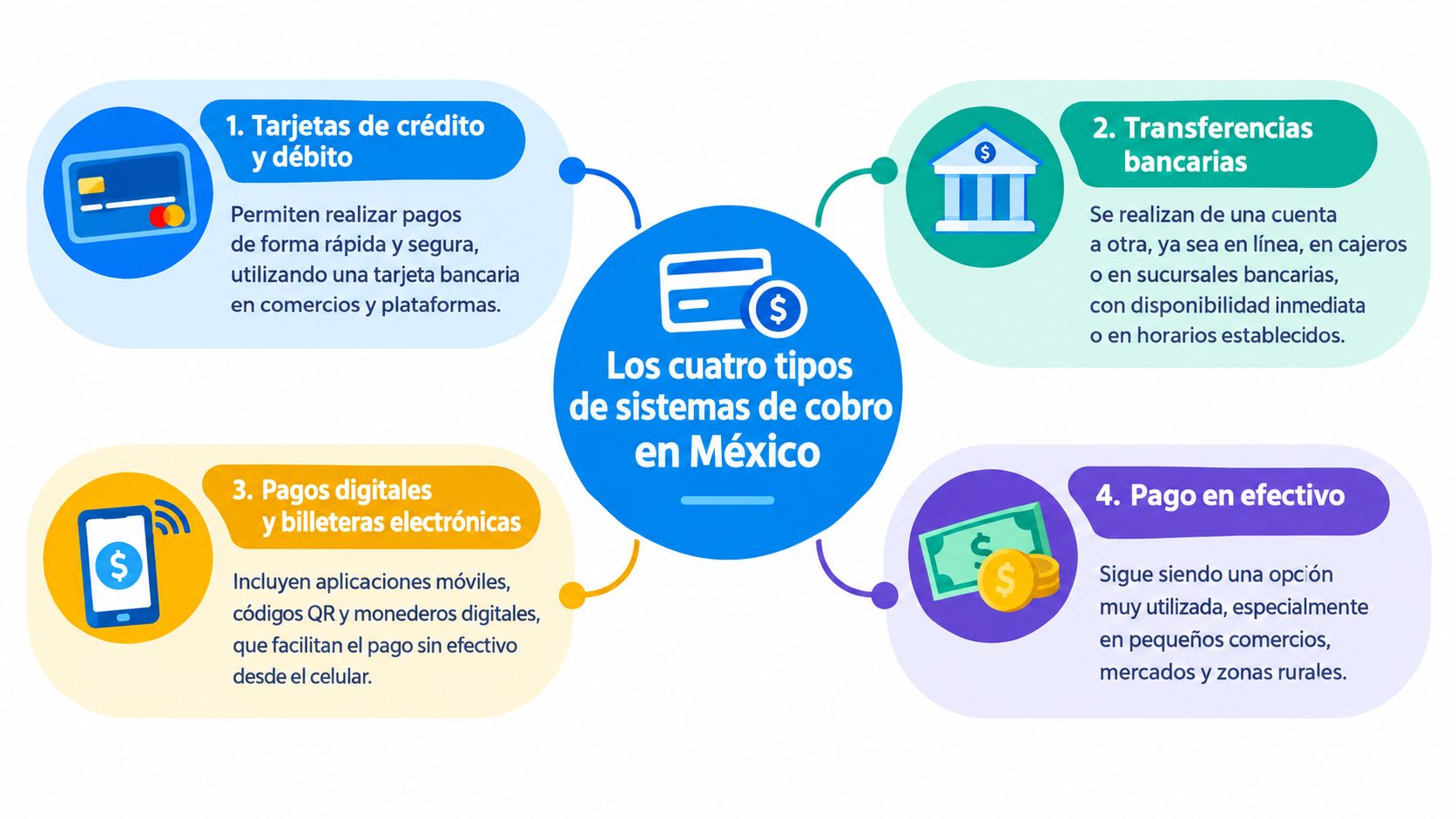
The market can be grouped into four categories. Each combines a different technical component with a different cost structure. The usual mistake is choosing based on the device's appearance rather than how the business actually operates.
Full POS or Point of Sale System
A full POS system combines hardware with cloud-based software. It can include menus, inventory, tables, kitchen tickets, tips, invoicing, and reports. It makes sense when the business needs to manage more than just the payment.
Its main advantage is integration. A sale can deduct inventory, record the payment method, and update a report without the employee entering the same information multiple times. Its disadvantage is the initial investment and the need to train staff. If you want to see how it works in practice, check out Swirvle's point of sale.
Traditional Payment Terminal
A traditional payment terminal is typically provided by a bank or a payment aggregator and charges a fee per transaction. Before signing, get the rate, monthly fee, and contract duration in writing, as they vary by agreement and volume.
It allows you to accept card payments without relying on the owner's smartphone. However, on its own, it does not manage inventory, customers, or campaigns. The business receives an authorization but does not necessarily gain any business intelligence from the sale.
Mobile Checkout App on Phone or Tablet
A checkout app turns a compatible phone or tablet into a payment terminal, using a connected card reader or NFC, depending on the provider. The processing fee depends on each plan.
The barrier to entry is lower because the business can use an existing device. The limits are battery life, connectivity, device compatibility, and NFC availability for contactless payments.
Classic Cash Register
A classic cash register records sales and cash but does not connect with banks or generate digital data. It has a low cost and charges no transaction fees, though its analytical capabilities are virtually zero.
The Mexican market context also requires checking integration capability. In 2025, over 22.5 billion transactions were processed with credit and debit cards through POS terminals, valued at more than 12.9 trillion pesos, according to the Bitso Real-Time Money report. By December of that year, there were more than 6 million terminals installed, and non-bank intermediaries and aggregators accounted for 79.0% of the devices, according to Banxico data reported by Mexico Business. Operational coverage increasingly depends on the system connecting well with acquirers and aggregators.
Which System is Best for Your Business Type
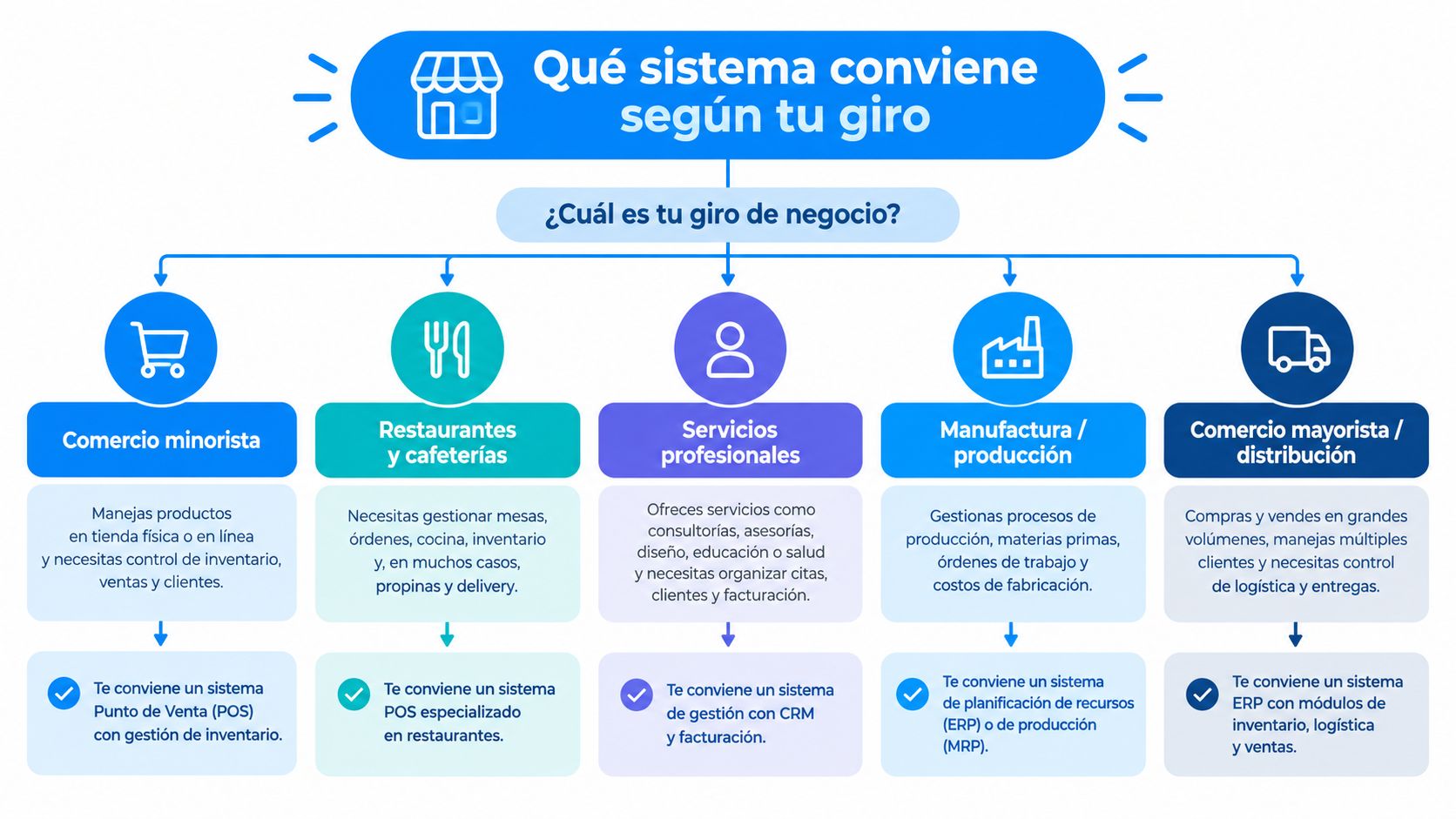
The line of business completely changes the decision. A restaurant should not choose the same system as a grocery store, even if both accept card payments. The difference lies in the average ticket, speed, tips, inventory, and operational complexity.
High-Traffic Coffee Shop
A coffee shop selling coffee, food, and add-ons needs to ring up transactions without interrupting the line. With low average tickets, a transaction fee applied many times a day requires analyzing the actual effective cost rather than just the advertised rate. A POS with an integrated terminal allows you to combine menus, modifiers, inventory, and contactless payments, while a mobile app can serve as a backup for events or pop-up spots.
Sit-down Restaurant
Split bills, tips, kitchen orders, and table-side payments require checkout to be linked to the original order. A standalone terminal forces staff to enter amounts manually, an unnecessary source of errors. The right choice is a POS connected with a mobile terminal, table-side ordering, and digital ticket routing.
Checkout System for Grocery Stores
In a grocery store, the ticket is low, the catalog is large, and the margin per product is tight. The checkout system must read barcodes, accept cash, card, and transfers, and deduct inventory with each sale so you know what to restock before running out of soda, milk, or eggs. A cash register handles cash but doesn't tell you which products leave a margin or which are being lost to shrinkage; a POS with inventory does. For day-to-day operations, refer to our guide on daily inventory for a grocery store.
Quick guide: high-traffic coffee shop, POS. Sit-down restaurant with tips, POS with portable terminal. Grocery or retail with many products, POS with inventory and barcode scanner. Mobile or temporary sales, checkout app. Cash-only business with very simple operations, cash register, as long as you accept the data limitations.
From Payments to Loyalty with Transactional Data
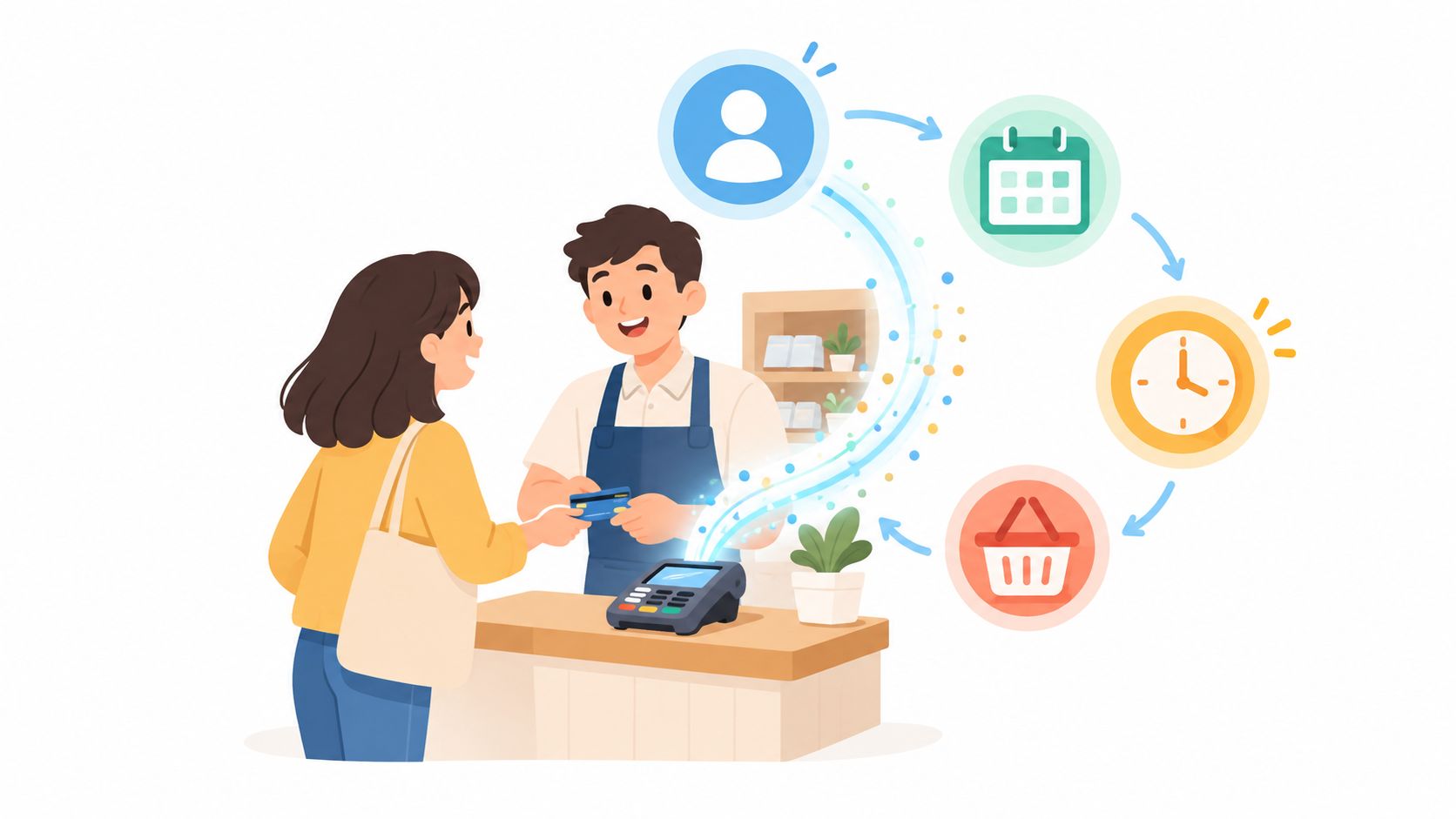
Accepting a payment is the beginning of value, not the end. Each sale can record what the customer bought, how often they returned, how much they spent, what time they visited, their preferred method, and which location they visited. This information allows you to make business decisions that a standalone terminal cannot support.
A coffee shop can identify which product most often accompanies a beverage and display that suggestion at the right time. A restaurant can separate frequent guests from those who have stopped visiting. A store can compare which categories yield the highest margins. The difference is not in gathering reports but in turning them into actions.
The system must answer business questions
A full POS usually captures this data layer better because it links the sale with the catalog, inventory, and customer. A standalone terminal normally stores limited transaction information. An app can sit in the middle, but its value depends on allowing you to export, segment, and integrate the information.
A business can build a simple routine:
Segment by frequency. Separate new, recurring, and inactive customers.
Analyze the ticket. Identify product combinations.
Track timing. Design promotions for low-demand hours.
Measure campaigns. Associate a coupon or benefit with a specific sale.
Compare locations. Identify differences in behavior and performance.
It is best not to guess results before establishing a baseline. A coffee shop can test an add-on recommendation and measure the average ticket before and after; a restaurant can target inactive customers with a campaign and compare recovered visits.
Privacy and Responsible Use
Transactional data does not give a business permission to send uncontrolled messages. The team must inform customers about what data is collected, how it is used, how the customer can withdraw consent, and who has access. The database must be protected with permissions, backups, and clear policies.
Digital cards can complement an identification and reward strategy. A helpful reference to organize this is the explanation on digital cards for customers.
Swirvle integrates point of sale, invoicing, inventory, and CRM, so it can record each sale and use the information to segment customers, run campaigns, and measure attribution. It fits when the business has decided that checkout must also serve to retain customers, not just authorize cards.
Checklist to Choose and Implement Your Checkout System
Before Selecting
Tracking current operations for several days helps avoid intuitive decisions. Document:
Business type and flow: coffee shop, restaurant, or store, with their peak demand hours.
Monthly volume: approximate number of sales and locations involved.
Average ticket: usual amount spent and products that increase it.
Requested methods: cash, card, transfer, NFC, and smartphone payments.
Special needs: tips, invoicing, split bills, or inventory.
During Selection
Each provider must supply written details on fees, monthly rents, contract terms, support, and actual activation time. The total cost over 12 months should include equipment, monthly fees, commissions, replacements, training, and integrations.
The evaluation should check if the system:
Connects sales and inventory: avoids manual stock deduction.
Supports tables or kitchen tickets: links the payment to the correct order.
Captures useful data: saves customer, product, location, and frequency.
Accepts contactless payments: includes NFC when the device is compatible.
Exports reports: allows reconciling and analyzing without being locked in.
Offers contingency: defines what happens if the network or device fails.
For tax compliance, review the fiscal requirements of an invoice and confirm that CFDI generation does not require duplicate entry. It is also helpful to compare options in our guide on point of sale software.

During Implementation
Testing should be done during real business hours, with normal orders, returns, tips, and end-of-day closures. Staff needs to practice the full workflow, not just inserting a card. There must also be a backup plan to process payments if the battery, connection, or hardware fails.
At 30 and 90 days, review checkout times, errors, fees, ticket size, payment method adoption, and returning customers. If a metric does not change, the system might be processing payments but not improving the operation.
Final Recommendation and 30-Day Action Plan
High-volume coffee shop: Comprehensive POS with integrated terminal and backup mobile app.
Sit-down restaurant: POS with table ordering, mobile terminal, bill splitting, and integrated tips.
Grocery or retail store: POS with barcode scanner and inventory; cash register only if operations are very simple and you accept not having digital analytics.
The recovery time should not be estimated with a generic promise. Calculate it using average ticket size, number of checkouts, commission, monthly fees, avoided errors, and the repeat sales that the system allows you to measure.
30-Day Action Plan
Week 1, Diagnosis. Measure average ticket, current payment methods, checkout times, errors, tips, returns, and best-selling products.
Week 2, Pilot. Test two alternatives under real conditions. Compare checkout times, staff ease of use, effective fees, receipts, and customer tracking capabilities.
Weeks 3 and 4, Adoption. Train staff, communicate digital payment methods to customers, set up reports, and review initial sales patterns.
Avoid signing up for a terminal with a long commitment if your business is seasonal: you need the flexibility to change devices, fees, or models.
Swirvle centralizes point of sale, CRM, loyalty, segmentation, and campaigns so that each checkout provides insights for the next visit. Learn more about Swirvle's point of sale.
Related Blogs

Nov 15, 2026
Clip vs Mercado Pago: Which terminal is best for your restaurant or coffee shop in 2026?

Nov 14, 2026
Checklist: Your Coffee Shop POS Features (9 Essentials)

Nov 13, 2026
What rewards should you offer in a restaurant loyalty program? 2026

Nov 12, 2026
How to manage clothing store inventory without losing sales? 2026 Guide

Nov 11, 2026
How to Use a CRM with WhatsApp to Keep Customers Coming Back: 2026 Guide

Nov 10, 2026
How to manage multiple restaurant locations from a single system?