How to create a catalog on WhatsApp Business to sell more? Learn how to create a catalog on WhatsApp Business to sell more
A coffee shop owner receives an order via WhatsApp while working the counter. She searches for the latte photo, finds an outdated menu, and has to ask again what kind of milk the customer wants and which location they will pick it up from. The problem isn't a lack of messages, but that every sale requires reconstructing the exact same information.
To sell more with a catalog, each product listing must allow customers to choose, customize, and move forward toward a confirmed order. When faced with the question “How to create a WhatsApp Business catalog to sell more?”, the operational answer is clear: set up an organized offering, connect it with in-store customer service, and track which conversations turn into purchases.
Why your SMB needs a WhatsApp Business catalog today
The catalog must function as a sales foundation, not as a photo album. When the manager shares an up-to-date listing, the customer sees a consistent reference and the team stops relying on images saved across different cell phones. This is especially useful when the person answering the chat isn't the one preparing the drink or providing the service.
The business opportunity is backed by verifiable track records. A 2019 analysis found that, in Mexico, 57% of SMBs using WhatsApp reported an increase in sales and approximately 48% were able to serve more customers after adopting the platform, according to the publication on its economic impact on small businesses. These are reported results about WhatsApp, not a guarantee of growth attributable exclusively to the catalog.
The operational cost of sending loose photos
In a coffee shop, an image without a price forces another conversation to open. In a barbershop, a photo of a haircut without explaining what it includes leaves the quote pending. In a restaurant, a menu without delivery conditions shifts all clarifications to the employee answering the chat.
The catalog consolidates that information, but it needs an owner. If no one reviews the listings when the menu changes, the business will have simply turned an outdated printed menu into an outdated menu inside the chat.
Operational rule: the customer should find everything they need to make a choice in the listing; the employee should use the conversation to confirm, not to rebuild the offer from scratch.
The owner achieves a useful system when they define these responsibilities:
Current offering: one person validates prices, availability, and terms before sharing products.
Consistent service: the team responds with the same commercial information, even across shift changes.
Explicit confirmation: each order is linked to a specific location, a fulfillment method, and a payment status.
Measurable tracking: the business distinguishes between inquiries, placed orders, and successfully collected payments.
The desired outcome is not receiving more repetitive questions. It is ensuring that someone who has already shown interest finds a clear path to buy, and that staff can deliver on what was promised without improvising.
Step-by-step technical setup of the catalog
The first item listing should be published with complete information before uploading the rest of the inventory. It is best to prepare approved images, names, and prices in advance. That way, the manager configures the catalog with defined data instead of making business decisions while filling out fields.
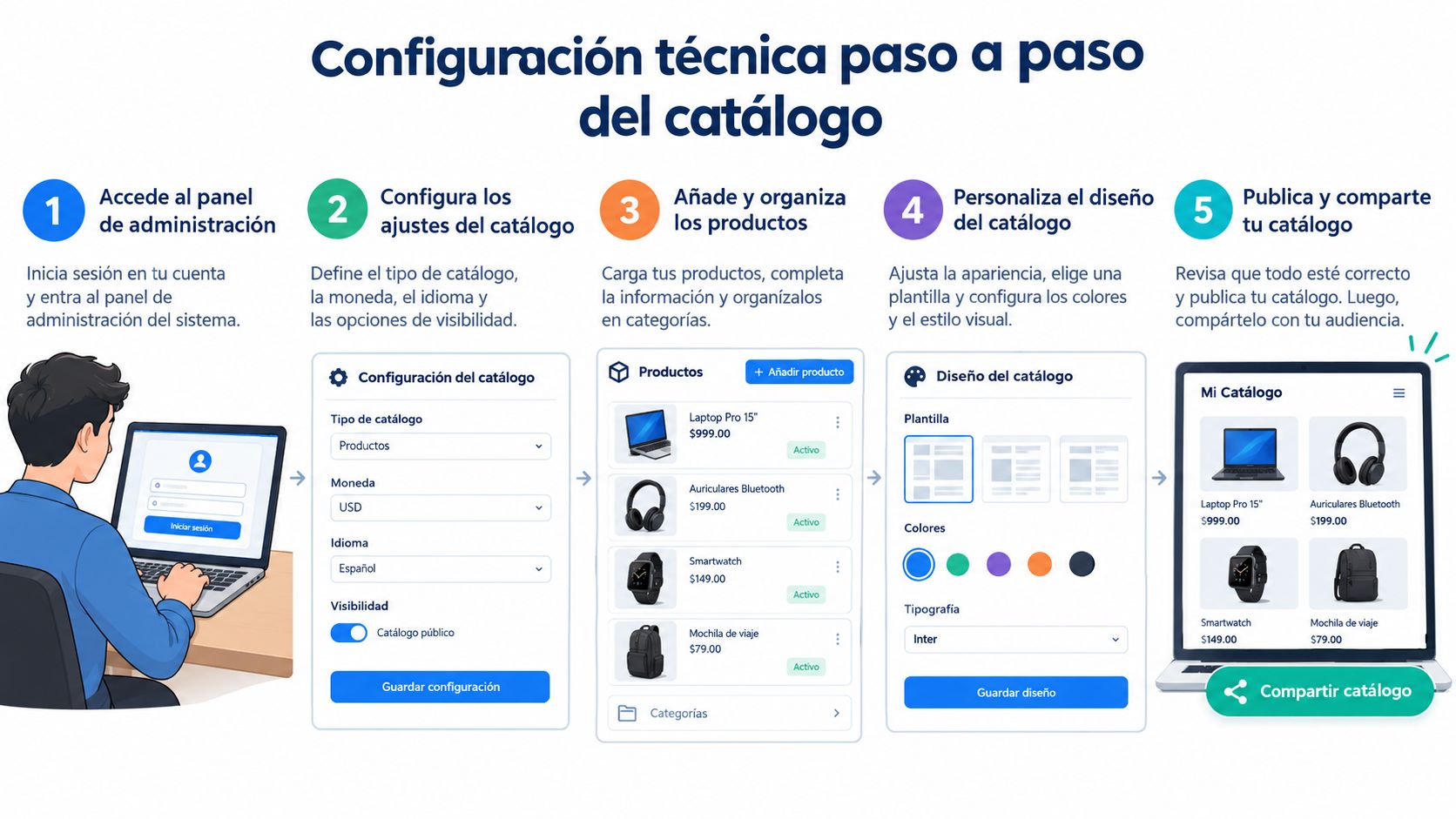
From the app to the first listing
The operational flow starts from Settings or the app menu, depending on the available interface, and continues to Business Tools > Catalog. From there, the manager selects the option to add a product or service.
Open the catalog. Before adding items, verify that you are working in the correct business account.
Add the product or service. Upload a photo that represents the actual offering, not a presentation the business cannot deliver.
Complete the identification details. Enter the item name and review the required fields in the interface.
Add commercial information. Include description, price, and internal reference code; the link and promotional price are filled in when applicable and available.
Save and verify. The manager reviews the result from the customer's perspective and shares the listing in a test conversation.
WhatsApp Business allows publishing up to 500 items per catalog and requires minimal information consisting of an unambiguous title, an image, country of origin, and, when applicable in Mexico, the price, according to the WhatsApp catalog documentation. That limit represents available capacity, not a publishing target.
For a coffee shop, a first listing could be named Classic Medium Hot Latte. The description would indicate what the drink includes, which milk substitutions the business accepts, and how pickup is confirmed. The price must correspond to the described item; any customization fee needs to be explained.
App vs. Enterprise Platform
The mobile app is a reasonable starting point when the team can manage the channel from a phone. The initial priority should be confirming that the business knows how to maintain its offering and fulfill orders systematically.
The enterprise platform with API warrants evaluation when there is a need to connect conversations with systems, coordinate customer service teams, or execute automated workflows. That decision requires reviewing integration scope, messaging terms, and who will maintain the flow.
An API does not fix confusing names or poorly tracked stock. Before paying for an integration, the business must be able to explain how an inquiry moves from the chat to an order that the branch can actually fulfill.
Listings that convert - images, descriptions, SKUs, and modifiers
A barbershop can showcase Classic Haircut, Fade Haircut, and Haircut with Beard Trim as examples of clearly differentiated services. Customers understand the offering much better than with internal names or packages whose components are known only to the manager. Service names must reflect real operational differences.
Photography also requires precision. It is best to use a vertical image with a clean background and good lighting, adding a contextual photo when it helps clarify the result or presentation. In beauty services, the business must have authorization to use customer images.
Descriptions must drive decisions
A useful listing explains what is included in the service and what is not. For a haircut with beard trim, the description can specify whether it includes a hair wash, line-up, or styling product, always aligned with the shop's actual operations.
In a beauty salon, the client needs to know the procedure offered, the estimated duration validated by the business, and the assigned professional when that choice is part of the service. If the price varies based on hair conditions, the listing must explain what requires a prior consultation, rather than presenting a variable estimate as a fixed total.
Element | Illustrative Example | Decision It Facilitates |
|---|---|---|
Name | Fade Haircut with Wash | Identifying the service |
Modifier | Styling product finish, subject to availability | Requesting a specific option |
Condition | Appointment confirmed via chat | Distinguishing inquiries from bookings |
Internal reference | BAR-CEN-FAD | Logging the service unambiguously |
The codes in the table are naming examples, not records from a real business. A SKU is an internal reference used to consistently identify a product or service. It is best to keep it stable and record branch location and campaign data in separate fields, even if the naming convention helps staff recognize them.
Customizing without hiding the price
In a coffee shop, modifiers can include milk choice, temperature, and add-ons. The manager must distinguish which modifications are included and which alter the total price, rather than leaving that surprise for checkout.
Ordering instructions can ask customers to specify the product, size, and milk when messaging. For a barbershop, it can request the desired service, branch, and preferred time slot; availability is confirmed prior to booking.
A complete listing does not eliminate conversation. It eliminates the questions the business could have answered upfront.
The most useful test is checking whether a newly hired employee can interpret the listing and take the order correctly. If they need to ask the owner to understand what is being sold, the description is still incomplete.
How to choose which products to publish and group them by intent
You shouldn't publish everything just because you have the space. Selection should begin with the products the business can reliably sell, prepare, and deliver. A sprawling catalog with no hierarchy forces customers to hunt around and staff to explain minor, irrelevant differences.
In Mexico, retail e-commerce reached 941 billion pesos in 2025, with an annual growth rate of 19.2%, and 71 out of every 100 consumers combined physical and digital purchases, according to the summary of AMVO's 2026 Online Sales Study. The operational takeaway is that the catalog must connect both channels, not compete with the physical store.
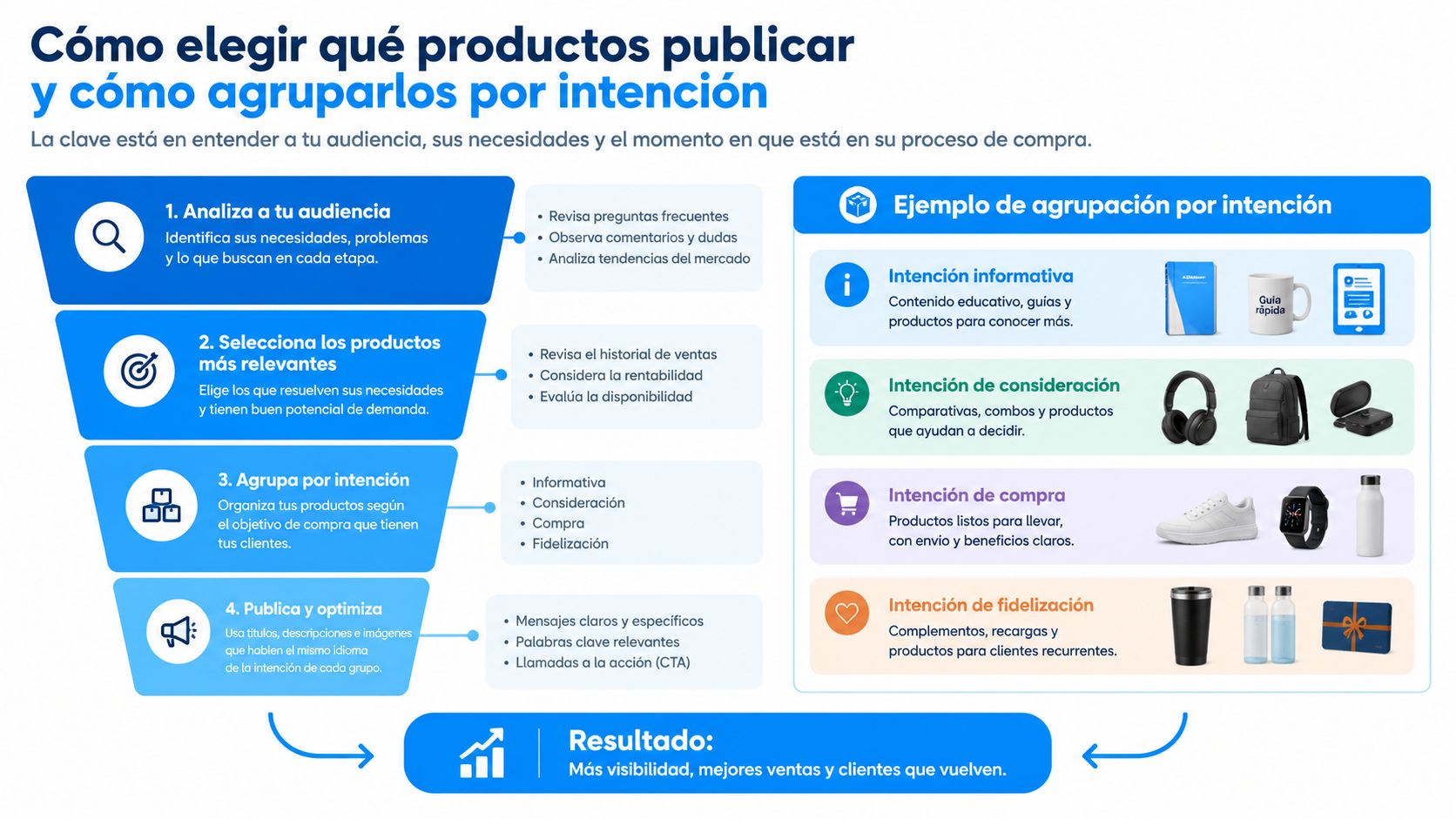
Commercial criteria over administrative categories
Item selection can be guided by these criteria, without assuming that the best-selling product is always the most profitable:
Proven margin: focus on what yields profit after costs and discounts.
Turnover: highlight items that the team sells regularly and can keep in stock.
Repurchase potential: everyday items help build relevant offers for recurring customers.
Operational fulfillment: leave out products dependent on unpredictable supplies or capacity the location lacks.
To maintain that selection, sound product inventory management is essential. The catalog manager needs to be notified of availability changes, not discover them when the customer is trying to pay.
Group by the customer's intent
A restaurant can divide its offerings into Lunch Specials, Combos to Go, and Delivery Service. The difference is not aesthetic: each group addresses a distinct occasion and requires different preparation, delivery, and payment terms.
A coffee shop can gather popular morning drinks and food items into a Breakfast for Pickup collection. A barbershop can separate individual services from packages, provided it explains what each option includes and how to book it.
The best practice is to share the collection directly relevant to the customer's stated need. Someone asking for takeout lunch does not need to receive the entire catering menu as well.
This segmentation does not automatically guarantee higher conversion on its own. It does, however, present a more relevant proposal and allows you to test whether it generates better orders than indiscriminately sending the entire catalog. Each collection should clearly state participating locations, availability, and pickup or delivery terms.
Messages, quick replies, and CTAs that close sales
Every listing needs a next step, and every conversation needs an owner. “Order,” “Book,” and “Customize” work well as calls to action when they specify what information the customer needs to send. A generic closing leaves the work required to confirm the sale unfinished.
Across the 22 markets Kantar surveyed in a study commissioned by Meta, Mexico included, 73.3% of consumers prefer messaging when communicating with a business, according to WhatsApp's State of Business Messaging report. Customer support should match that expectation with concise instructions and useful responses.

Prepared replies, genuine confirmations
A coffee shop can prepare responses for daily menu, milk substitutions, and pickup hours. The employee selects the appropriate one and confirms what varies: availability, branch location, and final price.
The quick replies setup in WhatsApp Business should also cover ingredients, delivery, and payment methods. It is best to separate informational messages from confirmations: sharing business hours is not the same as accepting a specific delivery time.
A barbershop needs distinct replies for appointment confirmations and rescheduling. Promotional announcements must be managed separately and sent only to authorized contacts, without mistaking a customer service conversation for campaign consent.
Closing criterion: before requesting payment, the manager confirms the product or service, customizations, pickup/delivery branch, total amount, and fulfillment method.
Labels help ensure another team member can pick up where the last one left off:
Inquiry: the customer is asking for information but has not committed to buying.
Quote: a specific proposal has been sent and is awaiting approval.
Payment: the manager is reviewing or confirming payment.
Repeat customer: represents a new sales opportunity with an existing customer.
Lost: the deal was not closed; the reason is recorded if known.
Measure sales, not chat enthusiasm
The minimum log for every opportunity should include lead source, branch, SKU, coupon used, and order value. A weekly review should compare product views (when available), conversations started, replies sent, paid orders, and average order value.
Conversion is calculated as paid orders divided by qualified conversations. The business must define upfront what counts as a qualified conversation to avoid shifting the denominator whenever convenient.
A 30-day A/B test can compare images or copy while keeping price, audience, and schedule identical. If testing promotions, control for other variables and review the cost of the incentive.
The final decision must consider incremental margin, not just gross revenue. A promotion that increases order volume while eroding profit margins is not worth keeping simply because it generated more chat activity.
Meta policies that can restrict your account if ignored
Having an active catalog does not grant permission to send promotional blasts to any contact. The business must differentiate between responding to an inquiry and initiating an outbound marketing campaign. Catalog availability and messaging initiation limits are entirely separate matters.
Messaging limits and quality rating
Under the business messaging limits set by Meta, the starting tier allows initiating conversations with up to 250 unique customers per business portfolio every 24 hours. Scaling can reach 2,000, then 10,000, 100,000, or unlimited tiers; reaching them requires meeting specific criteria, including utilizing more than 50% of the current limit over the last seven days and maintaining a high quality rating, according to the business messaging limits documentation.
These thresholds should not be interpreted as authorization to send bulk messages under any operational setup. The manager must verify which rules apply to their specific configuration.
Prior consent: campaigns must target users who opted in to receive marketing messages; Meta cites unsolicited outreach as a frequent cause of account restrictions in its business messaging policy.
Permitted categories: prescription medications, ingestible supplements, and medical products or services are among the prohibited categories listed in the applicable commerce policies.
Commercial responsibility: the business must handle sales terms, privacy, taxes, payments, and fulfillment; Meta does not fulfill orders on your behalf, per its WhatsApp Business fulfillment terms.
A coffee shop can collect opt-ins for promotions during customer registration. A barbershop must separate consent for appointment reminders from promotional marketing and honor customer preferences.
If an account faces restrictions, the catalog may remain properly configured while the ability to initiate contact with customers is throttled. Segmenting audiences and respecting opt-ins protects your business operations.
Connect your catalog to your CRM and track which products actually sell
Attribution ends at the receipt, not at the click. WhatsApp reaches 91.4% of internet users aged 16 and older in Mexico, according to GWI and DataReportal data published by Statista. That reach proves its relevance, but it does not prove that every inquiry generates revenue.
A CRM connects the customer, campaign, product, and branch location—provided that data is captured. To understand how this works in practice, review how a CRM is used in a coffee shop or restaurant.
From browsed product to logged transaction
Campaign codes and item SKUs must follow the order all the way to payment. For in-person visits, staff must log the coupon or acquisition source; for pickup orders, they must maintain the connection between chat thread and receipt.
With sufficient data, the business can segment audiences by purchasing habits and branch location, and issue targeted coupons, points, or rewards. You should never assume an in-store visit occurred without a purchase if you lack a mechanism to track store visits.

A proposed 30-day implementation plan:
Week 1: Publish 20 prioritized item listings and test them with the team.
Week 2: Set up quick replies and clear calls to action.
Week 3: Launch a segmented marketing campaign backed by user opt-in and attribution tracking.
Week 4: Analyze conversations, paid orders, average order value, and profit margins.
The immediate next step is assigning one person to manage the catalog and another to oversee sales logging, even if both roles fall to the same person initially. Without that accountability, the business will have published products, but zero actionable data to decide which ones to keep promoting.
Swirvle provides a CRM with a loyalty program, segmentation by buying habits and branch location, personalized campaigns, and reporting dashboards to measure results. Businesses looking to connect their WhatsApp product catalogs with repeat purchases and revenue attribution can visit Swirvle to explore how to organize customers, coupons, and location-based sales in a single unified system (the WhatsApp integration is included in the Premium plan).
Related Blogs

Oct 18, 2026
How to Create a WhatsApp Business Catalog to Sell More: 2026 Guide

Oct 17, 2026
How to set up quick replies in WhatsApp Business?

Oct 16, 2026
Can fake Google reviews be removed and how do you request it?

Oct 15, 2026
What are WhatsApp Business labels used for and how do you use them?

Oct 14, 2026
How to do a cash register closure step-by-step in a small business?

Oct 13, 2026
How to respond to a negative Google review without losing customers: The BLUF Guide