What are WhatsApp Business labels used for and how do you use them? Learn how to create them, manage them, and segment customers
If a coffee shop opens WhatsApp Business at eight in the morning and finds orders mixed with event inquiries, yesterday's complaints, and a couple of unanswered messages, the problem isn't a lack of effort. The problem is that the inbox lacks a business index. That is where WhatsApp Business labels stop being a colorful decoration and become a quick way to decide who comes first, what conversation is next, and which chat has already been lost to clutter.
In Mexico, messaging is already part of the daily relationship between businesses and customers. 67% of consumers use that channel to interact with companies, more than 80% of businesses consider it their most effective channel, and 75% use it across all stages of the customer journey. That explains why a label applied on time can prevent a sale from going cold due to sheer disorganization. When the inbox is treated as a task list rather than a dead archive, the day changes immediately. Data on business messaging in Mexico
The inbox no one wants to open on a busy morning

The owner of a coffee shop in Monterrey opens WhatsApp Business before turning on the espresso machine. There is an order from the previous afternoon, two inquiries about events, a customer who asked for the menu and never wrote back, and a message that was probably important, but is now buried. That situation isn't solved with "more attention"; it is solved with a simple index.
A label on the first message changes the course of the day
If the first new chat comes in labeled as “New order”, “Frequent customer”, or “Event”, the morning stops being a chase and turns into a list. There is no need to guess who wrote first or scroll through a hundred conversations one by one. It is enough to open the right label and reply by priority, not by memory.
Rule of thumb: an early label is worth more than ten mental reminders at the end of the shift.
The logic behind this is simple. An unclassified inbox makes everything feel urgent, even when it isn't. An inbox with labels turns chaos into visible categories, and that is exactly what SMBs selling through WhatsApp every day need.
What WhatsApp Business labels do and don't do
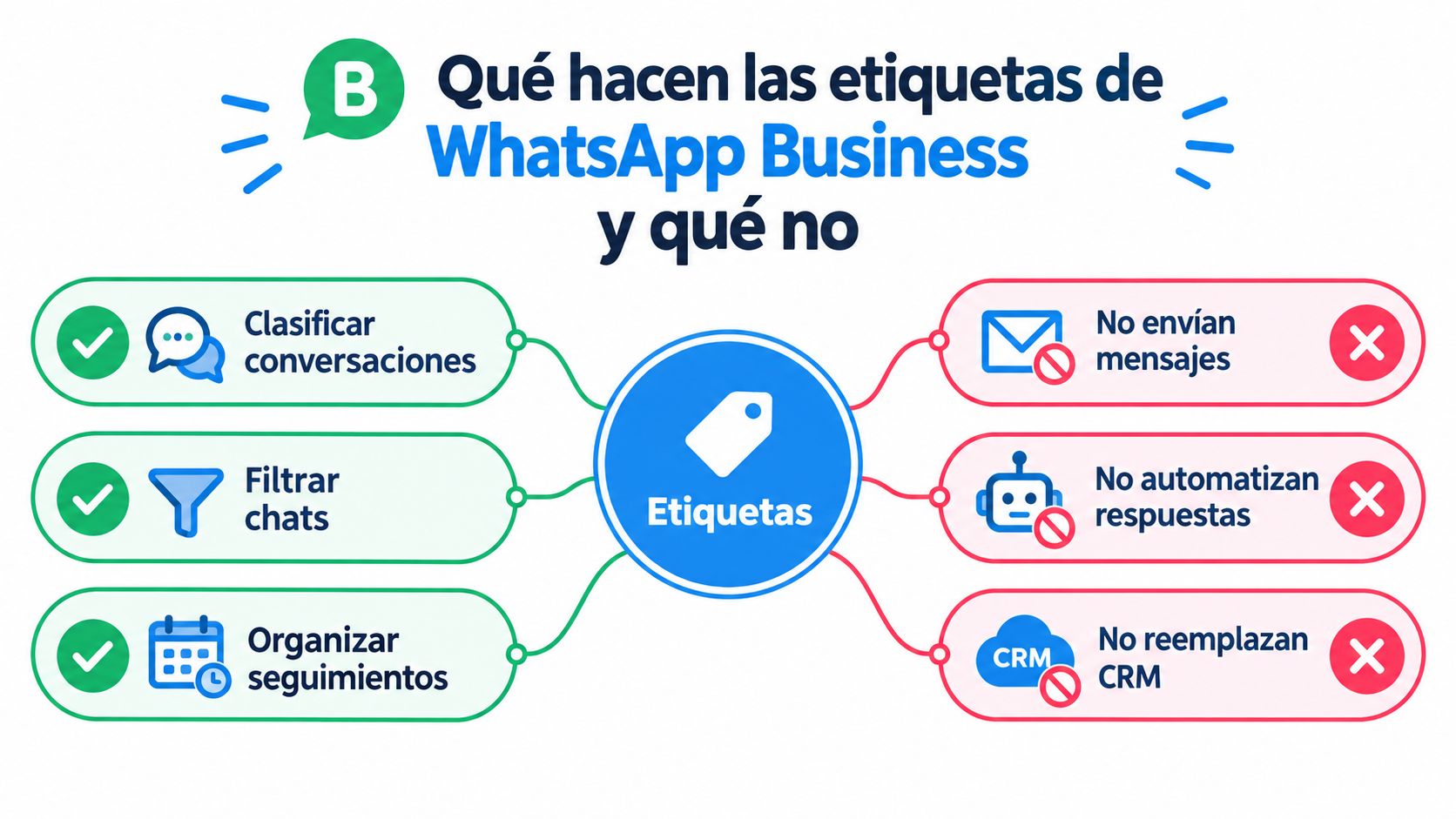
Labels are used to categorize entire chats, quickly filter conversations, and prioritize replies. They also help trigger specific follow-ups according to the sales stage, because a chat marked as "Quote sent" doesn't need the same message as one marked as "Purchase completed." That alone makes them useful for an SMB, as long as they are understood as an operational index and not magic.
The real scope is operational, not strategic
WhatsApp's official documentation allows you to create up to 20 labels/lists per business account and assign multiple labels to the same chat, so it is best to design a short, reusable taxonomy. Official documentation on WhatsApp labels and lists That limitation is not a problem; it is a usage clue. If a category doesn't help decide an action today, it is unnecessary.
What labels do not do is just as important. They do not send messages on their own, they do not automate replies, they do not replace a CRM, and they do not prove sales attribution. To avoid confusion, a useful way to look at the channel is this:
Classify conversations, to quickly find orders, payments, support, or leads.
Filter chats, to open what is active or overdue first.
Organize follow-ups, to know which conversation is up today and which one has already closed.
If someone tries to use labels as if they were mass campaigns, the operational limit breaks immediately. That is why it is better to think of them as a prioritization layer, not a full marketing system. When that clarity is missing, the inbox fills with ambiguous names and no one knows what to do with each conversation. Guide on responsible use of mass messaging on WhatsApp
How to create and assign labels without wasting half an hour

On the web version, the documented path is Tools > Lists > Add new list. From Chats, open the contact's menu and choose Add to list. In the app, you can also open a chat, tap Label chat, type the name, and save. That workflow is intentionally short, because if the process becomes cumbersome, no one will use it at the end of the day.
Ending the day with a short routine
WhatsApp recommends spending five minutes at the end of each day to label open chats and establishing the system by the fourth day of preparation. Daily routine recommended by WhatsApp Business That practice avoids the classic "I'll look at it tomorrow," which really means "it's going to stay unclassified." Five minutes is enough if the taxonomy is already thought out.
Editing also matters. You can change the name, the color, and delete a label when it is no longer useful. That helps clean up categories that started out well but later became vague. The healthiest approach is to use a single primary label per stage and review the whole set at the end of the shift, rather than letting three people apply different names for the same stage in the process.
A practice that actually works: review open chats at closing, label only what remains active, and leave the conversation ready for the next action.
Which label applies at each stage according to your industry
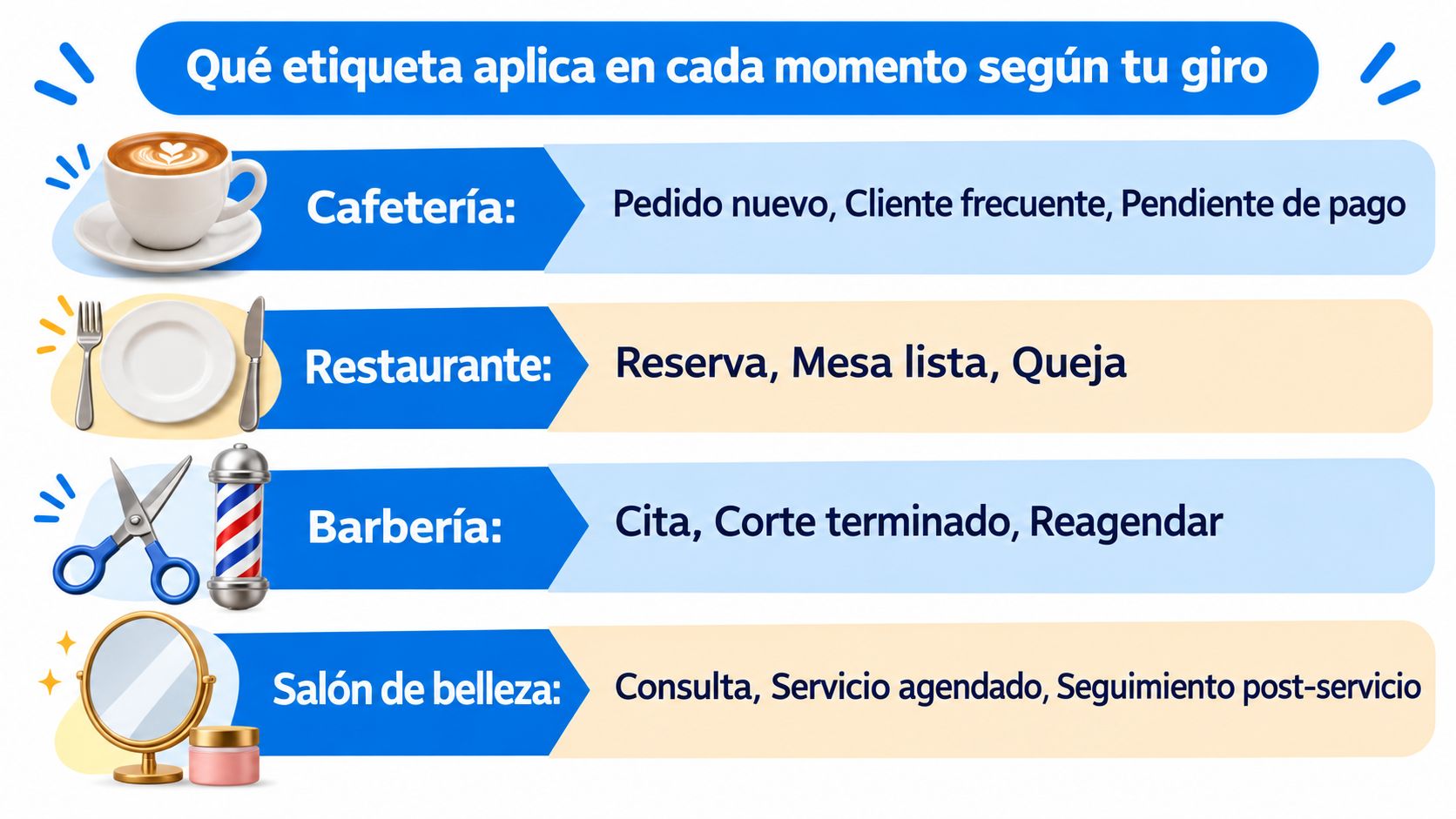
A conversation can have multiple labels at the same time, so there is no need to cram everything into a single category. Using multiple labels on a single chat This allows you to separate the sales stage from the customer type and the pending action. A customer can be frequent, have a pending order, and also require follow-up, and each thing deserves a distinct signal.
Industry examples you can actually copy
Industry | First Contact | In Progress | Closing | Follow-up |
|---|---|---|---|---|
Coffee shop | New order | Order ready | Purchase completed | Frequent customer |
Restaurant | Reservation | For pickup | Delivery completed | Repeat purchase |
Barbershop | First visit | Confirmed appointment | Service finished | Reschedule |
Beauty salon | Inquiry | Service scheduled | Service completed | Post-service follow-up |
The logic is to separate dimensions. One label can indicate stage, another customer type, and another pending action. That separation avoids contradictions such as a chat simultaneously looking "interested," "paid," and "needs follow-up" within the same name. In a coffee shop, "Frequent customer" does not replace "Order ready." In a barbershop, "Reschedule" does not mean the same as "Confirmed appointment."
The point is not to collect labels, but to use a few clear ones. When the team understands what triggers each one, operations become visible. When the name is ambiguous, the label is just decoration.
Why labels alone aren't enough and how Swirvle connects them
Labels organize conversations, but on their own, they don't prove that a campaign generated a purchase. Nor do they store purchase history, visit frequency, branch location, average ticket, or lifetime value. In an SMB with a physical store, that data needs to live in an external system, while WhatsApp remains the layer where things are prioritized and answered.
The label marks the action; the external system keeps the context
Just because WhatsApp is the fastest channel to talk to a business doesn't make it a complete sales database. The combination that works best is simple: a sales stage label in WhatsApp and structured data outside of it, such as branch, last purchase, category, and value. That is where an operationally focused CRM fits best.
How to centralize customer information without relying on memory helps understand that separation between signal and record. The label says what comes next today. The external system preserves the history and allows you to attribute results systematically. Without that division, the team ends up repeating questions, losing context, and estimating results by guesswork.
Operational key: WhatsApp organizes the conversation. The external system organizes the business.
Daily maintenance and metrics that matter
When labels are left untouched, they spoil. "New" stays there even after a reply was sent, "Follow-up today" lingers for three more days, and "Closed" ends up mixed in with active leads. To avoid this, each stage needs an owner, a next action, and a clear expiration rule.
What to review every day and what to measure every week
A sensible protocol looks like this: “New” disappears once the contact has been qualified, “Follow-up today” is reviewed daily, “No response” has a contact attempt limit, and “Closed” is kept as a record, not an active queue. In addition, it's worth auditing unlabeled chats, conversations with incompatible labels, and contacts that have stayed too long in the same stage.
The metrics that actually matter are few and direct:
Time to first response, because it shows how quickly inquiries are handled.
Completed follow-up rate, because it reveals operational discipline.
Conversion by stage, because it highlights where chats drop off.
Attributed sales, because it connects the conversation to revenue.
The most common mistake is confusing classification with consent. A label like "promotion" does not authorize mass messaging. Another mistake is using ambiguous categories like "interested" for everything. If a label doesn't state what action follows, it just adds noise. And if the system exceeds 20 categories or mixes statuses into a single one, the filter breaks down and the team stops trusting it.
Start tomorrow with five to eight categories and measure
The most practical way to start is simple. First, define between five and eight stages that reflect the actual business cycle. Then, create the labels in WhatsApp Business with only one primary label per chat, applying them as soon as the conversation calls for it. Next, connect each stage with external data like branch, last purchase, and ticket size to measure conversion and attributed sales. And finally, review weekly which label is moving, which is stalled, and which is no longer needed.
A clean start prevents underlying clutter
If a label accumulates chats without movement, it is either redundant or poorly defined. If multiple people use different names for the same status, the taxonomy is broken. And if everything is left for the end of the day, the inbox goes right back to square one. Guide to organizing customer information as volume grows serves as a reminder that useful order always begins with a few well-maintained categories.
The real decision isn't between labeling or not labeling. It is between continuing to treat your inbox as an archive or turning it into a measurable funnel.
Swirvle helps connect that operational priority with customer data, branch locations, and repeat purchases so WhatsApp stops relying on the team's memory (the WhatsApp integration is available on the Premium plan). If your business already uses labels and wants to better track which conversations turn into sales, it's worth checking out Swirvle to see how it fits into that workflow.
Related Blogs
Oct 15, 2026
What are WhatsApp Business labels used for and how do you use them?

Oct 14, 2026
How to do a cash register closure step-by-step in a small business?

Oct 13, 2026
How to respond to a negative Google review without losing customers: The BLUF Guide

Oct 12, 2026
What birthday promotions can a restaurant offer to make customers come back?

Oct 11, 2026
How to set up a WhatsApp loyalty program for my business?

Oct 10, 2026
What Day of the Dead promotions work in coffee shops and restaurants?