8 inventory control examples for SMBs: ABC, JIT, reorder point, cycle counts and more, with a worked calculation and when to move beyond Excel.
Inventory control is the method you use to record what comes in, what goes out and when to reorder each product. The 8 examples in this guide are ABC, just-in-time, reorder point, barcodes with cycle counts, a coffee shop case, perpetual vs. periodic inventory, seasonal planning and integrated software. Each one fits a different type of business; below you have a quick guide to choose and a worked reorder-point calculation.
An inventory is not just a list of products: it is the record of what you have, how much it is worth, where it is, and how it moves. When that record fails, it does not take long for the problem to appear at the cash register, in purchasing, and in customer service. In Mexican SMEs, this is seen every day: expired products, duplicate purchases, shortages during peak hours, and capital tied up in slow-moving merchandise.
The good news is that organizing inventory does not require operating like a massive chain. It requires method, discipline, and a system that records inputs, outputs, waste, and purchasing decisions logically.
If you are currently managing control with Excel, WhatsApp messages, and improvised counts, it is best to first review how good warehouse inventory control works. From there, the important thing is to adapt the method to your business model, not copy someone else's formula.
Quick guide to choosing the method
Micro-business with few SKUs and a single location: start with periodic inventory and a well-structured Excel sheet.
Retail with many references or very different categories: prioritize ABC and add a reorder point to avoid shortages in key products.
Business with perishables or recipes: JIT is recommended, along with waste control and portion standardization.
Two or more branches: you need perpetual inventory and, preferably, scanning or POS integration.
Operation with high zero-tolerance for error: medicines, fresh food, or expensive products justify more frequent checks and automatic alerts.
Here are 8 practical examples for SMEs, with scenarios for a pharmacy, coffee shop, restaurant, grocery store, and retail. The idea is not to apply everything at once, but to identify which method works for you today, which error is worth cutting this week, and when to leave Excel behind for a more integrated system.
1. ABC Inventory Control System
Before diving into the method, it is worth clarifying how I selected these eight examples. They are not designed for corporations with dedicated supply chain teams, but for SMEs operating with small margins for error and limited resources. I took five criteria: cost of implementation, minimum necessary data, complexity per branch, level of perishability, and compatibility with real work tools like Excel, POS, or integrated software. I also valued whether the method can start manually and scale later, because in a micro-enterprise, that is usually more important than technical sophistication.
In practice, the first point that usually breaks is not the purchase, but the record. I see the same pattern over and over again: the business believes it "purchases poorly," when in reality it sells, consumes, or wastes without leaving a consistent trace. That is why I would discard methods heavily dependent on fine data if the business still does not record inputs and outputs with daily discipline. For a micro-enterprise with 30 or 40 SKUs, for example, it would make no sense to start with complex integrations if there is not even a clean catalog and standardized units of measure.
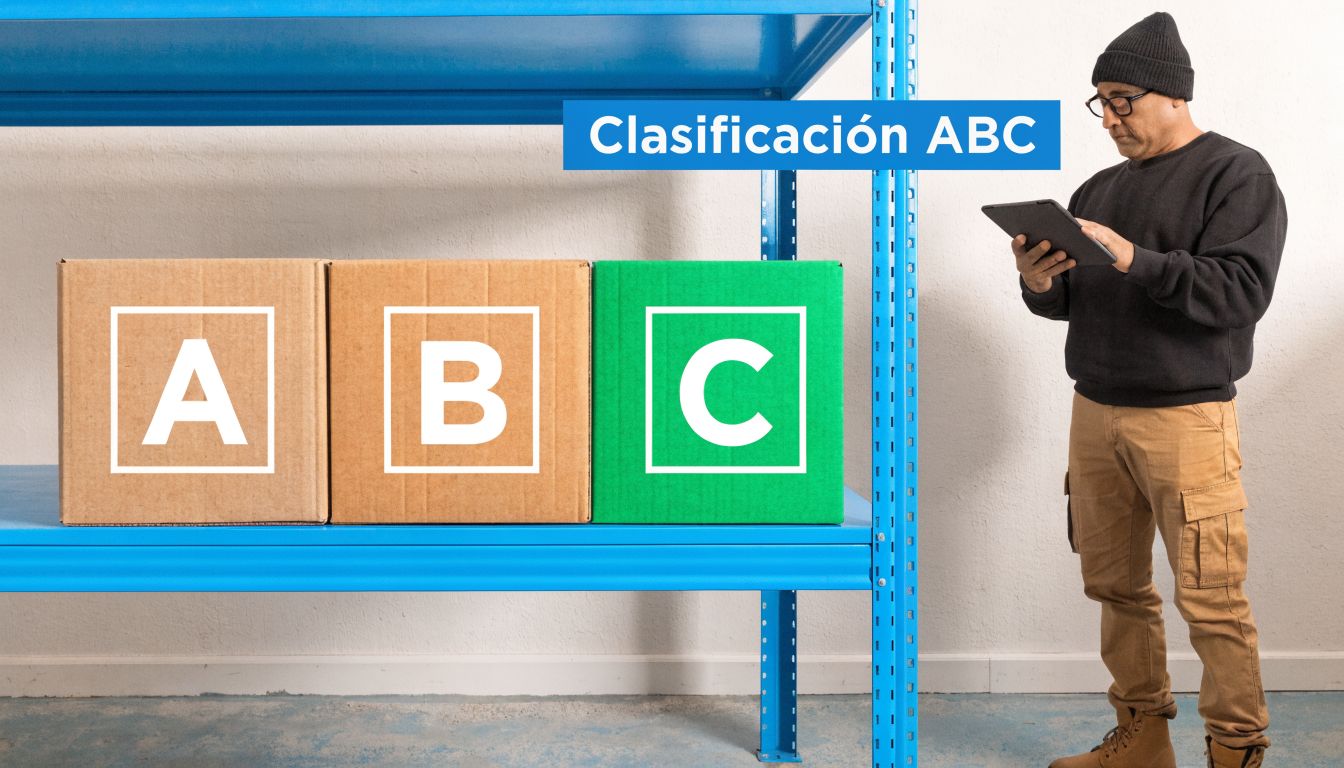
ABC appears first for a simple reason: it is almost always the starting point with the least friction. It forces prioritization, works with relatively basic information, and can be executed both in Excel and in a POS with historical reports. Additionally, it pairs well with other methods; for example, once you identify your A products, you can better define minimums, reorder points, and counting frequencies.
The ABC method keeps working because it forces you to stop treating all products equally. That is a very common mistake in SMEs. You cannot dedicate the same level of review to a box of bandages as you would to an expensive medicine, nor to parsley compared to a premium cut of meat.
In a pharmacy in Puebla, for example, it is convenient to separate high-value or high-revenue commercial items from those that only take up space. In a restaurant, Class A products are usually expensive proteins, seafood, wines, or ingredients with a high risk of expiration. Class C items are usually cheap consumables or simple replacements.
How to apply it to an SME
If you have multiple branches, classify by location and not just by general catalog. A syrup might be Class A in one branch and Class B in another. An imported wine might rotate quickly in Polanco and slowly in another area.
The practical approach is to cross-reference three things: product value, rotation, and risk of stockout. If you sell groceries, it is not enough to know which items leave the best margin. You also need to identify which ones cannot be missing because they drive complementary purchases. If you are also going to define safety cushions for those critical items, this explanation of safety stock calculation over at Mobel Suministros S.L. can be helpful.
Class A products: review them more frequently, buy them with control, and activate reorder alerts.
Class B products: keep them monitored, but without over-managing them.
Class C products: simplify. If you spend too much time counting them, you are already losing money.
Operational rule: if an expensive product runs out or is over-purchased, the error hits twice. You lose a sale or tie up capital.
Swirvle can help you identify which SKU really deserves attention by linking sales, average ticket, and behavior by branch. If you also want to better organize your margin and replenishment analysis, it is worth reviewing how this connects with the cost of purchases.
What works and what doesn't
Reviewing the classification periodically works, because inventory changes with seasons, promotions, and consumption habits. Leaving a fixed classification for months and assuming it remains valid does not work.
Applying an ABC classification "by estimate" does not work either. If you are going to classify, use real sales from the POS. That is the difference between a useful system and a pretty label stuck on the shelf.
2. Just in Time (JIT)
JIT is useful when a product loses value if it remains in storage for too long. In food and beverages, that happens every day. In a taco shop in CDMX, meat, tortillas, cilantro, and salsa should not be managed with the same logic as disposables or sodas.
Think of a specialty coffee shop in Monterrey. Roasted coffee, milk, and bakery items need frequent replenishment. If you buy too much, quality drops or it turns into waste. If you buy too little, you break the customer experience.

When it makes sense to apply it
JIT works well when you have relatively predictable demand, reliable suppliers, and disciplined operation. Walmart implemented a continuous replenishment system that monitors sales in real time and triggers automatic orders when stock drops, managing to reduce inventory without affecting availability, according to this analysis on successful companies due to their inventory management.
That same approach, scaled to an SME level, can help lower storage and reduce over-purchasing when demand forecasting is combined with frequent replenishment. In businesses with multiple branches, centralized visibility by location allows adjusting supply according to local consumption habits.
Negotiate frequency, not just price: a supplier that delivers more often can be worth more than a "cheap" one that forces you to over-purchase.
Create backup suppliers: if you rely on just one, your JIT breaks as soon as a delivery fails.
Separate critical inputs: tortillas, milk, bread, or main proteins cannot be managed the same as napkins.
A poorly executed JIT does not reduce inventory. It only multiplies emergencies.
The most common mistake
Many owners try to do JIT without precise data. They order "the usual," even though customer behavior has already changed by branch, weather, payday, or promotion. That is where a CRM connected to inventory stops being marketing and becomes pure operation.
3. Reorder Point (ROP) Method
The reorder point solves a very simple question: at what exact moment should you buy again before running out of a product? Its value lies in avoiding late purchases and also panic buying.
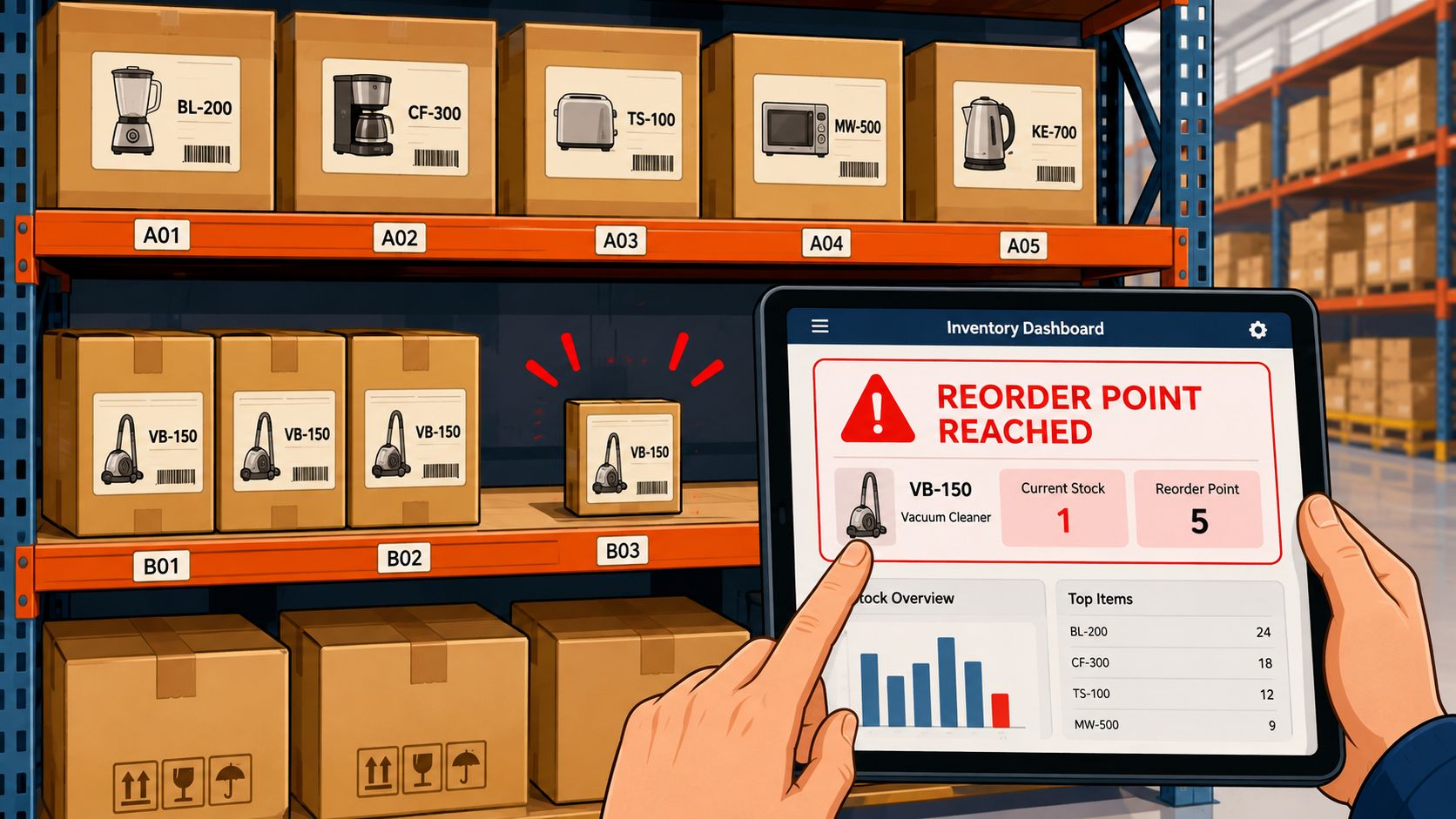
An ice cream parlor in Yucatan needs this more than it seems. There are bases, toppings, and containers that move differently according to the day, time, and season. If you wait until there is "almost none left," you are usually already late.
How to define a useful ROP
Do not copy the same minimum for all branches. A location in a tourist area and another in a residential neighborhood do not consume the same way. The ROP must be built with real consumption, supplier delivery times, and a small cushion for variations.
In a pharmacy, this is very clear. There are products with constant rotation that should never be missing, but it is also not wise to fill the warehouse out of fear. In clothing, the same happens with basics like white t-shirts, socks, or medium sizes.
Calculate by branch: do not use a global average if local behavior changes a lot.
Adjust by supplier: an item with slow delivery requires a higher reorder point.
Review after promotions: a campaign can alter your normal consumption.
Where it usually fails
The ROP fails when it is fed with dirty data. If inputs are not recorded properly, if waste is not captured, or if staff sell without scanning, the system will give poor recommendations. It is not the method's fault. It is the record's fault.
If your theoretical inventory does not match the physical one, do not automate purchases yet. First, correct operational discipline.
In SMEs with multiple locations, having visibility by point of sale makes the ROP stop being intuition. That is where automation really starts to pay off.
4. Barcodes and Cycle Counting
This is one of the methods that usually yields the highest return because it improves accuracy without halting operations. Instead of closing for half a day to count everything, you count a portion of the inventory frequently and record movements through scanning.
A coffee shop chain in Nuevo Leon can use it to control coffee beans, milk, syrups, and cups. It does not seem like a complex inventory, until you add multiple branches, over-the-counter sales, internal consumption, and open products used during service.
A practical case worth looking at
Conservas Márquez transformed its operation by automating a warehouse of 4,000 pallets and achieving permanent inventory in real time through WMS integration with automatic barcode reading, replacing monthly manual paper and Excel counts with immediate ERP synchronization, according to this example of automated inventory with integration and barcode reading.
For a Mexican SME, there is no need to replicate all that infrastructure to learn the core lesson. The lesson is this: when receiving, sales, and outputs are recorded at the right time, a large part of the gap between physical and digital inventory disappears.
How to apply it without going crazy
Start with your most important products. If you try to label and clean up everything at once, the team will get overwhelmed. Better to start with what sells the most, costs the most, or gets lost the most.
Scan upon receipt: every input must be registered before reaching the shelf.
Scan upon selling: if the sale is not deducted, the stock data starts off incorrect.
Scheduled cycle count: counting one section per day or per week is better than a sporadic mega-count.
Discrepancy review: counting is not enough. You must correct the root cause.
In small franchises or chains, the lack of synchronization between physical and digital inventory can translate into poor decisions and lost sales. That is why this method is not a luxury, but a way to elevate operational reliability.
5. Example in a Coffee Shop in Edomex
In a coffee shop with multiple branches in the State of Mexico, the problem is almost never just a "lack of inventory." The real problem is usually a mix of variable recipes, inconsistent portions between shifts, and preparation disconnected from demand by the hour.
I have seen this pattern repeat more than once: in the morning there are leftover pastries, at noon there is no milk, in the afternoon there is waste, and at closing nobody knows if the problem was purchasing, production, or execution. When each shift prepares things "their own way," the inventory stops measuring real consumption and starts recording noise.
What I would do in an operation like this
First, standardize recipes. A latte cannot have a different amount of milk depending on who is at the bar. A panini cannot be assembled with "whatever looks good." Every variation turns into invisible waste.
Second, separate sales inventory from production inventory. Coffee beans, milk, syrups, and bakery items must be measured differently than cups, lids, or napkins. Third, analyze demand by hour blocks and by branch.
In a coffee shop, controlling inventory without controlling the recipe is a waste of time.
A simple way to operate it
Document every recipe: with clear photos, portions, and units of measure.
Record actual waste: spilled milk, day-old bread, opened products.
Cross-reference sales with schedules: do not prepare the same way at 8 a.m. as you do at 4 p.m.
Review by branch: hot and cold beverage sales change a lot by area.
Here comes an angle that almost nobody manages well: integrating inventory with CRM and loyalty programs. When you know which customers buy cappuccinos, frappes, or coffee-and-pastry combos and at which branch, you can adjust production and campaigns with more precision. Swirvle helps precisely on that bridge between consumption, repurchase, and replenishment, especially in brick-and-mortar businesses with recurring customers.
What does not work is launching promotions to move product without checking if there is actually enough stock or if the recipe is costing more than it makes.
6. Perpetual vs. Periodic Inventory
There is not much room for romanticism here. If your business wants to grow, periodic inventory alone falls short. It works for very small businesses with a limited catalog and simple operations. As soon as you have multiple categories, multiple people handling merchandise, or more than one branch, you need perpetual inventory.
Perpetual inventory updates stock levels with every sale, purchase, or adjustment. Periodic inventory relies on counts at fixed dates. On paper, it sounds simpler. In practice, it leaves information gaps for days or weeks.
How to choose without getting complicated
A small artisan stall in Puebla can survive with a count at the end of the day. A clothing store with sizes and colors cannot. A restaurant or a pharmacy, even less so.
The most sensible option for many courage-driven SMEs is a hybrid: perpetual system as a base and cycle counts to validate. This way, you have daily visibility and at the same time detect discrepancies before they become a bigger problem.
Perpetual: best for retail, food, pharmacies, and businesses with multiple branches.
Periodic: useful only when the catalog and volume remain very manageable.
Hybrid: the best path to grow with control.
The nuance many overlook
It is not enough to "have a system." If nobody records returns, internal consumption, waste, and transfers, your perpetual inventory degrades very quickly. Software does not fix messy habits.
If you are evaluating the right model, it also helps to review the types of inventories that exist to choose an operational structure that actually fits your industry. That is usually where you define whether you will manage with clarity or just with pretty reports.
7. Inventory Planning by Seasonal Demand
Seasonality punishes those who buy with a short memory. A pharmacy in winter, an ice cream shop during holidays, a gift shop in February, or a venue near tourist areas in Baja California experience very clear peaks and valleys. If you do not anticipate, you buy late or get stuck with out-of-season stock.
A souvenir shop on a cruise route does not sell the same all year round. A restaurant in a corporate area does not consume the same in December as in a normal month. The problem is not seasonality. The problem is treating it like a surprise.
Which data is actually worth looking at
Review historical data by product, branch, and period. Do not just stop at "it sells more in summer." You need to know which category goes up, which presentation goes down, and which item requires advance purchase because the supplier also gets overwhelmed.
Additionally, there is an underutilized angle that can give you an advantage: connecting real-time inventory with loyalty programs. You can review this approach in the analysis on inventory and seasonal demand, especially if your challenge is moving surplus without punishing the entire margin.
How to use that idea in a real business
If you detect seasonal overstock, you can move it with targeted campaigns before it loses commercial value. It is not the same to send a mass promo as it is to offer a specific coupon to customers who actually buy that category and live near the branch with excess inventory.
Seasonal inventory is planned from purchasing, but corrected with well-targeted marketing.
Talk to suppliers early: if everyone buys at the same time, you will arrive late.
Plan the exit, not just the entry: define from the start how you will move stock if demand drops.
Adjust by branch: a useful promotion in CDMX might not work in Yucatan.
h2 id="130">8. Management Software: Point of Sale Integrated with CRM
Here is where we should stop talking about "software" as if it were an automatic upgrade. Not all businesses need the same thing. In practice, there are three very different configurations: manual or periodic control, Excel control, and control with software integrated into a POS. The right question is not which one looks more professional, but which one resolves your real level of complexity without creating more work than it eliminates.
Three inventory systems and when each is appropriate
1. Manual or periodic. Works in small operations with few SKUs, a single location, and low frequency of movement. Think of a very small shop, a temporary pop-up, or a family business with fewer than 50 active references and daily or weekly counting. Its advantage is almost zero cost; its limit appears as soon as multiple people handle inventory or products have high rotation.
2. Excel. This is the next logical step when you already need history, filters, and some analysis, but cannot yet justify a larger implementation. It works well when you manage between dozens and a few hundred SKUs, a single branch, or a centralized operation, and when you can discipline the recording of inputs, outputs, and adjustments. The problem with Excel is not the spreadsheet; it is that it does not handle simultaneous events, user capture errors, or synchronization between locations well.
3. Software or integrated POS. It becomes justifiable when there are multiple branches, sales throughout the day, the need for real-time alerts, or low tolerance for error. Also, when you want to connect inventory with campaigns, repurchases, transfers, and customer behavior. Microsoft explains this leap from recording to continuous inventory analysis through fields such as year, month, product, quantity, sales amount, and cost amount in its ad hoc inventory analysis guide; that capability is what allows you to detect slow-moving items, compare branches, and decide before stock ties up capital.
Mini-framework to choose
Up to 50 SKUs, 1 location, 1–2 movements per day per product: manual or periodic may suffice.
50 to 300 SKUs, 1 branch, daily updates, and a small team: a well-designed Excel is usually enough.
More than 300 SKUs, 2 or more branches, continuous movements or counter sales: POS or integrated software is recommended.
High frequency of adjustments, returns, waste, or transfers: move out of Excel before control depends on memory and text messages.
Low tolerable error: healthcare, fresh food, expensive products, or intense promotions justify earlier automation.
The point where software adds real value
A practical example of stock control where software outperforms Excel is branch transfers. In a small retail chain, a shared sheet might say there are 6 units of a product, but not clearly show who authorized moving 2 items from one branch to another, when it was done, if they arrived complete, or if the system has already updated the minimum stock levels in both locations. With a POS or integrated system, you can record the transfer, deduct from the origin, receive at the destination, leave user traceability, and trigger alerts if a branch falls below the minimum.
What changes in daily operation
If you have three branches, you need a single view of inventory to decide on transfers, replenishment, and promotions. You also need minimum stock alerts and real-time updates with every sale to stop operating with a delay.
In retail, food, and small franchises, this integration helps avoid a very common failure: launching campaigns without checking real availability. Promoting an out-of-stock product creates friction. Promoting one with well-segmented overstock can help you shift inventory without eroding the margin of the entire line.
First master the base inventory: inputs, outputs, waste, and transfers.
Then connect CRM: to segment by buying habit and branch.
Define alerts and reports from the start: rotation, low stock levels, slow-moving items, and campaign response.
Where Swirvle fits in
For SMEs with physical stores, an integrated tool simplifies things much more than having separate apps that "sort of talk to each other." If you want to evaluate that path, it is worth reviewing how a point of sale with inventory works and how it connects with loyalty actions and campaigns.
In practice, the valuable thing is not just counting items. The valuable thing is using those data to decide what to buy, what to transfer, what to promote, and which customer to offer which product based on actual availability.
Example of Inventory in Excel and in Small Businesses
If you need a simple example to start, a well-put-together Excel sheet remains a reasonable option for small businesses. It does not replace a system when the operation grows, but it can give you initial order if you define clear columns and recording rules. The important thing is that the sheet records movements, not just final balances.
Basic Column Structure
A minimum template should include:
Code or SKU
Product
Category
Unit of Measure
Initial Stock
Inputs
Outputs
Waste or Adjustment
Final Stock
Unit Cost
Total Value
Supplier
Reorder Point
Branch or Location
Date of Last Movement
Simple Example
Let's assume a small stationery shop with three products:
SKU | Product | Initial Stock | Inputs | Outputs | Waste | Final Stock | Reorder Point |
|---|---|---|---|---|---|---|---|
PAP-001 | Letter Ream | 20 | 10 | 18 | 0 | 12 | 8 |
ESC-014 | Blue Pen | 50 | 0 | 22 | 3 | 25 | 15 |
TON-003 | Black Toner | 6 | 2 | 5 | 0 | 3 | 2 |
With something so simple, you can already answer basic operational questions: which item rotates the most, which one is nearing its minimum, and where is there a discrepancy between theoretical and physical output. In small businesses, that clarity is usually worth more than a pretty template full of formulas that nobody understands.
How to operate it simply
Record inputs the same day you receive merchandise.
Record outputs at the time of sale or at shift closure, but always with the same rule.
Separate waste from sales; if everything is recorded as "sold," the analysis gets distorted.
Perform a quick weekly count of the most sensitive products.
If you manage two locations, add a column per branch or use separate sheets per point of sale.
For a small food business, I would not start with 40 tabs or advanced formulas. I would start with 15 or 20 critical products, a fixed unit of measure, and a daily recording routine. If that discipline does not exist, no future system will fix the underlying problem.
Worked example: reorder point and safety stock
Illustrative example (made-up figures to explain the calculation): a grocery store sells an average of 12 bottles of cooking oil a day and its supplier takes 3 days to deliver. It wants to keep 2 days of sales as a buffer.
Item | Calculation | Result |
|---|---|---|
Average daily sales | from your POS | 12 units |
Lead time | from the supplier | 3 days |
Safety stock | 12 × 2 days | 24 units |
Reorder point | (12 × 3) + 24 | 60 units |
Order to cover 7 days | 12 × 7 | 84 units |
When the system shows 60 bottles, place the order.
While it arrives, the store sells about 36 and has around 24 left, which is the buffer.
Review daily sales every month: if they go up or down, recalculate the reorder point.
Apply this calculation first to your A products (the ones that move the most money) and leave the C products for a periodic count.
Comparison: 8 Examples of Inventory Control
Method / Case | Implementation Complexity 🔄 | Necessary Resources ⚡ | Expected Results 📊 | Ideal Use Cases 💡 | Key Advantages ⭐ |
|---|---|---|---|---|---|
ABC Inventory Control System | Moderate; best when you can review classification at least once a month or seasonally | 8 to 12 weeks of sales history, clean catalog, and at least 80 active SKUs so prioritizing actually changes decisions | Useful when 10%–20% of SKUs concentrate most of the value or sales; allows counting A weekly, B bi-weekly, and C monthly | Multi-SKU retail, pharmacies, and grocery stores with wide assortments | Focuses time and capital on the products with the most weight |
Just in Time (JIT) | High; only suitable if the supplier can deliver within short, repeatable timeframes | Nearby or reliable suppliers, frequent replenishment, and daily recording discipline | Reduces excess inventory when buying every 1–3 days instead of stockpiling for weeks; useful if expiration waste is already visible | Perishables: restaurants, coffee shops, and high-daily-rotation stores | Lowers storage and waste when demand is relatively predictable |
Reorder Point (ROP) Method | Low to moderate; can be set up in Excel if you record daily | Consumption per day or week, delivery lead time per supplier, and minimum per branch | Works best for products with stable demand over 4–8 weeks and defined lead times; avoids buying "when it is almost gone" | Medicines, apparel basics, ice cream parlors, and repetitive products | Simple method, easy to automate, and highly useful to avoid stockouts |
Barcodes and Cycle Counting | Moderate; requires routine more than large infrastructure | Labels, scanner, or POS reading, and a fixed count calendar | Greatly improves accuracy when inputs and outputs are always scanned; recommended if you can no longer wait for the monthly count | Small chains, high-movement retail, and warehouses with frequent handling | Detects discrepancies early and avoids relying on long closures to count |
Case: Coffee Shop in Edomex | Moderate; depends on standardizing recipes and reviewing by shift | Recipe books, portion control, and reports by hour or branch | Usually useful when there are 2 or more shifts, multiple branches, or recurring waste in milk, bread, or syrups | Coffee shops and restaurants with production throughout the day | Reduces invisible waste and connects actual consumption with production |
Perpetual vs. Periodic Inventory | Variable: periodic low; perpetual medium-high | Periodic: counting time. Perpetual: POS or system and recording habits | Periodic still works with under 50 SKUs and 1 location; perpetual becomes preferable with 2+ branches or many daily movements | Periodic for micro-businesses; perpetual for retail, food, and pharmacies | Allows choosing control based on actual complexity rather than technology trends |
Seasonal Demand Planning | High; requires looking at at least 1 full seasonal cycle | Historical data by season, budget, and early coordination with suppliers | Helps when demand changes due to holidays, weather, or commercial dates; best to plan purchases weeks or months in advance depending on the industry | Tourism, gifts, winter pharmacy, school supplies, and ice cream shops | Improves availability during peaks and reduces out-of-season surpluses |
Management Software: POS Integrated with CRM | High; justifiable when Excel can no longer support the operation | Investment in software/hardware, users, branches, and operating rules | Becomes logical with 2+ branches, more than 300 SKUs, or continuous movements; improves traceability of sales, transfers, and alerts | Expanding SMEs, franchises, and retail with active campaigns | Unites inventory, sales, and customers in a more reliable operational flow |
Your Next Step: From Inventory Data to Profitability
These 8 examples leave a clear message: the best system is not the most sophisticated, but the one your team can execute with discipline and that gives you enough visibility to buy better, sell better, and correct quickly.
If you have a single branch and a small operation, it usually makes sense to start with ABC, reorder points, and cycle counts, even in Excel. If you manage perishables, JIT and recipe standardization usually yield the most immediate impact. If you already operate multiple branches, perpetual inventory and POS and CRM integration stop being optional upgrades and become basic infrastructure.
It must also be said directly: buying software does not fix weak processes. First, you need to record inputs, deduct outputs, capture waste, review discrepancies, and assign responsibilities. When that exists, technology multiplies control. When it does not, it just digitizes the chaos.
Operational evidence points in that direction. Walmart reduced inventory without affecting availability through real-time monitoring, automated ordering, and supplier collaboration, according to the analysis cited above. Conservas Márquez eliminated delays and double entries by moving from manual counts to automatic reading and systems integration. They are different scales, but the logic works the same for an SME: visibility plus discipline produces better decisions.
In businesses with multiple branches, there is also an advantage that is often underestimated. When inventory is connected to customer data, you stop pushing generic promotions. You start moving the right stock, from the right branch, to the right segment. That is where inventory and marketing finally work together.
Swirvle fits well into that conversation because it combines CRM, loyalty, and operations for brick-and-mortar businesses. If your challenge is not just counting stock, but understanding who buys, what they repurchase, and how to activate campaigns based on actual availability, a platform like this can help you turn scattered data into more useful decisions.
If I had to choose a single quick-return action for a starting SME, I would begin by cleaning up the catalog and defining minimum stock levels for critical products. It is less flashy than buying software, but it is usually the change that first reduces shortages, impulse buys, and internal arguments over "where the merchandise went."
If you want to connect inventory, branches, and purchasing behavior into a single flow, check out Swirvle. It can be a useful option for brick-and-mortar SMEs that need to see stock, segment customers, and activate campaigns based on real operational data.
Frequently Asked Questions on Inventory Control
What is an inventory and an example?
An inventory is the record of assets or products that a business has to sell, produce, or consume in its operation. A simple example is a pharmacy that records how many boxes of paracetamol, syrups, and bandages it has available, how much they cost, and in which branch they are located.
How to do an inventory step by step?
First, define which products you will record and use consistent names, codes, and units of measure. Then, write down initial stock, inputs, outputs, waste, and final stock; finally, compare the record with the physical count and correct discrepancies. In a small format, this can be done in Excel; in more complex operations, it is best to use a POS or software.
What are the 3 most common types of inventories?
A basic and highly useful classification distinguishes between raw materials inventory, work-in-progress inventory, and finished goods inventory. In retail, there is also a lot of talk about periodic, perpetual, and safety inventory, because they describe how it is controlled and not just what is stored.
What are the 3 parts of an inventory?
In operational terms, an inventory record typically has three essential parts: product identification, movements, and valuation. That is, you need to know what product it is, how much enters or leaves, and what its cost or value is to the business.
When is Excel enough and when is it not?
Excel is enough when the catalog is small, there is only one location, and recording can be done with discipline. It stops being enough when there are multiple branches, many movements per day, transfers, different users, or the need for real-time alerts.
What method is best for a small business?
For a small business, the most practical approach is usually to start with periodic inventory or Excel, add ABC classification, and define minimums or a reorder point for key products. There is no need to implement everything at once; executing three simple controls well makes more of a difference than having an advanced system fed with poor data.
Related Blogs

Oct 29, 2026
What holiday promotions work in a restaurant? 2026

Oct 28, 2026
How much does a grocery store make per month in Mexico? 2026

Oct 27, 2026
How to attract more customers to my grocery store in 2026?

Oct 26, 2026
8 ideas: What promotions can I run for Buen Fin if I have a small business?

Oct 25, 2026
What thank-you messages should I send to my customers?

Oct 24, 2026
What questions should you ask in a restaurant satisfaction survey? 8 ideas