what is a point of sale: understand what a POS does, how it works step-by-step, and which type is best for your business in Mexico.
What point of sale is: understand what a POS does, how it works, and what type is best for your business in Mexico.
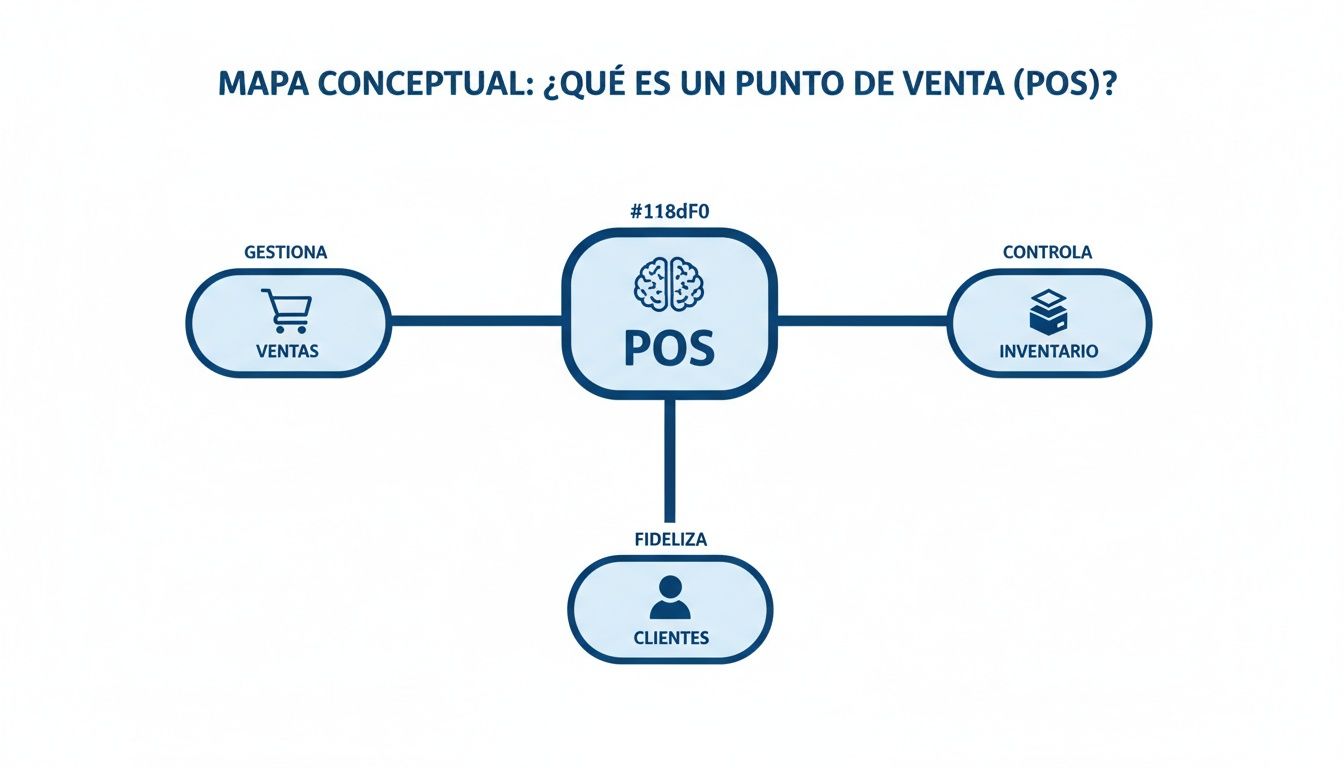
A point of sale is the moment and place—physical or digital—where a business processes a transaction. A POS system, on the other hand, is the technology that enables that payment and records everything that happens around it: products, payments, inventory, customers, and reports.
The difference matters because many people use both terms as if they were the same thing. In practice, the point of sale can be a checkout register in a store, a tablet in a coffee shop, a counter in a pharmacy, or even an online checkout; the POS is the set of software and hardware that operates that process.
If you need a quick answer, this is the basic flow: the cashier inputs products, the system calculates taxes and discounts, the customer pays, the inventory updates, and the transaction is ready for reports, reconciliation, and even billing. This ability to turn a sale into useful data is the reason why the modern POS is no longer just a "box." In fact, the sector's evolution goes from the cash register patented in 1879 to the systems developed by IBM in the seventies and eighties, when the point of sale began to turn into a business information hub, as summarized in this historical account.
What is a point of sale system
A point of sale is the instance in which a business completes a purchase. A POS system is the platform that allows processing payments, recording the transaction, and connecting it with the rest of the business. To put it bluntly: the point of sale is the transaction; the POS is the system that makes it operable, traceable, and manageable.
It is useful to separate both concepts from the start. In our review, this is the most common mistake: thinking that a POS is only a screen to accept card payments. It is not. A point of sale system combines software, devices, and operational rules so that every sale leaves a useful footprint in inventory, cash drawer, customers, and reports.
There are also two main forms of point of sale. The physical one is the most obvious: a checkout in a store, a terminal in a restaurant, a tablet at a bar counter. The digital one appears when the sale is closed on an online channel and the system synchronizes stock, payment, and confirmation without going through a counter. To understand this logic, it helps to think of other sectors where the point of interaction changes, but the system behind it coordinates the operation; a simple example of a digital experience can be found in the Spanish version of the Suave Mattresses guide, where the visible storefront for the user is only a part of the process happening behind the scenes.
From payment to report: how a sale is completed
A well-implemented POS usually follows this sequence:
Captures the sale: the cashier scans or selects products or services.
Calculates automatically: subtotal, taxes, promotions, tips, or discounts.
Processes the payment: cash, card, bank transfer, digital wallet, or vouchers.
Updates the operation: deducts inventory, records cash register movement, and links the customer if applicable.
Closes the administrative cycle: leaves the information ready for reports and, in Mexico, for electronic invoicing when the business enables it.
Let's think of a specialty coffee shop in Roma, in Mexico City. When a customer orders a latte, the system does not just process the payment: it deducts ingredients, records the payment method, adds the sale to the day's total, and, if there is a loyalty program, links it to the customer's profile. That is the difference between taking a payment and operating a business.
Key differences compared to a cash register
To understand what a point of sale system is, it is worth comparing it to a traditional cash register. The shift is not cosmetic; it changes how you manage your business.
Functionality | Traditional Cash Register | Point of Sale (POS) System |
|---|---|---|
Sales recording | Basic. Adds prices and calculates change. | Advanced. Applies discounts, splits bills, and manages diverse payment methods. |
Inventory management | None. Manual counting is required. | Automatic. Deducts products in real time, alerts on low stock, and facilitates purchasing. |
Customer relationship (CRM) | Nonexistent. | Integrated. Creates profiles, tracks purchase history, and manages loyalty. |
Reporting and analysis | Basic. Only closing or Z-reports. | Detailed. Sales reports by product, category, employee, and time period. |
Integrations | None. | Multiple. Can connect with accounting, e-commerce, or delivery apps. |
Invoicing | Manual or nonexistent. | Automated. Can generate electronic invoicing when the workflow allows. |
The practical difference is noticed quickly. A pharmacy in Monterrey does not just need to process payments; it needs precise inventory control, batch tracking, and visibility of expiration dates. A cash register does not solve that. A well-configured POS can get much closer to that operational need.
In Mexico, additionally, the fiscal aspect is significant. The SAT keeps the CFDI 4.0 framework and its validations active for electronic invoicing, so automating that part reduces manual work and data entry errors, as detailed in the official SAT documentation. If you want to dive deeper into how to use this data to grow, we recommend our article on sales analysis.
How a point of sale works step by step
The operation of a modern point of sale is best understood by following a transaction from start to finish. Not all business types operate the same, but the core logic is repeated.
1. Registration and scanning of products or services
The process begins when the system identifies what is being sold. This can occur by barcode, catalog search, quick selection on screen, or loading a service. Configuration matters here: if products are incorrectly registered, the POS will charge correctly, but report incorrectly.
2. Real-time commercial rules
Next, the POS applies prices, promotions, taxes, tips, or authorized discounts. In restaurants, for example, it can split bills; in retail, respect price lists by branch; in pharmacies, restrict certain operations according to internal policies.
3. Payment processing and validation
The customer pays and the system records the method. If there is an integrated terminal, the confirmation enters the same flow; if not, the business may end up reconciling separately. Our recommendation here is simple: the fewer manual steps between payment and recording, the fewer discrepancies will appear at the end of the day.
4. Automatic update of inventory and cash register
Once payment is confirmed, the system deducts stock, records the income, and leaves traceability for audits and reports. This step is key in businesses with high turnover. What we see most in SMBs is that the problem is usually not selling, but not knowing precisely what went out, at what time, and through which channel.
5. Receipt emission, invoice, or customer registration
In the end, the POS generates a ticket, prepares the information for invoicing, or associates the purchase with a frequent customer. If a loyalty program exists, it can also add points or trigger a follow-up automation.
Common mistakes in implementation
Before moving on, it is worth pointing out three frequent failures:
Cataloging products and variants incorrectly, which distorts sales and inventory.
Not defining user permissions, opening the door to uncontrolled discounts or cancellations.
Installing without training, thinking that the system is "self-explanatory."
A POS can greatly improve operations, but only if the actual flow of the business was well translated into the system.
How to choose the ideal type of point of sale for your SMB
Choosing a point of sale system does not start with comparing brands; it starts with understanding what type of system you need. If that basis is omitted, it is easy to hire an oversized solution, or worse, one that takes payments well but does not support daily operations.
Types of point of sale systems
On-premise
The on-premise model installs the software and database locally, usually on servers or computers owned by the business. Its biggest advantage is direct control over the infrastructure and, in certain cases, greater independence from the internet for critical functions. Its limitation is clear: it requires a higher initial investment, technical maintenance, and an operational discipline that many SMBs do not have.
It usually fits best in businesses with very rigid internal policies, unstable connectivity, or highly specific customization needs.
Cloud POS
The Cloud POS hosts information on remote servers and allows access to sales, inventory, and reports from multiple devices. For most SMBs, it is the balance point between cost, scalability, and visibility. It allows managing multiple branches, reviewing indicators remotely, and updating the system without complex installation processes.
Its main limit is dependence on good configuration and a clear connectivity policy. A reliable provider must offer backup offline operation, not just a sales promise.
mPOS
The mPOS brings the point of sale to tablets or smartphones. It is especially useful when selling from a fixed counter gets in the way more than it helps: restaurants with table service, pop-ups, trade shows, markets, coffee shops, or stores with assisted service.
The advantage is mobility. The limit is usually in peripherals, complex workflows, and ergonomics when the volume of operation demands more robust stations.
POS integrated with e-commerce
There is a fourth scenario that is increasingly important: the POS integrated with an online store. Here, the value is not just in taking payments through two channels, but in sharing catalog, inventory, promotions, and order statuses. For an omnichannel business, selling in-store with one stock and online with another usually ends in overselling, returns, and a bad experience.
Decision elements: key system components
Before choosing a provider, check if the system covers these components:
POS Software: catalog, prices, taxes, users, reports, and permissions.
Terminal or tablet: where the cashier or seller operates.
Reader or scanner: useful in retail and pharmacy for speed and control.
Receipt printer: still relevant for operations, kitchen, or receipts.
Cash drawer: important if the business handles cash intensively.
Connectivity: stable internet, local network, and backup options.
Integrations: invoicing, accounting, e-commerce, delivery, CRM, or payment terminals.
In our editorial experience, the most expensive purchase is usually not the hardware: it is contracting software without checking if it integrates with what you already use or with what you will need in six months.
Brief selection matrix by business type
Business Type | Recommended POS Type | What to prioritize | What is usually extra |
|---|---|---|---|
Coffee shop | Cloud POS or mPOS | payment speed, simple recipes, cash register closings, loyalty | complex industrial backoffice modules |
Retail | Cloud POS or on-premise depending on size | inventory, barcodes, promotions, multi-branch | table workflows or kitchen orders |
Restaurant | Cloud POS or mPOS | orders, kitchen, bill splitting, service times | interface designed only for retail |
Pharmacy | Robust Cloud POS or on-premise if there are strict internal rules | inventory control, traceability, expiration dates, reports | solutions that are too basic for the counter |
If you operate in food and service, this guide on point of sale systems for restaurants can help you, where we break down functions specific to the sector.
Elements that make up a point of sale system: software and hardware
A point of sale system is not a single piece. It works as a set of layers that must fit together. When one fails, the problem is not always seen on screen; sometimes it appears at the cash register, in inventory, or in reconciliation.
Software: the business logic
The software defines how your company sells. That is where the catalog, prices, taxes, promotions, user profiles, reports, and operating rules live. It is also where processes like returns, cancellations, discounts, and, in many cases, invoicing are configured.
If the software is good, operations gain order. If it is limited, it forces solving problems outside the system with spreadsheets, manual notes, or double data entry. That is why it is not enough for it to just "take payments"; it must reflect the real flow of the business.
Hardware: counter execution
The hardware is the visible part of the system:
terminal, laptop, or tablet
barcode reader
receipt printer
cash drawer
bank terminal or card reader
peripherals depending on industry, such as kitchen printers
Not every business needs everything. A coffee shop can operate well with a tablet, printer, and payment reader. A high-volume retail store probably needs scanners, reliable printers, and a more durable fixed station.
Security, payments, and compliance
When the POS processes cards or integrates with payments, security stops being a technical topic and becomes an operational one. The PCI DSS standard remains the reference for protecting card data, and the payments industry details its controls on the official PCI Security Standards Council website. In addition, many providers use point-to-point encryption or tokenization to reduce exposure of sensitive data; Visa explains this approach in its guide on payment tokenization.
The editorial recommendation here is practical: if a provider avoids explaining how they protect information, how they handle permissions, or how they operate when the internet fails, you are not facing a minor detail, but rather an operational risk.
Features that transform your daily management
A modern point of sale system is not just a payment tool; it also organizes critical business information and connects processes that previously had to be resolved separately. Its value is not in accumulating modules, but in making sales, inventory, customers, and compliance operate as a single flow.
When that happens, daily management stops depending so much on manual follow-up. The change is noticeable in specific tasks: less data entry, fewer closing errors, and better visibility to operate with sound judgment.

Frictionless inventory management
One of the most valuable capabilities of a good POS is real-time inventory control. It is no longer about counting boxes by hand or keeping stock in a notebook.
Imagine a specialty coffee shop in Puebla. Every time you sell a drink, the system can deduct ingredients or products from stock and alert you before an important reference runs out. That provides margin to reorder in time and avoids losing sales due to unnecessary stockouts.
This automation helps reduce two costly problems: selling without product available or locking up cash in slow-moving merchandise. If you want to dive deeper into this topic, check out our guide on product inventory management.
CFDI Invoicing and Integrated CRM
In Mexico, complying with the SAT is not optional. A competent system can better prepare and automate the issuance of CFDI 4.0 and, in some cases, facilitate self-billing systems for customers. That reduces administrative burden and frees up team time for commercial tasks.
But the reach of the POS goes beyond compliance. Its CRM layer allows turning every transaction into useful history: what the customer buys, how often they return, and which categories they prefer.
An integrated CRM in the POS doesn't just record a sale; it helps build context about the customer to make better commercial decisions.
Think of a barbershop in Mexico City. If the system shows the history of services and products purchased, it becomes easier to trigger relevant promotions instead of sending generic campaigns to the entire database.
Loyalty programs and automations
Once you know your customers better, the next step is to create reasons for them to return. That is where loyalty programs and automations come in. An advanced POS allows for better segmentation and measuring if those actions really generate a return.
Some common uses are:
Rewards for visits: an ice cream shop in Mérida can configure simple benefits to encourage recurrence.
Segmentation by spending or frequency: instead of launching the same promotion to everyone, you can distinguish between frequent, occasional, or inactive customers.
Automated campaigns: if a customer stops buying for a certain period, the system can trigger a reminder or incentive through a channel defined by the business.
These features turn the point of sale into an active growth tool, not just a payment station.
The real benefits of a point-of-sale system in your business
The real benefits of a modern POS are not in the list of features, but in the observable changes it causes in the operation. When the system is well configured, the business gains speed, reduces errors, and makes better decisions with less manual work. When it is poorly configured, it only digitizes the disorder.
What changes in daily operations
Before implementing a POS:
sales recorded with little traceability
inventory updated at closing or manually
cash discrepancies difficult to explain
promotions applied inconsistently
lack of clarity on which product moves and which locks up cash
After implementing a POS:
tickets and movements with time, user, and payment method
inventory with updates by sale and better stockout visibility
faster cash reconciliation
centralized discounts and commercial rules
reports by product, shift, branch, or employee
That change saves operational time. In retail and food, a few seconds less per transaction and fewer recaptures at closing end up turning into hours recovered per week. It also reduces data entry errors: fewer incorrectly entered prices, fewer improvised discounts, and fewer differences between what left physically and what appears in the system.
Concrete benefits: where it is noticed most
Operational time savings
A POS prevents repetitive tasks: re-entering sales data, updating inventory by hand, reconstructing cash reports, or searching for lost tickets. That does not always sound spectacular, but it is profitable. Our assessment is that this is usually the most undervalued benefit by SMBs until they compare a manual closing with one assisted by a system.
Fewer data entry errors and better cash control
When the product is scanned or selected from a well-structured catalog, the margin for human error drops. In addition, if permissions are well-defined, cancellations or out-of-policy discounts also decrease. In practice, this facilitates reconciliation and makes shift closings more reliable.
Inventory visibility
A good POS does not completely replace inventory discipline, but it does prevent working blindly. Knowing what was sold, what was returned, and what moved by branch helps buy better and reduce stockouts. If you want to dive deeper into this point, check out our guide on product inventory management.
Omnichannel capability
When the physical store, social networks, delivery, and e-commerce operate separately, classic errors appear: selling something already out of stock, not recognizing the same customer across different channels, or poorly measuring real profitability. A connected POS reduces that fragmentation and provides a single operational version of sales.
Real limits and trade-offs
Not everything is an advantage. Implementing a POS also introduces new demands:
Depends on a good initial configuration. If the catalog, taxes, or units are poorly loaded, reports will be unreliable.
Requires training. An intuitive system helps, but does not substitute for clear processes and basic training.
Brings recurring costs. Subscription, support, peripherals, hardware replacement, or integrations can weigh more than it seems in the initial quote.
That is why it is useful to evaluate return with operational criteria, not just commercial ones. If the system saves you time, reduces errors, and improves visibility, the monthly cost is usually justified. If it ends up duplicating processes, it is not.
Data-driven decisions, not intuition
Perhaps the most powerful benefit of a POS is its ability to turn every sale into actionable information. Reports allow you to stop guessing and start deciding with recent data on products, schedules, employees, or branches.
That opens up a visibility that was previously difficult to sustain. Suddenly you can detect which items are truly star products, at what times demand concentrates, or which promotions work best. With that basis, a restaurant in Nuevo León can adjust schedules, purchasing, or campaigns with greater precision.
A point of sale system makes operations less reactive and more anticipatory: it doesn't just record what happened, it also helps you prepare for what is coming next.
This logic is also reflected in high-movement industries. For example, the Mexican automotive market started 2026 with an 8.7% growth in light vehicle sales, as reported by Cluster Industrial and Milenio. Beyond the sector, the useful point is the same: when the volume of transactions increases, the need to record and read data correctly becomes even more critical.
Increase in Customer Lifetime Value (CLV)
A good POS, especially if it integrates CRM and loyalty, goes beyond internal efficiency. It also becomes a tool to build longer-lasting relationships with customers and increase their Customer Lifetime Value (CLV).
Imagine an ice cream shop in Yucatán. If its POS identifies those who buy seasonal flavors frequently, it can notify them when a new one arrives or trigger a relevant promotion. That type of personalization not only improves repeat purchases; it can also elevate visit frequency and average ticket. If you want to dive deeper into how to apply it, check out our guide on the importance of vouchers and digital wallets.
A broader perspective also helps scale the operational weight of each retail location. In France, official statistics recorded 340,000 retail points of sale in early 2015; active stores averaged 1.1 million euros in annual revenue, with around five people and 250 m² per establishment, according to data from INSEE. The local takeaway is direct: each point of sale is not just a counter, but a unit of productivity that needs visibility and control.
Checklist: How to evaluate your next POS system
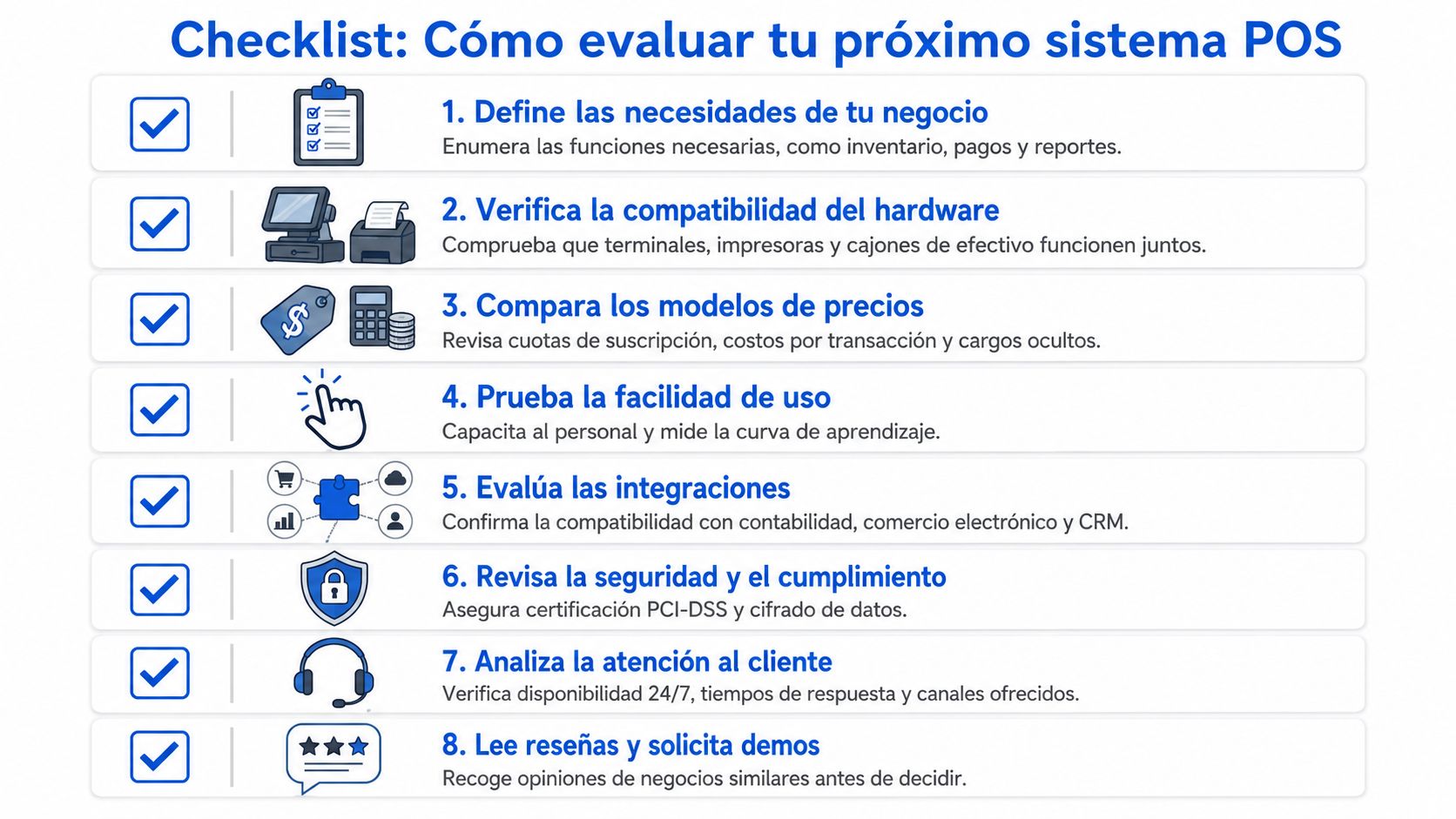
Choosing the right point-of-sale (POS) system is one of the most strategic decisions you will make for your business. It is not just about buying software to collect payments; it is about finding a technology partner to help you grow. A practical checklist can guide you through evaluating your options.
Ease of use and training
First things first: how easy is it to use? A complicated system can turn into your worst nightmare during peak hours, creating a bottleneck that costs you money.
Think of a coffee shop in the Roma neighborhood with a line out the door. If your team takes forever on each order because the interface is confusing, you don't just lose sales; you also leave a bad impression on your customers.
A good POS should be so intuitive that a new employee can handle it comfortably in less than a day. The complexity should be behind the counter—in reports and analytics—not in front of the customer.
Insist on a live demonstration (a demo) and ask straightforward questions about the training process. This will give you a very clear idea of the actual learning curve.
Hardware compatibility
Before signing anything, you need to confirm if the software works with the equipment you already have. This includes your receipt printers, barcode scanners, cash drawers, and even the card terminals you currently use.
Having to replace all your hardware can skyrocket the initial investment. The ideal choice is a flexible provider that offers a system compatible with a wide range of devices.
Real and local technical support
When your point of sale fails, your business comes to a halt. It's that simple. Therefore, the quality of technical support is essential.
Are they available when you need them? Make sure they offer support during your operating hours, especially if you have a restaurant in Monterrey or an ice cream shop in the Riviera Maya (Yucatán) that relies heavily on weekends.
Do they speak your language? It is essential that the support is in Spanish and that they provide multiple ways to contact them (phone, chat, WhatsApp).
How good are they at solving problems? Look for reviews and feedback from other businesses in Mexico. Are they fast and efficient? A great provider doesn't just put out fires; they help you get the most out of the tool.
Scalability for the future
The business you have today will not be the same one you have in two years. The POS you choose must be able to grow at your pace.
Are you planning to open another location of your barbershop in the State of Mexico? Do you want to launch an online store? Will you need more powerful inventory or CRM features later on? A smart POS system is modular. Ask directly about multi-location management and integrations with other platforms. If the system cannot support your expansion, sooner or later it will become an anchor.
Clear pricing with no surprises
Finally, analyze the pricing structure with a magnifying glass. Do not get carried away by just the cheapest monthly fee, which often hides additional costs.
Are there fees for initial installation or setup?
Will they charge you extra commissions for each transaction?
Do software updates have a cost?
Are there hidden charges for adding more users, products, or locations?
Demand a complete breakdown of all potential costs. This will help you avoid unpleasant surprises. Choosing a POS is a long-term investment that directly affects your profitability and your ability to make better decisions. If you want to dive deeper into this last point, I recommend reading about data-driven decision-making in our article.
To help you compare options more objectively, here is a table you can use when talking to different providers.
Checklist for choosing your POS provider
Evaluation Criteria | Key Questions to Ask | Priority (High/Medium/Low) |
|---|---|---|
Ease of Use | Can you give me a live demo? How long does it take a new employee to learn to use it? Is the interface intuitive for my type of business? | High |
Key Features | Does it include inventory management, sales reporting, CRM, and electronic invoicing (CFDI 4.0)? Which features have an extra cost? | High |
Hardware | Is it compatible with my current receipt printer, card readers, and payment terminals? Do you sell hardware or do I need to get it on my own? | Medium |
Technical Support | Is support 24/7 or only during office hours? Is it in Spanish? What contact channels do you offer (phone, chat)? What is the average response time? | High |
Scalability | Does it allow managing multiple locations? Does it integrate with e-commerce platforms like Shopify or delivery apps? Can I add more advanced features in the future? | Medium |
Total Costs | What is the installation cost? Are there transaction fees? How much does it cost to add more users or locations? Are there hidden charges? | High |
Security | How do you protect my customers' data and my sales data? Does the system operate without an internet connection? | High |
Using this table will give you a clear view and help you make an informed decision, ensuring that the POS you choose is a true engine for your business and not a headache.
Frequently asked questions about point-of-sale systems
Are POS, TPV, and point of sale the same thing?
They are used as synonyms in many conversations, but they do not mean exactly the same thing.
Point of sale: the place or moment when the sale is completed.
POS: the complete system that allows taking payments, recording, and managing the operation.
TPV: in many contexts, it is used to refer to the terminal or payment device, especially the one linked to card payments.
In commercial practice they usually blend, but if you are going to evaluate providers, it is useful to distinguish between system, terminal, and process.
How to evaluate which is the best point of sale for a business?
The "best" is not defined by popularity, but by operational fit. For a coffee shop, speed, ease of use, and cash register control matter. For retail, inventory, scanning, and promotions carry more weight. For restaurants, orders and kitchen. For pharmacies, traceability and fine control.
Our recommendation is to compare four things before anything else: if it reflects your real workflow, if your team can learn it quickly, if it integrates with payments/invoicing, and if the total cost still makes sense after adding support, hardware, and integrations.
Where do you get a point of sale?
There are four common routes:
Specialized SaaS provider, which sells software by subscription.
Aggregator or payment processor, which offers a POS along with a terminal or reader.
Authorized distributor, useful when you need local installation, training, or hardware.
Complete hardware bundle, where the provider delivers a tablet, printer, drawer, and software already prepared.
The best route depends on your complexity. If you operate something simple, a closed package may suffice. If you have several branches or more delicate processes, it is usually better to go with a provider with more serious implementation.
When is a free POS useful and when is it not?
A free POS can serve to validate a very small operation, perform tests, or start with few SKUs and a simple workflow. It stops being useful when the "no cost" model starts limiting users, inventory, reports, support, or critical integrations.
The warning signs are clear: non-transparent commissions, limited data export, almost nonexistent support, or basic functions locked behind payment modules. If the business depends on the system to take payments every day, cheap can become expensive very quickly.
Is my data safe if I use a cloud POS?
It can be, but not by default. Security depends on the provider, their infrastructure, and how they manage access, encryption, and compliance. If they handle payments, they must demonstrate serious controls; if they also store customer data, they should also offer user permissions, logs, and clear backup policies.
The reasonable thing is not to accept a simple "yes, it is safe," but to ask for specific details about data protection, operational continuity, and support in case of incidents.
Do I need internet all the time for it to work?
Not necessarily. Most modern point-of-sale systems come prepared for this with an offline mode.
This means that if the internet suddenly goes down in your coffee shop in Mexico City, you can keep taking payments and recording sales without a problem. As soon as the connection returns, the system automatically synchronizes all information with the cloud. It is a key feature to ensure your business never stops. You can better understand how different systems adapt to these needs in our analysis of LoyaltyPro vs Swirvle.
A good POS system gives you the freedom of the cloud without leaving you stranded when the connection fails. It is designed to keep you operating no matter what happens.
If after reviewing options you want a platform that unifies sales, inventory, and customer loyalty in a single operation, you can Discover how Swirvle can boost your business here.
Functionality | Traditional Cash Register | Point of Sale (POS) System |
|---|---|---|
Sales recording | Basic. Adds prices and calculates change. | Advanced. Applies discounts, splits bills, and manages diverse payment methods (card, cash, vouchers). |
Inventory management | None. Manual counting is required. | Automatic. Deducts products in real time, alerts on low stock, and generates purchase orders. |
Customer relationship management (CRM) | Nonexistent. | Integrated. Creates customer profiles, tracks purchase history, and manages loyalty programs. |
Reporting and analytics | Basic. Only Z-reports for cash drawer closing. | Detailed. Sales reports by product, category, employee, and time period. Key metrics in real time. |
Integrations | None. | Multiple. Connects with accounting software, e-commerce platforms, delivery apps, etc. |
Invoicing | Manual or nonexistent. | Automated. Generates electronic invoices (CFDI in Mexico) at the time of sale. |
Related Blogs

Oct 22, 2026
How to prevent employee petty theft in my business?

Oct 21, 2026
How to Control Food Waste in a Restaurant: 2026 Guide

Oct 20, 2026
What is the global invoice for the general public and when is it issued? SAT Guide

Oct 19, 2026
How to take restaurant orders on WhatsApp without losing any?

Oct 18, 2026
How to Create a WhatsApp Business Catalog to Sell More: 2026 Guide

Oct 17, 2026
How to set up quick replies in WhatsApp Business?