Learn what a sales dashboard is and how to use it in your small business. Discover the key metrics and data-driven strategies to grow your business.
A sales dashboard is a board that shows on a single screen, and in near real-time, the key numbers of your business: how much you sell, how much each customer spends, who returns, and which products are moving. The difference with a sales report is simple: the report is a snapshot of a period that has already closed; the dashboard is a live board that updates with each sale and lets you react the same day.
Here you will see when to use each one, the 6 metrics that a food business dashboard must have, and how to build yours in 5 steps.
Dashboard vs sales report: when to use each one
They do not compete: they complement each other. The dashboard is used to operate the day-to-day; the report, to review and plan. If you are looking for report formats, check out these sales report examples and these sales report templates for SMEs.
Sales dashboard | Sales report | |
|---|---|---|
What it is | Live board that updates with each sale | Document of a closed period (day, week, month) |
Question it answers | "How are we doing today?" | "How did we do and why?" |
Who uses it | Shift manager, owner in the day-to-day | Owner, partners, accountant |
When is it reviewed | Several times a day or at the end of the shift | At the end of the week or month |
For which decisions | Moving staff during peak hours, pushing a product, reacting to a slow day | Adjusting prices, menu, budget, and goals |
Format | Charts and stoplights with few indicators | Tables with more detail and comparisons |
Rule of thumb: if the decision is made today, look at it on the dashboard. If it is made next month, rely on the report.
If you are just starting to measure, first build the habit of tracking the daily sales of your business; the dashboard is the next step.
The 6 metrics that a food business dashboard must have
In a coffee shop, restaurant, bakery, or ice cream parlor, you don't need twenty indicators. With these six, you see almost everything that matters. "Good" values depend on your line of business and your area, so compare yourself against your own previous weeks.
Metric | How it is calculated | What it tells you | What you do with it |
|---|---|---|---|
1. Sales of the day vs same day last week | Total sold today compared to the same day of the previous week | If you are above or below normal | React in time with a promotion or reinforce staff |
2. Average ticket | Total sales ÷ number of tickets | How much each customer spends per visit | Combos, suggestive selling, counter arrangement |
3. Number of tickets per hour | Tickets grouped by time slot | Your peak hours and your slow hours | Adjust shifts and launch promotions for slow hours |
4. New vs returning customers | Customers with a first purchase vs customers who had already bought | Whether you are growing by attracting or by retaining | Welcome for new ones, rewards for returning ones |
5. Visit frequency | Visits per customer in a period | How deep-rooted the habit is | Detect customers who stopped coming and send them a message |
6. Most and least sold products (with margin) | Units and profit per product | Which dishes or drinks sustain your business and which ones get in the way | Highlight profitable ones, redesign or remove those that do not sell |
Metrics 4 and 5 only exist if your point of sale terminal saves who bought. That is why it is convenient for the point of sale to be connected to the CRM: each ticket is linked to a customer and the dashboard can show retention, not just sales.
How to read them together
Sales go down, ticket stable, tickets go down: fewer people are coming. Review retention and send a message to customers who have not returned.
Sales stable, ticket goes down: people are coming, but they are spending less. Review combos and suggestive selling.
Many new customers, few returning ones: you attract well, but you do not retain. Work on your loyalty program.
A product sells a lot but leaves little margin: review its recipe or price before promoting it further.
Implement your first sales dashboard in 5 steps
Now that you know what it is and why you need a sales dashboard, it is time to roll up your sleeves and get to work. Get rid of the idea that this is a massive technology project, reserved only for large corporations. We are going to break it down into a grounded process so you can start making data-driven decisions today.
Setting up your first dashboard doesn't have to be an odyssey. The secret lies in starting with a very clear objective and moving step by step, rather than wanting to measure everything at once.
Think about the journey of your data. It is not abstract; it is a concrete flow that goes from each sale you register to the strategy you define for growth.
The journey of your information looks something like this:
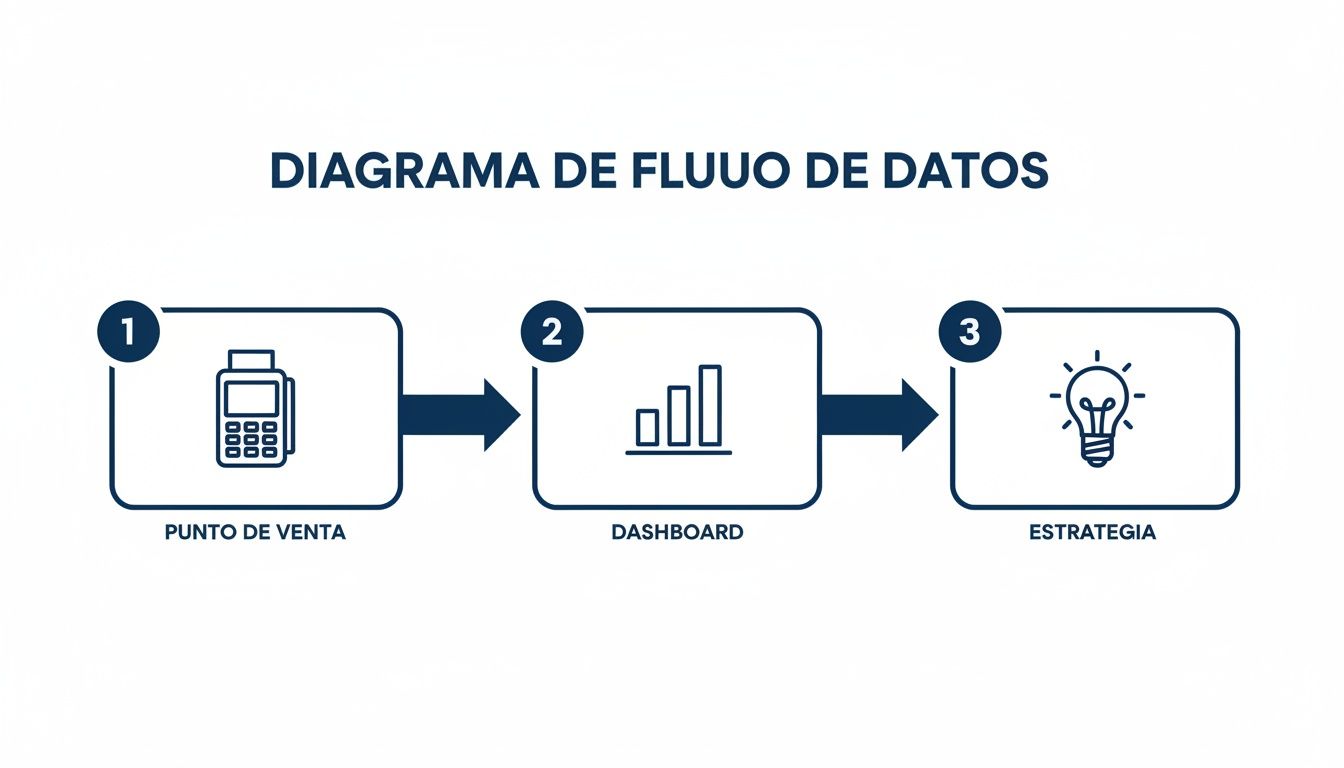
As you can see, each transaction at your point of sale is the fuel that powers your dashboard's engine. And it is that engine that illuminates the path for your next strategic moves.
1. Define your main objective
Before getting lost in a sea of numbers, you must start with a single key question. Ask yourself: what specific problem do I want to solve or what opportunity do I suspect exists? A well-defined objective is like a beacon: it concentrates your efforts and gives you a tangible goal.
For example, a coffee shop owner in Mexico City might ask: "What is my lowest sales day and why?". This question is infinitely more useful than a vague desire like "I want to sell more."
2. Identify your data sources
Once you have the question, you need to know where the answers are. Chances are you already have that information, but scattered all over the place. Centralization is key.
Your main data sources will almost always be these:
Point of Sale (POS): The heart of the operation. Every transaction, product, time, and payment method is registered here.
Customer Relationship Management (CRM): The logbook of your relationships. It contains each customer's purchase history, frequency, and details.
Inventory Control: The map of your merchandise. It tells you which products you have, which ones rotate faster, and which ones are gathering dust on the shelf.
Connecting these pieces is the critical step to getting the full picture. In fact, a good sales record is the foundation upon which everything else is built.
3. Choose the right tool
Here you find yourself at a crossroads with three main paths. Each has its advantages and disadvantages, especially for an SME or franchise.
The manual route (Spreadsheets): Using Excel or Google Sheets seems "free", but its real cost lies in the time and risk involved. It is a manual process, terribly slow, highly prone to human error, and almost impossible to keep updated in real-time.
Traditional Business Intelligence (BI) platforms: Tools like Power BI or Tableau are very powerful, no doubt about it. However, their learning curve is steep, their cost can be high, and you usually need a specialist to configure and maintain them.
All-in-one systems: Solutions like Swirvle were born to solve this problem. They integrate the point of sale, the CRM, and the sales dashboard into a single ecosystem. For an SME, this is by far the most efficient option, as data connects natively and analysis is automated.
For the vast majority of SMEs, an integrated system is not only easier, it is smarter. It removes the technical friction and allows you to focus on what really matters: analyzing results, not fighting with technology to get them.
4. Configure your KPIs and visualizations
With the tool ready and the data flowing, it is time to shape your board. This translates into two things: selecting the indicators (KPIs) that answer your initial question and choosing the type of chart that represents them best.
The goal is not to make "pretty" charts, but functional ones. A quick guide:
Bar charts: They are ideal for comparing categories. For example, the total sales of each of your branches in Puebla.
Line charts: They are perfect for seeing the evolution of something over time. For example, how your average ticket has changed in the last six months.
Pie charts: Use them to show the composition of a total. For example, what percentage of your sales comes from each product category.
Stoplights or single-number cards: Ideal for the shift manager: today's sales versus last week, in green or red.
5. Analyze, act, and repeat
This is the most important step of all and, curiously, the one most often forgotten. A dashboard is not a museum piece to be admired; it is a working tool, a catalyst for action.
Let's go back to the coffee shop example. If the dashboard confirms to the owner that Tuesdays are, indeed, their slowest day, they now have the power to act. They could launch a "2x1 Tuesdays" promotion, adjust their staff schedule to optimize costs that day, or send a reminder to their most loyal customers (by email or push; by WhatsApp in the Premium plan).
And then, the cycle begins again. You measure the impact of those actions on the same dashboard, learn from the results, and adjust the strategy. It is a virtuous circle of continuous improvement that transforms your business: you stop reacting and start anticipating.
Frequently asked questions about sales dashboards
Do I need to know about computers to use one?
No. In a system that already integrates POS and CRM, the indicators come pre-built: your job is to review them and make decisions. If you do it in Excel, you will need time to input and update the data.
My business is small, do I really need it?
When resources are limited, every decision weighs more. Knowing what time your place fills up, what your star product is, and who your most loyal customers are helps you spend every dollar and every shift better.
Can I make a sales dashboard in Excel or Google Sheets?
Yes, and it is a good way to start. The disadvantage is that you rely on inputting or exporting data manually, so it updates with a delay and it is easy to make mistakes. When you already review it daily, it is better for the board to feed itself directly from your point of sale.
How often should I review the dashboard?
Daily sales and tickets per hour, several times a day or at the close of each shift. Average ticket, retention, and products, once a week. The rest, in your monthly report.
What is the difference between a KPI and a metric?
A metric is any data you measure (for example, tickets per hour). A KPI is the metric you chose as a key indicator because it is tied to a goal (for example, increasing your average ticket this quarter). Every KPI is a metric, but not every metric is a KPI.
Swirvle connects your point of sale terminal with the CRM and the loyalty program, so each sale is linked to a customer and you can see sales, average ticket, and retention without inputting anything manually. Meet Swirvle.
Related Blogs

Oct 22, 2026
How to prevent employee petty theft in my business?

Oct 21, 2026
How to Control Food Waste in a Restaurant: 2026 Guide

Oct 20, 2026
What is the global invoice for the general public and when is it issued? SAT Guide

Oct 19, 2026
How to take restaurant orders on WhatsApp without losing any?

Oct 18, 2026
How to Create a WhatsApp Business Catalog to Sell More: 2026 Guide

Oct 17, 2026
How to set up quick replies in WhatsApp Business?