
Learn how to optimize Google Business Profile for coffee shops in Mexico with a practical step-by-step guide, real examples, and content tactics.
Your coffee shop may have good coffee, a great bar, and a nice atmosphere, but if someone searches for “coffee shop near me” and sees an empty listing, doubtful hours, or old photos, the decision goes elsewhere before the customer even thinks about walking through the door. In Mexico, that moment matters more than it seems, because 83.1% of the population aged 6 and over used the internet in 2024, 100.2 million people, and 73.6% of households had internet access, according to INEGI, with a highly mobile and domestic usage that drives decisions from the phone (INEGI's 2024 internet habits). If the Google listing doesn't respond quickly to the intent, the coffee shop loses the visit before there is even a chance to sell a second coffee or a concha.
Why your coffee shop lives or dies on Google Maps
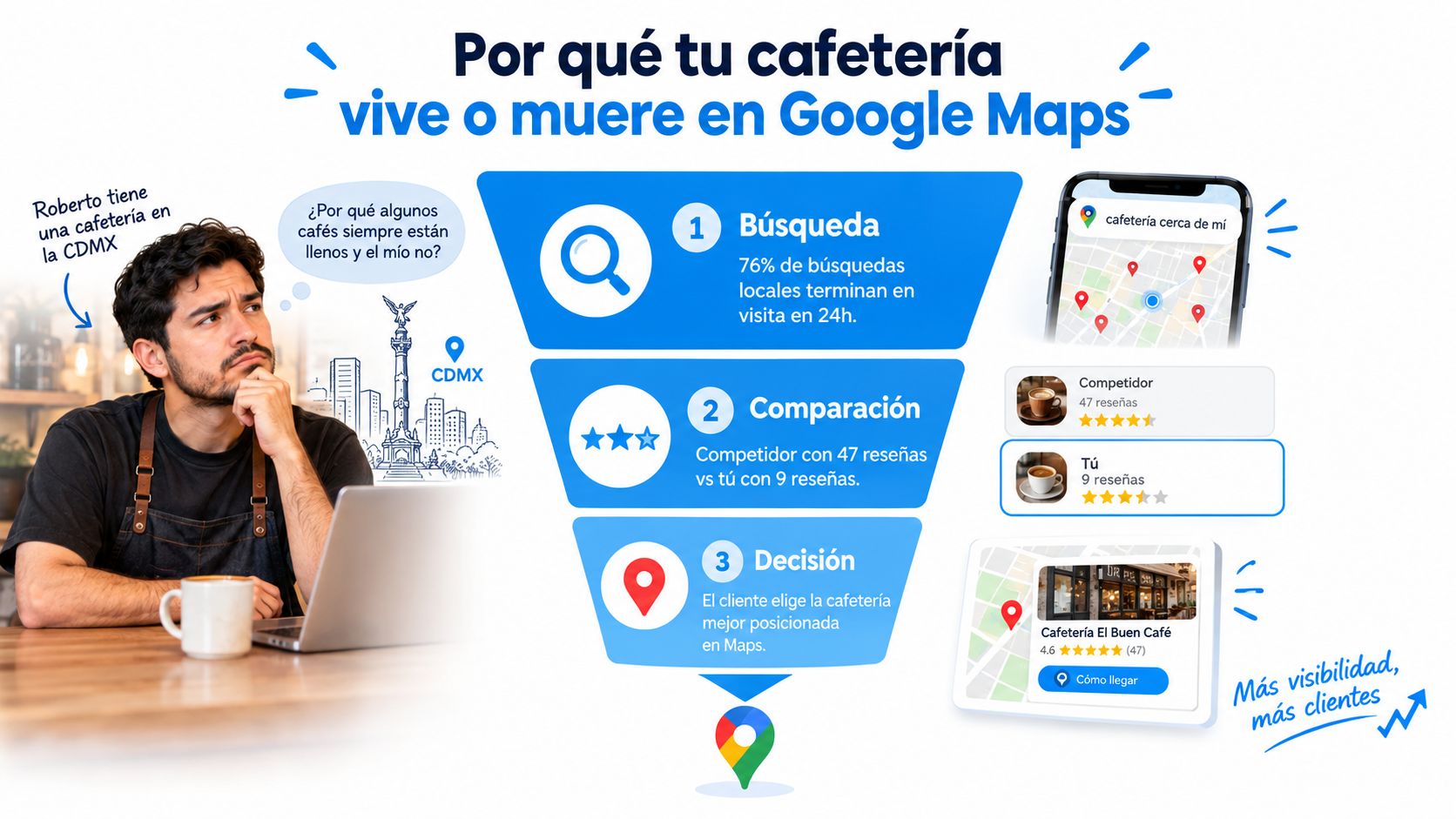
At 8:00 a.m., Roberto opens Google Maps from the bar of his coffee shop in CDMX and sees something uncomfortable. The place on the corner has more visible reviews, recent photos, and clear answers to basic questions, while his own still has incomplete data and little activity. That moment defines an important part of customer acquisition, because the customer compares in seconds and decides before walking through the door.
The listing decides before the door does
For coffee shops, Google Maps works as a storefront with minimal friction. The customer checks location, hours, photos, reviews and, if everything fits, taps “Get directions,” calls, or saves the route. That journey is the real funnel of the visit, and also the first filter to know if the listing is helping to sell or just taking up space.
The Mexican context makes this funnel more sensitive. INEGI's 2024 internet habits show that a large portion of usage occurs from home and from mobile connections, so the search for a coffee shop usually happens at a specific moment, near departure from home or work, not during a long exploration. The listing has to resolve the intent at that very instant, or the user goes with another option.
Rule of thumb: if the listing does not answer hours, access, atmosphere, and reviews, the customer does not keep researching, they change pins.
Three coffee shops, same neighborhood, different decisions
In a highly competitive neighborhood, a coffee shop with a complete listing usually has an advantage because Google understands better what it offers and the user finds fewer reasons to doubt. Another, with basic data, may still appear, but converts less because it leaves open questions. The third, unverified, is almost completely out of the visible game.
That contrast weighs heavily in searches like “coffee shop near me” or “breakfast Roma Norte”. A complete listing not only attracts clicks, but also reduces doubt prior to the visit, which is where customers are lost without the owner even noticing. Every impression on Maps, every call, and every saved route are micro-purchase decisions, and it pays to read them that way if the profile is connected to a CRM.
Google Business Profile is not a digital ornament. It is a local acquisition piece that converts intent into a visit. What is missing from the listing translates into friction, and in a coffee shop, that friction almost always ends in an empty table.
Step-by-step initial setup of the listing
A well-set-up listing doesn't start by uploading photos, it starts by making it clear who the business is, where it serves, and under what conditions. Google requires the representation to be accurate, the address or service area to be exact, and that only one profile exists per business, in addition to recommending using the fewest categories possible to describe the main activity (Google Business Profile policies). For a coffee shop, this avoids duplicates, stuffed names, and unnecessary suspensions.
What gets configured first
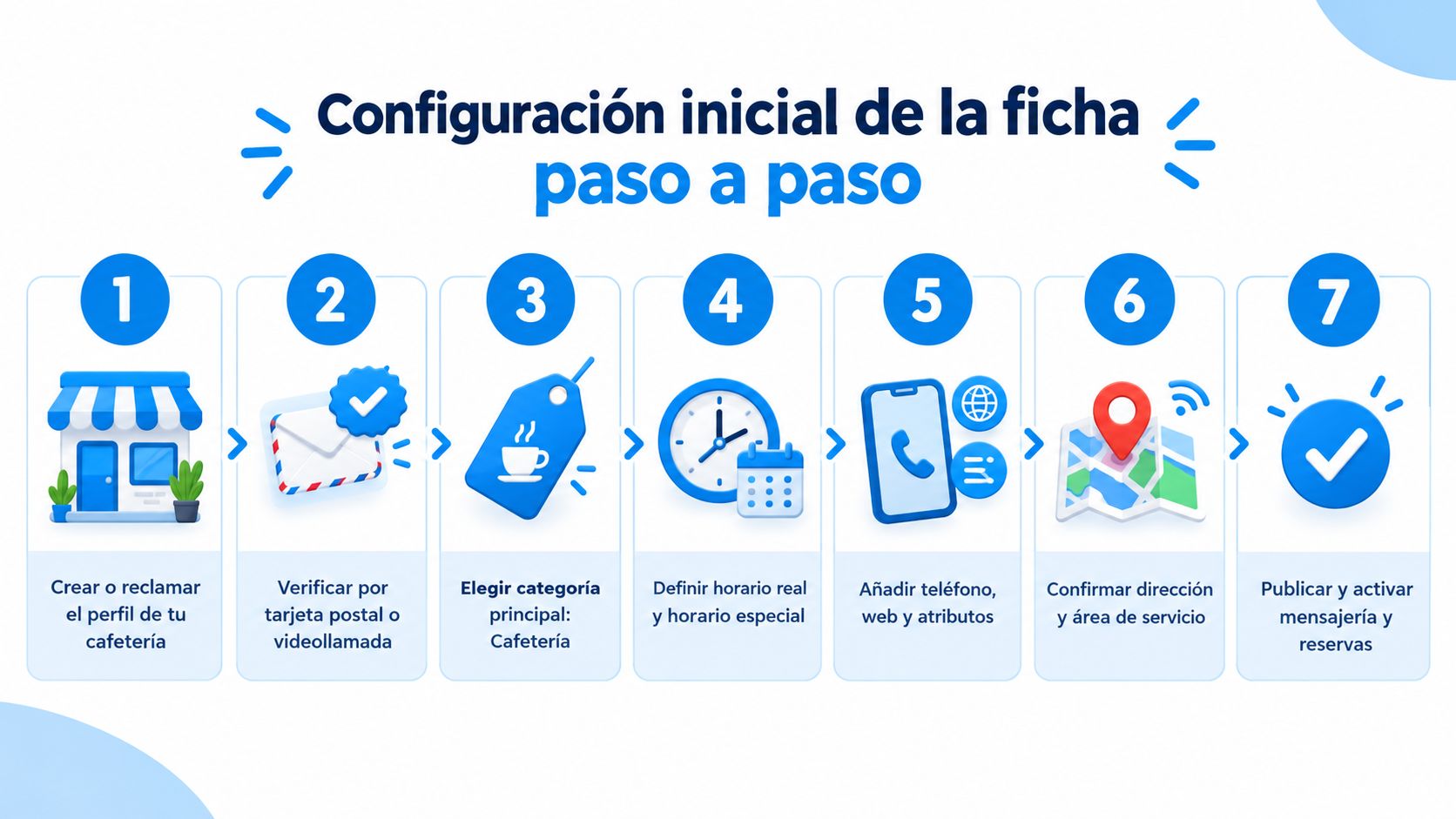
The correct order is operational, not aesthetic:
Create or claim the profile, because you can't optimize what you don't control.
Verify it by postcard or video call, depending on availability.
Choose the primary category “Coffee shop”, with few secondary categories that are truly relevant.
Complete the NAP (name, address, and phone), identical to how it appears on social media, menu, and signage.
Define real hours and add special hours for holidays or seasons.
Activate useful attributes, such as free Wi-Fi, terrace, takeaway, or pet-friendly.
Add digital menu, website, and messaging, if the business is already set up to respond quickly.
In a coffee shop with a public address, for example in Polanco, it is best to show the exact location and ensure the route to the premises is unmistakable. In a coffee shop located inside a gallery with restricted access, it may be better to hide the public address and work with a service area or very clear directions, because the customer does not need to guess how to get in. That decision is not about design, it is about conversion.
Name, description, and consistency
The visible name must be the real business name, without stuffing extra keywords. If the sign says one thing and the listing another, risk goes up and trust goes down. In coffee shops, consistency between signage, website, social networks, and the listing is worth more than any attempt at a shortcut.
The description has up to 750 characters and should be used to explain what kind of coffee shop it is, what is served, and what makes it different. That is where a sentence about breakfast, bakery, specialty drinks, or remote work fits, always written as useful information, not filler. The digital menu should be linked from the listing so that the customer understands the offering before heading out.
Minimum checklist before publishing:
Profile claimed and verified
Correct primary category
Consistent secondary categories
Identical NAP across all channels
Normal hours and special hours loaded
Useful attributes activated
Address visible or hidden with criteria
Complete description
Linked menu
Functional phone number
Active website or contact channel
Messaging reviewed and ready to respond
h2 id="46">Photos, menu, and posts that convert visits
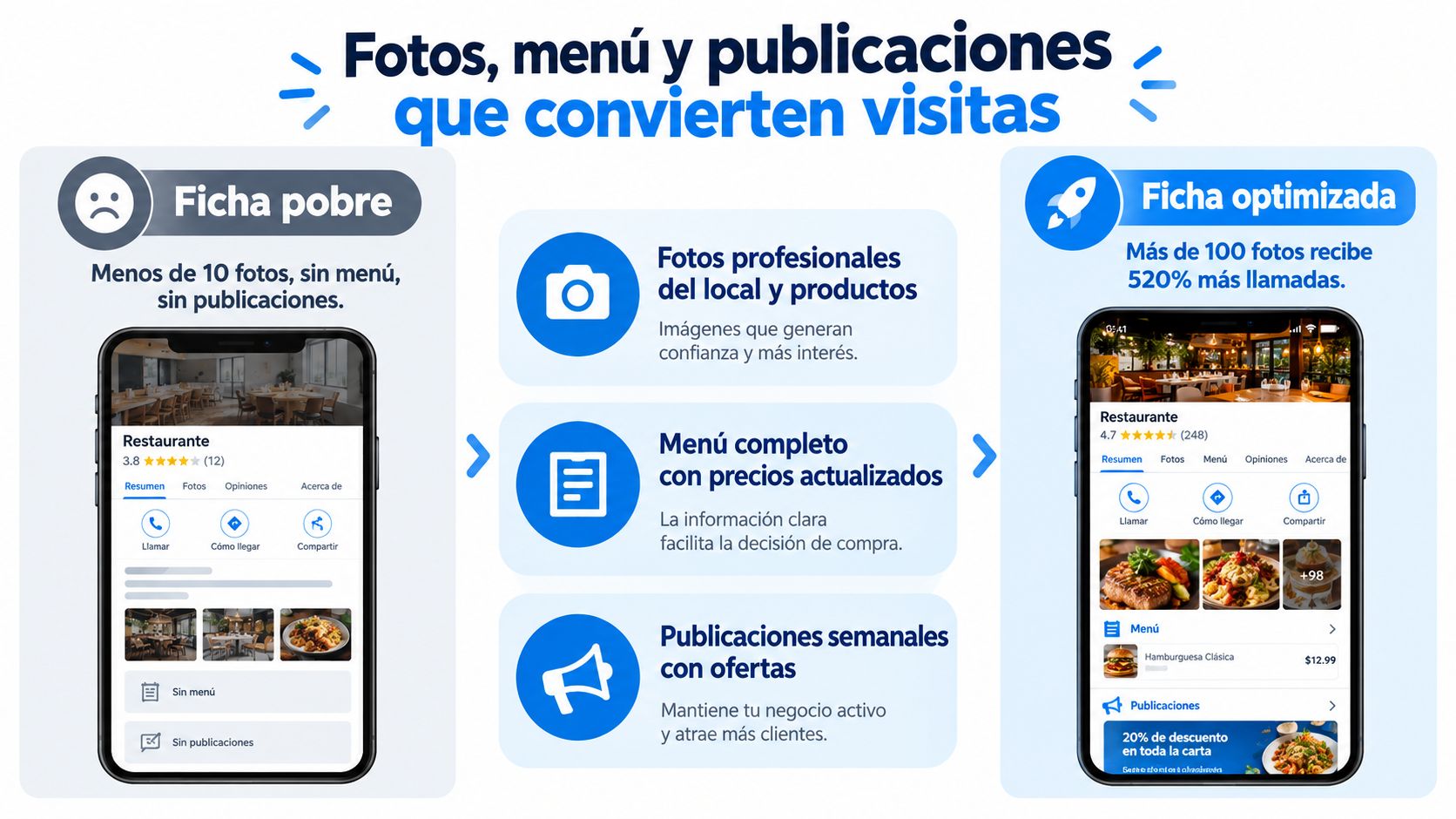
An empty Google Business Profile listing doesn't sell. In a coffee shop, the customer decides in seconds if it is worth going, ordering, or saving the place for later. Photos, the menu, and posts work as an acquisition funnel connected to the operation, because every click must bring them closer to a visit, a repeat purchase, or a higher ticket.
What photos drive sales, not just decorate
The right visual mix is not based on piling up images for the sake of it. Scenes that reduce doubts and anticipate the actual experience are what work. A bar with the barista preparing espresso communicates craft. A close-up shot of latte art, a table with natural light, and the busy terrace help the user picture themselves there. The counter with bread and pastries also adds value, because it shows what is actually being bought.
The listing needs recent life. In neighborhood coffee shops, a weekly update usually performs better than a massive photoshoot that is then abandoned. In small spots, leaving photos frozen for months makes the listing look older than the business. The decision is not aesthetic, it is operational.
Menu and posts with sales logic
The menu should not be hidden in a heavy PDF or three clicks away. It is best to upload it clearly and legibly, and link it to a file that the team can maintain without friction. A poorly solved menu holds back sales even when the place is full.
Here it helps to treat the menu as a decision page. The way breakfasts, breads, and drinks are presented changes what gets sold first and what remains invisible. To organize this part, it is useful to review how to design a menu to sell the most profitable dishes.
Posts also drive traffic. A coffee shop that uploads a seasonal offer, a small tasting, or the drink of the day stays top of mind without spamming. If it only posts once in a while, it loses activity signals that Google does show to the user.
A simple routine works better than improvisation. 3 new photos every 15 days and at least 2 monthly posts are enough to keep the listing from looking like a dead directory. With that, the profile starts to behave as a commercial channel, not an forgotten showcase.
Reviews and questions that build reputation
Reputation is not fixed with a handful of friendly replies; it is managed as a weekly process. Google states that businesses should reply to reviews, post offers or events, and review insights, but most coffee shops only do half of this and irregularly (Google Business Profile help). The problem is usually not a lack of good intentions, but a lack of system.
Respond quickly and read patterns
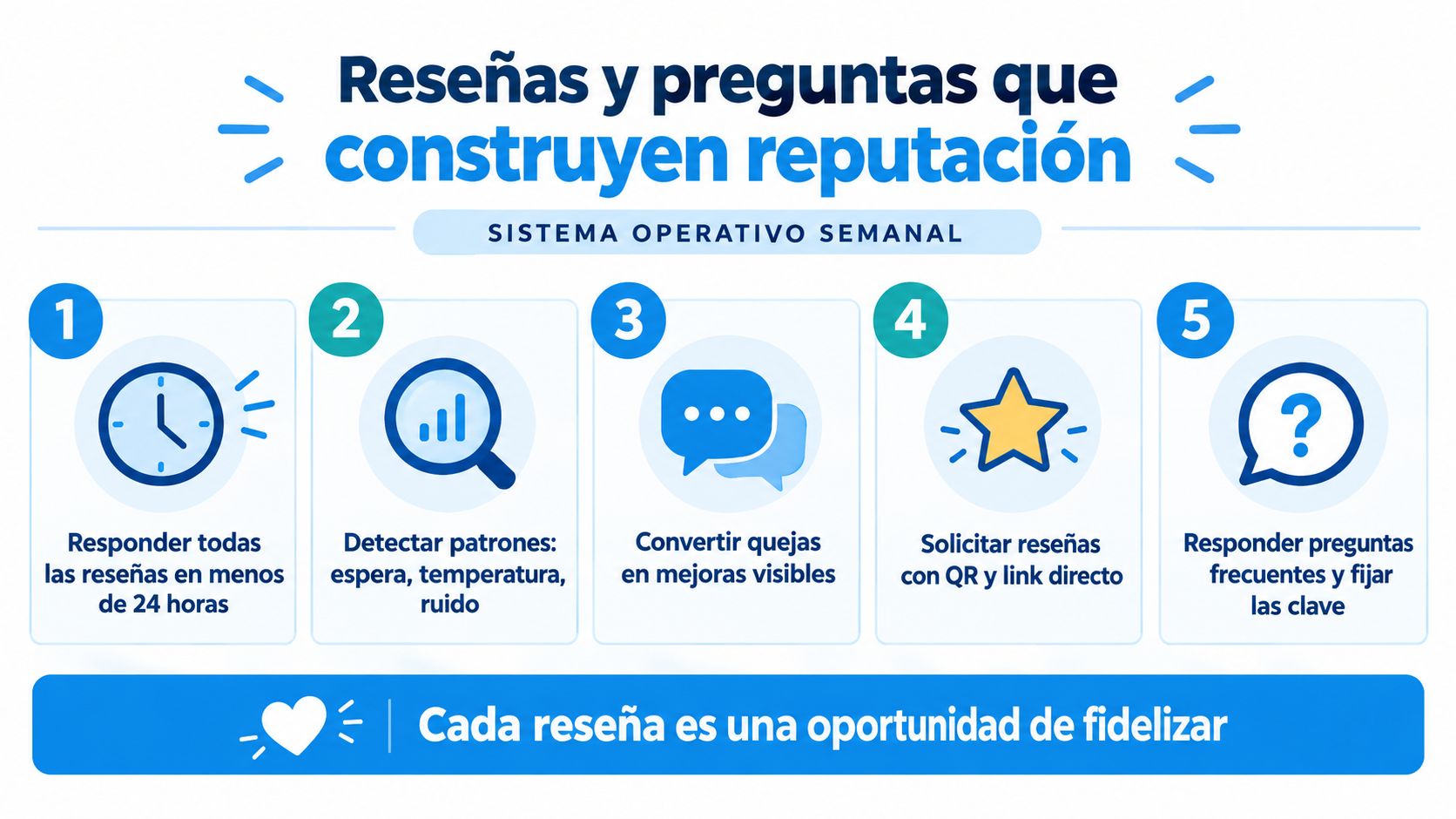
Responding in less than 24 hours should no longer be up for debate. A 1 to 3-star review is not just an image problem, it is also a clue about wait times, coffee temperature, or noise—three issues that pop up repeatedly in coffee shops with loose operations. If several complaints repeat the same reason, the place has an operational issue, not a marketing one.
Replies must sound human and resolve something. A review about the Wi-Fi asks for a short clarification and a future solution. A complaint about slow service requires owning the issue and explaining the internal adjustment, not fighting with the customer. If the place offers vegan options or a pet-friendly environment, that should also be visible in the reply and in the listing.
Questions and answers with intent
The Q&A section can become a mini digital front desk. It is best to seed frequently asked questions about parking, accessibility, tables for working, milk options, special hours, or if pets are allowed, and answer them with a clear signature from the owner or the manager. Google rewards useful activity, but penalizes what sounds forced or off-topic.
A simple protocol works better than constant improvisation:
Ask for a review after consumption, not in the middle of a rush.
Use a QR or short link next to the payment area or on the ticket.
Ask for specific details, such as the atmosphere, service, or favorite product.
Always reply with context, not with generic text.
Flag repeated questions to turn them into pinned content.
The best review is not the longest one, it is the one that helps another customer decide without hesitation.
The weekly review should look at four metrics: average rating, volume of new reviews, average response time, and percentage of reviews with photos. Without this dashboard, reputation becomes intuition, and intuition does not detect patterns in time.
Connect the listing to your CRM and build customer loyalty
The Google listing does not end on Maps, it starts there. Every call, every message, and every saved route can become a useful record if the business connects those dots with a CRM and stops treating the listing as a dead end. The logic changes completely when Google interaction feeds follow-up, segmentation, and repeat visits.
From click to useful data
When someone writes via the message button to ask about available tables, that contact can enter the CRM with date, reason, and branch. If the call comes from the listing, it should be tagged as a lead and not get lost on the counter phone. If the review is positive, it can trigger a return campaign with a comeback coupon or an invitation to try another drink.
This flow also helps solve specific loyalty programs for coffee shops. A digital stamp card, a free coffee for birthdays, or an inactivity recovery campaign at 30, 60, and 90 days work better when the business knows what the person bought and which branch they returned to. Segmenting them by favorite product avoids sending generic messages that nobody reads.
Automation without erasing the human touch
A well-set-up CRM does not replace the barista, it just prevents the business from forgetting someone who has already spent money there. Automations serve to register, classify, and re-contact with context, while human service continues at the bar, in the dining area, and in messaging. That combination is what turns the Google listing into a real acquisition and repetition funnel.
In small coffee shops, the advantage is usually not in making more noise, but in not losing the information that already exists. When the listing, the message, and the customer history cross paths, patterns of visits, preferences, and consumption hours appear. That is where an orderly operation improves recurrence without the need for constant discounts.
Using a unified system also prevents a question about table availability from ending up as just an isolated answer. It can open a booking, leave a record, and prepare subsequent communication. To see this approach applied to the coffee shop sector, it is useful to check out a CRM for coffee shops.
Core idea: Maps brings the intent, the CRM converts that intent into a repeatable relationship.
Measure results and maintain continuous improvement
Optimization does not end when the listing looks pretty. It ends when the coffee shop can link Google Business Profile actions to sales, visits, and recurrence without guessing. For this, a monthly dashboard is needed to gather searches, actions, reviews, photo views, and point-of-sale data.
What to look at every month
A useful control should cross direct, discovery, and branded searches with calls, directions, menu clicks, and messages. It is also useful to observe which photos are viewed most, how many new reviews arrived, and what the rating looks like. When the CRM and POS are connected, the average ticket attributed to customers coming from the listing and the recurrence rate can already be estimated.
Key Google Business Profile KPIs for Coffee Shops | Monthly Target | Data Source | Review Frequency |
|---|---|---|---|
Direct searches | Stable or upward trend | GBP Insights | Monthly |
Actions from the listing | Sustained growth | GBP Insights | Weekly and monthly |
New reviews | Continuous flow | GBP and CRM | Weekly |
Average rating | Stable and healthy | GBP | Weekly |
Most viewed photos | Periodic renewal | GBP Insights | Monthly |
Attributed average ticket | Gradual increase | POS and CRM | Monthly |
Recurrence rate | Progressive improvement | CRM | Monthly |
Quarterly improvement plan
Work can be organized by months. In the first, audit of NAP and categories. In the second, refreshing photos and posts. In the third, an ethical review campaign, without misleading incentives. In the fourth, adjustment of attributes, messages, and extensions that have become outdated.
Formulas must be simple so that the team actually uses them. Local ROAS is understood as sales attributed to the listing divided by the expense of the channel or local campaign. Cost per review is calculated by dividing the acquisition investment by the number of reviews obtained. Customer Lifetime Value captured by Maps crosses average ticket, return frequency, and customer retention in the database.
Early warning signs
A drop in actions usually warns before a drop in sales. If calls, directions, or menu clicks go down, the listing is losing conversion capacity. If, in addition, repeated negative reviews appear about wait times, temperature, or noise, the problem is already in the operation, not in the positioning.
To dive deeper into how to read if your marketing investment is actually returning results, this guide on how to know if your marketing is working can be useful. That reading, combined with GBP and CRM, prevents the coffee shop from confusing visibility with profitability.
Swirvle helps convert your Google listing into a real flow of customers, with CRM, loyalty, segmentation, and automations designed for coffee shops and physical businesses. If the goal is to move from isolated visits to measurable recurrence, it is worth knowing how it works at Swirvle and checking if it fits the daily operation of your location.
Related Blogs

Oct 23, 2026
Is it legal to charge a card payment fee in Mexico?

Oct 22, 2026
How to prevent employee petty theft in my business?

Oct 21, 2026
How to Control Food Waste in a Restaurant: 2026 Guide

Oct 20, 2026
What is the global invoice for the general public and when is it issued? SAT Guide

Oct 19, 2026
How to take restaurant orders on WhatsApp without losing any?

Oct 18, 2026
How to Create a WhatsApp Business Catalog to Sell More: 2026 Guide