Learn the tax requirements for a CFDI 4.0 invoice in Mexico. A guide for SMBs: avoid SAT errors and invoice correctly from your POS.
The problem almost never starts in accounting. It starts at the cash register.
A customer finishes their consumption at a coffee shop in Nuevo León, pays with a card, and says: “Can you give me an invoice?”. At that moment, all the doubts come out together. If the RFC is wrong, if the use of the CFDI does not correspond, if the fiscal address does not match, if the sale came from the correct branch, if the system is actually stamping today and not later. In an SME, this scene is repeated every day, just as much in a pharmacy in Mexico City as in a barbershop in the State of Mexico or an ice cream parlor in Yucatán.
As a tax advisor in Monterrey, I see it often. The business owner believes that invoicing is a process that comes after the sale, when in reality it is part of the operation. If it is resolved poorly, it causes issues with the SAT, complicates your reconciliation, and wears down customers who actually need to deduct.
The tax requirements of an invoice are not an exclusive matter of the accounting firm. They impact your cash register, your point of sale, your loyalty program, and the way you manage multiple branches. If you sell in physical stores and also work with promotions, coupons, points, or rewards, you need invoicing to be thought out from the daily operation, not at the end of the month.
To invoice or not to invoice That is the question for your SME
It is 8:15 p.m. at a coffee shop chain with three branches in Monterrey. In San Jerónimo, a customer asks for an invoice when paying. In Cumbres, another sale was closed using points from the loyalty program. Downtown, the cashier captured the RFC, but the POS sent the transaction to a different corporate name. The problem is not minor. Right there, the rework, the cancellation, and the uncomfortable call from the customer who actually needs to deduct begin.

Since 2022, operating with CFDI 4.0 has demanded more discipline in data capture and system logic. For an SME with a single cash register, that already requires order. For an SME with multiple branches, promotions, and rewards accumulated in a CRM or in platforms like Swirvle, it requires something more concrete: that the invoicing comes out right from the point of sale, with the correct branch, the correct recipient, and the correct treatment of discounts, digital wallets, or redeemed points.
In practice, to invoice or not to invoice is not a philosophical discussion. It is an operational decision that impacts the cash register, reconciliation, and customer service. If you leave tax data capture for later, errors in RFC, tax regime, postal code, and use of CFDI increase. If you also manage branches, the risk goes up because a sale can be charged at one register and stamped with data from another unit, something that later complicates both internal review and handling clarifications.
I see it often with owners of restaurants, pharmacies, and specialty stores. The focus is usually on selling fast. It makes sense. But when the invoicing process is left out of the normal payment flow, the business ends up paying for that time savings in corrections, credit notes, and hours spent by the administrative team.
Rule of thumb: if your CRM, your POS, and your invoicing module do not share the same customer, branch, and promotion application data, the tax error is already planted before the stamping occurs.
That is why it is convenient to organize data capture and payment confirmation from the source. If today your team requests tax information via WhatsApp, on paper, or with loose messages, it would benefit you to standardize that step with a clearer process, like the one explained in this guide on payment requests.
There are also sectors where this difference between a useful receipt and a poorly resolved one becomes even more delicate. If your operation includes assets or pre-owned units, it is worth reviewing this complete guide on pre-owned invoices in Mexico.
Invoicing correctly helps to collect payments better, reconcile faster, and respond to the customer without improvising. In an SME with multiple branches, this discipline is no longer the sole task of accounting. It is part of the daily design of the operation.
What a Tax Invoice Is and Why It Is Crucial for Your Business
A cash register ticket confirms that someone paid. A tax invoice proves to the SAT what happened in that transaction, who participated, and how its tax effects were calculated. They do not serve the same function.
I usually explain it to SME owners this way. The ticket is the commercial receipt. The CFDI is the tax file of the sale. That is where the issuer's RFC, the recipient's RFC, the description of the good or service, the date, the payment method, the payment process, and the tax breakdown live.
The difference that actually matters in practice
At a coffee shop in La Condesa, the ticket is used to clarify a charge with the customer. But if a company buys a coffee break for the office and needs to deduct that expense, the ticket alone does not help them. They need a valid invoice.
In an auto parts store in the State of Mexico, the same thing happens. You can sell quickly with a ticket, but if your customer is a workshop, a fleet, or a company, the correct invoice determines whether that transaction is tax-useful or not.
For your customer: it gives them a usable receipt for deductions and credits.
For your business: it organizes income, taxes, and reconciliation.
For your accounting: it reduces corrections, cancellations, and rework.
An organized SME does not invoice "whenever there is time." It invoices as part of the checkout process.
This also applies to less obvious transactions. For example, in the buying and selling of used vehicles, there are documentary and ownership criteria that do not look like the retail counter. If you deal with this, it is worth checking this complete guide on pre-owned invoices in Mexico, because it clearly shows how risk changes when the tax document is the basis of a major transaction.
The tax invoice matters because it connects sales, taxes, and evidence. If that document starts off wrong, everything else gets complicated.
The Essential Requirements of a CFDI 4.0 Invoice
It is 7:15 p.m. at an SME with three branches. The register has already closed at two points of sale, a sale with a loyalty wallet was entered at the third store, and a corporate customer is asking for their invoice "with their correct details" before the end of the day. That is where you can tell if your operation is well-organized or if you were just collecting payments quickly.
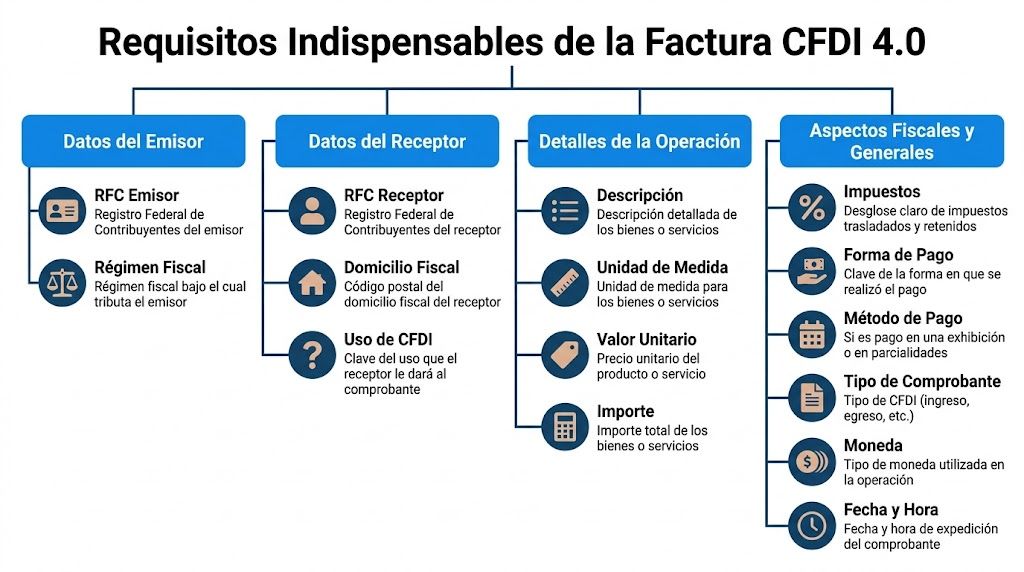
In CFDI 4.0, the problem is rarely "not knowing that you have to invoice." The real problem lies in capturing and validating each data point as the SAT expects it, from the customer's tax identity to the way the system reflects discounts, redeemed points, or partial payments. In businesses with multiple branches, the error also appears when the POS saves one data point, the CRM another, and invoicing ends up using a third.
Issuer and recipient data
The invoice must accurately identify who issues and who receives.
RFC of the issuer and the recipient
Name, corporate name, or business name
Tax regime of the issuer
Postal code of the recipient's tax address
Use of CFDI
Here, it is not advisable to work "from memory" or with old databases. If the customer changed their tax regime, if their corporate name has a minimal variation, or if the postal code does not match their tax status certificate (constancia), the invoice may require cancellation and replacement. In a pharmacy chain or in a coffee shop with recurring sales to companies, that turns into lost hours every week.
For SMEs with a loyalty program, there is another fine point. The customer's profile in the CRM is not always usable as-is for invoicing. One thing is the commercial record to accumulate points and another is the tax record to issue CFDIs. It is convenient to separate both fields from the system design and tie them with validation rules. If you still have that part scattered across registers, spreadsheets, and emails, it helps to review how to organize the registration of sales by branch and channel so that the invoice comes from a reliable source.
Transaction details
The invoice must also clearly describe what was actually sold.
This includes product or service code, quantity, unit key, description, unit value, and amount. In daily operations, a generic description often causes problems. "Consumption" or "counter sale" might pass at the register for internal control, but in invoicing, it leaves little room to clarify promotions, bundles, bonuses, or redeemed rewards.
In businesses with multiple branches, I recommend checking that the product catalog is the same across all registers and that each SKU has its tax code properly tied. If one branch invoices a combo as a finished product and another breaks down each component, inventory, reconciliation, and tax reporting differences will appear later. The SAT does not see "commercial intent." It sees what was stamped.
The currency, exchange rate when applicable, date and time of issuance, and the treatment of discounts must also be correct. If your points program reduces the price at the time of payment, the system must reflect that discount consistently. It is not advisable to hide the redemption of rewards as a manual adjustment because then nobody can reconstruct the transaction.
CFDI validation elements
A valid invoice is not sustained only by commercial data. It needs the technical and tax elements that make it verifiable:
Fiscal folio or UUID
Digital stamp of the issuer
Digital stamp of the SAT
Original chain
Certification date and time
QR Code
Payment form
Payment method
Transferred or withheld taxes, when applicable
Here, it pays to be very practical. The SME owner should not rely on someone "checking at the end" if the XML came out right. The system must block issuance if a mandatory field is missing, if the RFC does not pass validation, or if the payment method does not match the transaction. That prior control costs less than a chain of cancellations.
It is also useful to distinguish between core tax data and branch operational data. The issuing company might be a single entity, but the point of sale, the series, the internal folio, and transaction traceability must allow identifying where the sale occurred and which system originated it. This separation helps a lot when there are clarifications between the main office, the branch, and the accountant. If you want to better understand the technical part supporting that electronic identity, the Digital Certificates guide provides useful context to avoid blocks and incorrect configurations.
Controls that actually work in daily operations
What yields the best results in SMEs with multiple registers and high volume is not reviewing later. It is validating before stamping.
Control Point | What to Review |
|---|---|
Tax customer | RFC, corporate name, tax regime, and postal code exactly as they must be captured |
SAT Catalogs | CFDI use, payment form, payment method, and product codes correctly mapped |
Products and promotions | That discounts, combos, wallets, and rewards are consistently reflected |
Branch and system | Series, internal folio, source of sale, and relationship with the POS or CRM |
Final validation | UUID, stamps, certification, XML, and QR present |
I have seen the same pattern many times in Monterrey. The SME that invoices well is not the one that "corrects quickly." It is the one that configured its operation well so that errors do not leave the cash register.
Tax Breakdown: VAT and Income Tax Without Errors
It is 8:30 in the evening, the last branch has closed, and the problem appears in administration. The sale at the register matches, the payment entered the bank, but the CFDI came out with a different base, the VAT does not match, and a promotion from the loyalty program ended up affecting the tax incorrectly. In an SME with multiple branches, that error does not stop at one invoice. It replicates at every point of sale where the configuration is wrong.
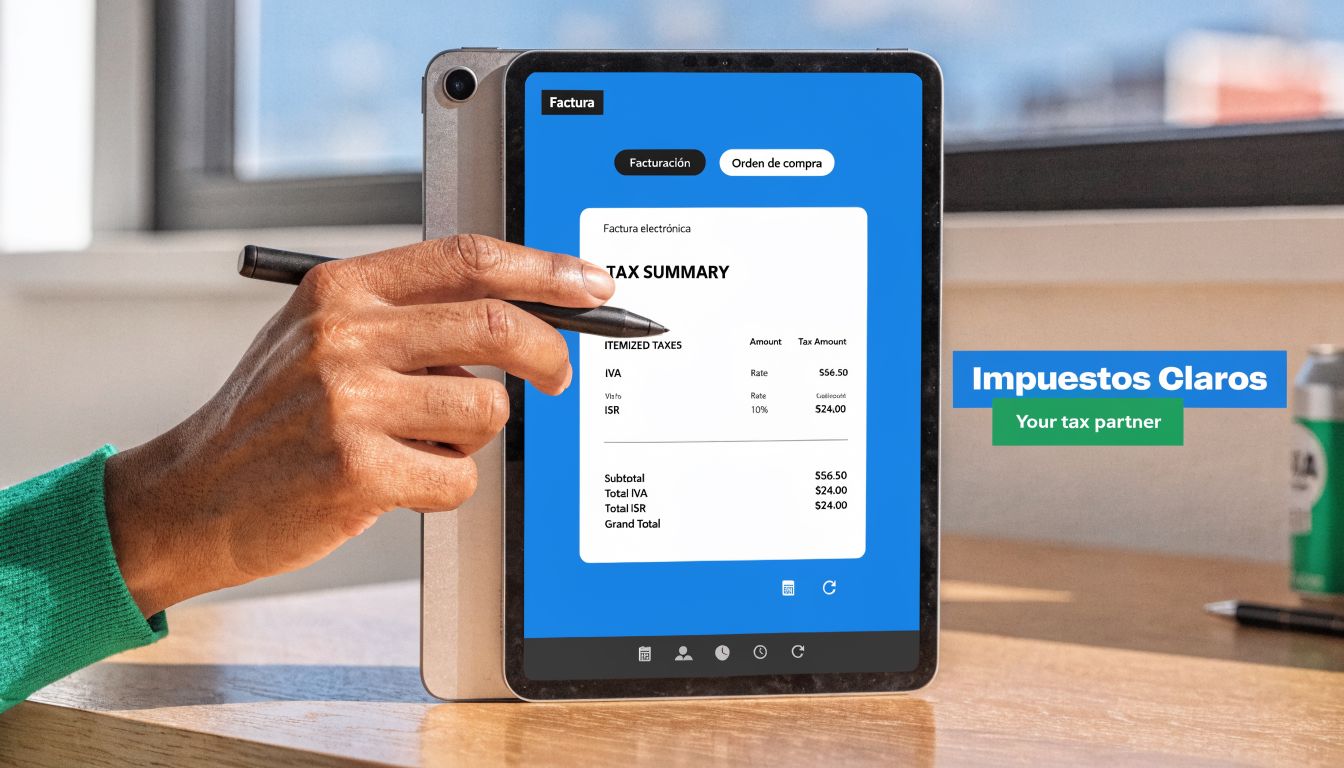
In daily operations, the correct breakdown of taxes depends less on memorizing rules and more on configuring the logic between POS, CRM, and stamping correctly. The SAT publishes the applicable rules in Annex 20 and in its CFDI catalogs, but the typical error in SMEs is not born in the XML. It is born before, when the system does not distinguish well between price, discount, taxable base, rate, and withholding.
How VAT should look
In the invoice, VAT must be separated and calculated based on what actually corresponds. That implies showing clearly:
Taxable base
Rate or fee applied
Transferred tax
Total amount
Practical example for a store in Monterrey:
Concept | Amount |
|---|---|
Base | $1,000 MXN |
Transferred VAT 16% | $160 MXN |
Total | $1,160 MXN |
It seems basic, but many operations get stuck here. In coffee shops, pharmacies, and stores with combos, the frequent problem is that the system discounts after calculating the tax or distributes the discount poorly between taxable and exempt products. If you also manage rewards or digital wallets in a commercial scheme, the system must distinguish whether that benefit reduces the sale price, works as a form of payment, or only registers an internal promotion. Tax-wise, it is not the same.
In border branches, the criteria must also be controlled by operation, not by store custom. Applying a reduced rate just because the cash register is in a border branch is a bad practice. The transaction must meet the corresponding tax conditions.
Where Income Tax (ISR) and withholdings go wrong
ISR does not appear on every income invoice as if it were automatic data. In many cases, it enters through withholdings, and that is where I see the most errors in services, leases, and transactions with certain types of taxpayers.
The most common failures are these:
Using the subtotal as if it were always the actual taxable base
Forgetting ISR or VAT withholdings when the recipient and the transaction actually require them
Applying taxes by branch instead of applying taxes by type of act or activity
Rounding differently at the register, ERP, and stamping
Recording promotions, coupons, or rewards incorrectly and altering the tax base
In businesses with digital loyalty, this happens a lot. A customer accumulates points at one branch, redeems them at another, and the register only subtracts a final amount. If the POS does not send the correct details of the discount or how the reward was applied to the CFDI, the invoice comes out with an incorrect tax breakdown even if the ticket looks logical for sales.
If the ticket total is right but the XML calculates another base, the problem is in the configuration of the data source.
That is why it is convenient to check that the same catalog of products, promotions, and taxes feeds both the sale and the stamping. If each branch modifies rules on its own, the main office ends up reconciling differences that should have never left the cash register. This control of the sales record from the point of sale helps to detect why a small error in capture ends up becoming a repeated tax problem.
What to check every week
Useful review is not done only at the end of the month. In SMEs with multiple branches, I recommend reviewing these four fronts every week:
Invoices with rates different from the usual ones, to confirm if there was a valid tax reason or just a configuration error.
CFDI with withholdings, to validate that the type of customer and the transaction did justify that treatment.
Sales with promotions, coupons, or rewards, especially if the benefit was generated at one branch and redeemed at another.
Cancellations and substitutions, because many tax differences start with a poorly issued invoice that nobody linked correctly afterward.
That weekly control avoids accumulated adjustments, clarifications between branches, and last-minute corrections with the accountant. In transferred and withheld taxes, the problem is rarely in a single invoice. It is in a poorly configured process that repeats every day.
Common Invoicing Errors and How to Avoid Them
It is 8:30 at night, one branch has already closed, another continues to sell, and the same old problem appears in administration. Tickets that do not match the CFDI, customers who paid in two installments without a payment complement, and loyalty program rewards applied as if they were any regular discount. Here, it is not just the capture that fails. The process between the cash register, CRM, and stamping fails.
In SMEs with multiple branches, invoicing errors almost never start in accounting. They start at the counter, at the POS, or in the way the CRM saves the customer. A coffee shop that allows invoicing after the purchase, a pharmacy that accepts partial payments, or a chain with cumulative points needs clear rules for each case. If each branch interprets the transaction in its own way, the SAT ends up seeing inconsistent documents.
One of the most delicate errors is omitting the Complement for Receipt of Payments in credit transactions, installments, or deferred payments. The rule is not resolved with "we will correct it later." If the income CFDI is issued first and the payment is received later, the system must trigger the corresponding complement and link it correctly. If that does not happen, the tax file of the transaction remains incomplete.
The ice cream shop that collected in two parts
An ice cream shop in Mérida sells packages for events. The customer leaves a deposit and settles the balance days later. At the register, they issued the initial invoice and considered the case closed.
The problem appeared when reconciling payments. The second payment did enter the bank, but nobody generated the corresponding complement. Result: lost hours looking for folios, reviewing bank statements, and correcting something that could have been automated from the beginning. In businesses with layaway, special orders, or scheduled deliveries, this error is repeated a lot.
The barbershop that used generic keys
In a barbershop in the State of Mexico, reception invoiced quickly using generic keys and minimal data. It helped to clear the line. It did not help corporate customers who later requested reinvoicing because their administrative area rejected the CFDI.
That rework costs more than it seems. There are cancellations, substitutions, follow-ups with the customer, and the risk of issuing outside the correct operational time. In an SME with multiple branches, the damage also hits the main office because the same error is replicated at all registers if nobody corrects the template.
Points, coupons, and rewards poorly reflected
Here, many guides fall short. In businesses with a loyalty program, the error is not always in the RFC or the product key. It is in how the system records the benefit.
If a customer accumulates points at one branch and redeems them at another, the POS and CRM must distinguish between a commercial discount, an internal bonus, and the actual payment received. If that logic is not well-configured, the invoice can end up showing an incorrect base, a poorly captured payment method, or a difference between what was charged and what was stamped. I have seen it in pharmacy chains, coffee shops, and specialty stores. The problem is not caused by the loyalty program. It is caused by treating it as a simple promotion when tax-wise the transaction requires more control.
Late stamping
It is also common to leave pending invoices for the end of the day or for "administration to take them out tomorrow." This practice breaks traceability.
The person who collected the payment no longer remembers the details. The customer is no longer there to validate data. The system has already mixed up returns, changes in payment methods, or reward redemptions. Then CFDIs built from memory, WhatsApp screenshots, or loose cash register notes appear. That alone generates errors in a single branch. In several, it becomes a routine.
How to actually avoid these errors
The useful solution is not to complicate operations further. It is to define rules that the system can execute every day.
Single tax capture of the customer: the RFC, tax regime, postal code, and use of CFDI must be saved once and reused across all branches.
Separate flows by transaction type: cash sales, deposits, installments, returns, digital wallets, coupons, and substitutions should not follow the same logic.
Centralized catalog by branch: products, taxes, promotions, and rewards must come from a single configuration, not from local adjustments at each register.
Automatic relationship between sale, payment, and CFDI: if the customer pays later, the complement must be planned from the origin of the transaction.
Daily review of exceptions: not of all invoices, but of cases with a change in payment method, cancellation, point redemption, or differences between ticket and stamping.
In an SME that uses CRM and POS to operate multiple branches, invoicing well depends less on memorizing rules and more on translating them into consistent flows. If the system distinguishes well what was a sale, what was a discount, and what was a reward, corrections, calls to the accountant, and customer rejections are reduced. If it does not distinguish, the error leaves the cash register every day.
Invoicing for SMEs in LATAM: Key Differences
Mexico has one of the most specific structures in electronic invoicing due to the operational weight of the CFDI, its catalogs, and its tax validation. But if you have plans to grow outside the country, it is useful to understand a basic idea: in LATAM the trend is toward more digitalization, more traceability, and more electronic validation.
What changes between countries
In Colombia, the central reference is usually the validation of the electronic invoice before the DIAN. In Chile, the language revolves around DTE and the SII. In Argentina, the operation is understood under AFIP regulatory logic.
The names change. The principle does not. The tax authority wants to see a structured, identifiable, and verifiable transaction.
What does not change for a physical SME
If you have restaurants, pharmacies, or coffee shops, operational problems are similar throughout the region:
Poorly captured customer data
Poorly reflected discounts
Deferred payments without correct backup
Lag between point of sale and invoicing
Low traceability by branch
The real difference is not just in local law. It is in how well you translate that law into cash register, POS, CRM, and administration processes.
An SME that learns to invoice well in daily operations usually adapts better to other countries than an SME that only "complies" from accounting.
If you operate only in Mexico today, you do not need to obsess over every foreign regulation. You do need to build orderly processes, because that is what later allows scaling to other markets without rebuilding everything from scratch.
Integrate the Correct Invoicing in Your CRM and Point of Sale
It is 7:40 p. m. at a coffee shop with four branches in Monterrey. At the register they apply a loyalty coupon, the customer asks for an invoice, and at closing, administration discovers that the sale was recorded in one branch, the discount in another logic, and the CFDI came out with incomplete data. The problem did not start at stamping. It started in how the POS, CRM, and register operation captured the sale.
In businesses with multiple branches, correct invoicing depends on a single operational principle: all systems must speak the same tax language from the first click. If each point of sale captures customers, promotions, and rewards with different criteria, the error drags through to accounting, cancellations, and reconciliation.
The blind spot of the branches
Here I see a very frequent failure in SMEs that grow fast. The company already has an organized corporate name, but each branch ends up operating with its own shortcuts. A pharmacy can sell well all month and still generate rework because the sale was not clearly linked to the correct operational origin, to the corresponding series, or to the customer's actual history.
That hits three fronts at the same time:
Reconciliation between sales, register cuts, and CFDI
Review of promotions applied by branch
Handling clarifications, cancellations, and substitutions
Control of folios, series, and internal policies
Traceability for auditing and administration
If branch A records a reward as a general discount and branch B treats it as a manual adjustment, the problem is no longer just about capture. It is about criteria.
CRM, POS, and invoicing must share rules, not just data
A good system is not just for collecting payments quickly. It must define which field the cashier fills out, which one the system validates, and which one can no longer be improvised. In an SME with loyalty, this matters much more because not all promotions have the same operational treatment.
It is convenient to configure from the source:
Process | What is best to resolve in the system |
|---|---|
Customer registration | Validation of name, RFC, tax regime, and postal code |
Sale at branch | Correct identification of the point of sale and its series |
Promotions | Separate rules for commercial discounts, coupons, and rewards |
Re-issuance | Visible history of CFDI, cancellations, and substitutions |
Supervision | Unified catalogs for all branches |
That order prevents the register team from "interpreting" tax policy on the fly.
Loyalty and rewards: Where the operation breaks down the most
Many guides talk about the CFDI as if the sale were linear. In a real SME, that does not happen. There are accumulated points, free items, coupons per visit, wallets, and campaigns by branch. If the CRM and POS do not distinguish these mechanics from their configuration, the invoice ends up reflecting a different transaction than what actually occurred.
I have seen it in coffee shops, restaurants, and small pharmacy chains. Marketing launches a useful promotion to sell more. The register applies it as best as it can. Systems leaves it as a "discount." Afterwards, administration has to correct what the system should have resolved from the beginning.
That is why it is convenient to define a simple matrix by type of benefit: what activates the promotion, how it is recorded at the register, how it impacts the amount, and what must remain available for invoicing and subsequent review.
What is actually worth automating
Not everything should depend on the cashier or the supervisor on duty. There are tasks that are best left tied down in the system:
Auto-filling tax data from the customer file
Series and folios associated with each branch
Rules for promotions and rewards
Blocks on incomplete captures
Log of changes, cancellations, and substitutions
If you are reviewing how to organize this part in your daily operation, it is worth evaluating a point of sale software that also helps control branches, promotions, and tax traceability.
The real difference is not in stamping at the end. It is in selling well, recording well, and leaving the invoice ready from the source. That is where an SME with multiple branches stops putting out fires and starts operating with control.
Frequently Asked Questions about Invoicing for SMEs
It is 8:40 p. m. at an SME with three branches. At one register, points were redeemed as a discount, at another as a courtesy, and in administration the request for an invoice comes in from a customer who does want to deduct. The doubt does not start at the SAT. It starts in how the sale was recorded.
How do I invoice loyalty rewards without getting into trouble
If you handle points, wallets, coupons, or prizes per visit, do not put everything in the same bag. In practice, a reward can affect the amount, the description of the concept, or the way you document the transaction, and that must be defined from the POS and not until someone in invoicing tries to fix it by hand.
The useful criterion for an SME is this: first identify what happened at the register. Was there a real price reduction? Was a product delivered without charge? Was an accumulated customer balance applied? Each case may require a different treatment in the CFDI. If your loyalty program lives in a CRM or in a tool like Swirvle, it is convenient to map each mechanic with a tax rule and an operational rule by branch.
If that logic is not configured the same way across all registers, the same benefit ends up invoiced in different ways. That is where clarifications, cancellations, and friction with frequent customers begin.
What do I do if a customer detects an error later
Correct with a method.
If the error is in the RFC, corporate name, tax regime, postal code, use of CFDI, or amounts, check if it is appropriate to cancel and issue a substitute CFDI. The important thing is to maintain complete traceability. Which document came out first, why it is being corrected, and which one replaces it.
In an operation with several branches, I recommend a very short and clear flow:
Validate which data point is wrong with the ticket and the CFDI in view.
Confirm in which branch the sale was generated.
Check if the error changes taxes, amounts, or tax data of the recipient.
Apply cancellation or substitution as appropriate.
Leave evidence in the system, not in loose messages on WhatsApp or email.
That last point avoids many problems. If the correction depends on someone remembering what happened on the afternoon shift, you have already lost control.
Can I leave invoicing for the close of the day
You can, but it increases operational risk.
When the tax capture is left for later, differences appear between what the register saw, what the CRM saved, and what administration tries to stamp. In businesses with loyalty, branch promotions, or accumulated rewards, this lag hits harder because it is not always clear if the sale was normal, if there was points redemption, or if an subsequent bonus existed.
That is why it is convenient to request and validate tax data from the moment of the sale, especially with recurring customers. In small pharmacy chains, restaurants, and coffee shops, that reduces rework and avoids lines the next day for poorly issued invoices.
What do I check if I have several branches
Start with four concrete controls:
Correct series and folio by branch
Identical tax catalogs at all registers
Uniform rules for promotions, rewards, and courtesies
Real synchronization between POS, CRM, and invoicing module
If one of those four fails, invoicing gets fragmented. One branch stamps well, another captures free text fields, another corrects manually. The SAT sees documents. You end up carrying an operational problem.
If your branches sell under the same brand but invoice with different criteria, the risk is not just in a poorly made invoice. It is in the lack of control between the register, system, and administration.
If your SME has several branches, manages frequent customers, and wants to organize the relationship between sales, loyalty, and invoicing without improvising, Swirvle can help you centralize customers, campaigns, and commercial operations in one place. That makes it easier for promotions, points of sale, and customer follow-up to work on consistent data, which is key when you want to grow without the administrative part becoming a bottleneck.
Related Blogs

Sep 19, 2026
Effective promotions to increase sales during low-traffic hours: 2026 guide

Sep 18, 2026
Examples of coffee shop loyalty programs (physical and digital)

Sep 17, 2026
Pros and cons of the "free coffee for the first 100 customers" promotion

Sep 16, 2026
How to organize a private coffee tasting: a practical guide

Sep 14, 2026
How to optimize Google Business Profile for barber shops

Sep 13, 2026
The best customer retention software for coffee shops
Try Swirvle for free
No card required · 30 days free
Start your free trial