Discover what a tablet POS system is and how it can transform your SMB. Complete guide on benefits, features, ROI, and how to choose the best one in LATAM.
A tablet point of sale is a system for checking out, recording sales, and controlling inventory that works as an app on a tablet, instead of a cash register or a computer. It is especially suitable for coffee shops, restaurants, bakeries, and counter-service businesses with limited space that need to move between tables or want to start with less hardware.
In this guide, you will see how it works, when to choose a tablet over a computer or terminal, what else you need besides the tablet, and what to check before subscribing to a system.
Table of Contents
What is a Tablet Point of Sale and How It Works
The software is the brain
The hardware is the physical base
Why it does work for an SMB
Essential Features Beyond Checking Out
Checkout, operation, and daily organization
Invoicing and inventory without double work
CRM and loyalty as a real engine of growth
Tablet vs computer vs terminal: when to choose a tablet
What you need besides the tablet
Criteria for Choosing and Implementing Your Ideal POS System
Five filters to make a good decision
Comparison table of criteria when choosing a POS provider
Swirvle: The Loyalty Brain Behind Your Point of Sale
The sale ends at checkout or starts there
What changes when the POS feeds campaigns
Frequently asked questions about the tablet point of sale
Can I use any tablet as a point of sale?
Does a tablet point of sale work for a sit-down restaurant?
Can I invoice from the tablet?
What happens if the internet goes down?
Tablet or cell phone?
What is a Tablet Point of Sale and How It Works
The simplest way to understand a tablet point of sale is this: a traditional register does few things, and almost all of them stay locked at the counter. A tablet system does much more and connects those tasks with each other.
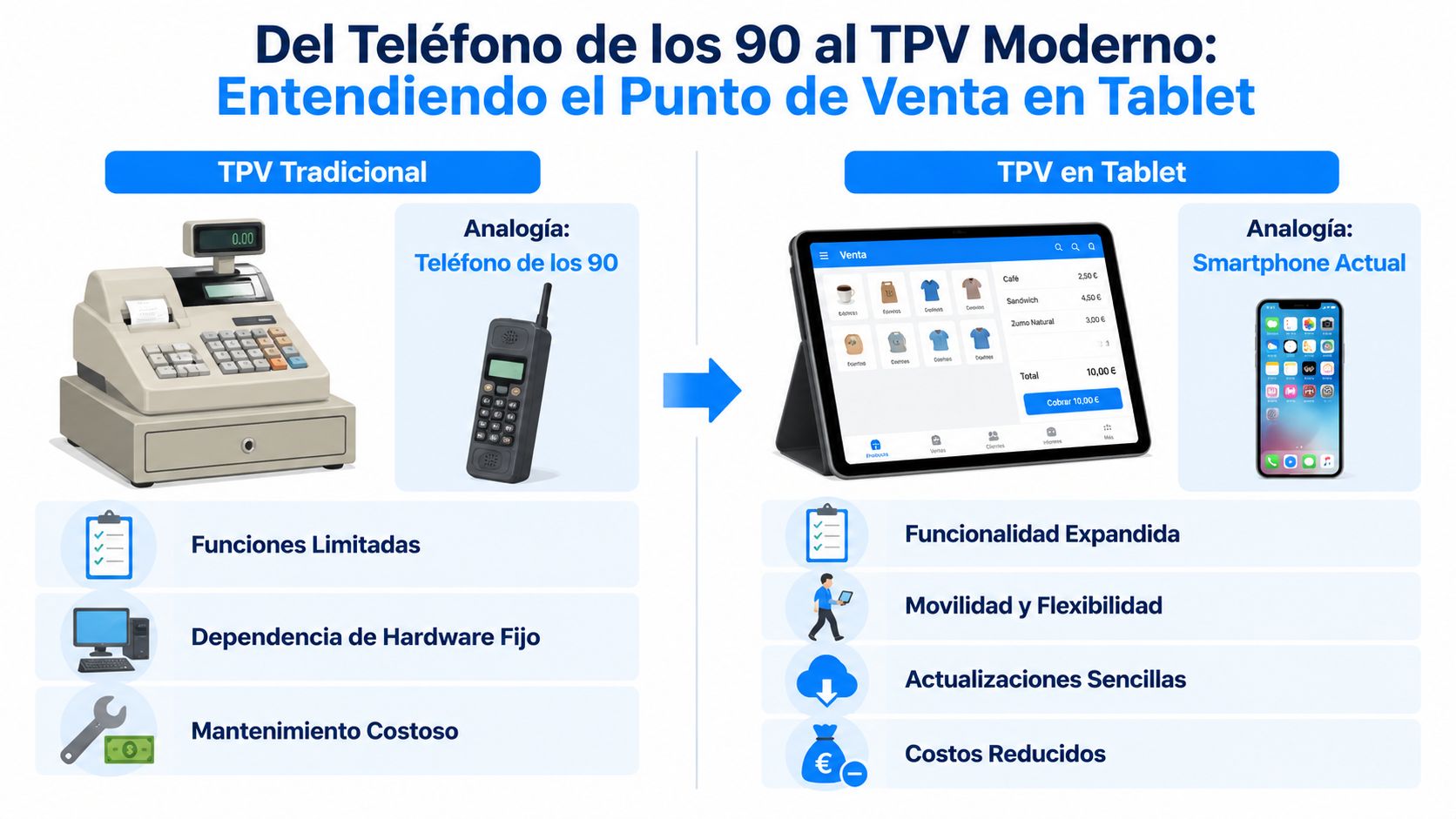
The useful comparison is not "register vs touch screen." The real comparison is similar to the leap between an old phone and a smartphone. Before, you dialed and hung up. Now, the same device is used to communicate, organize, browse, pay, and work. Something similar happens at the counter.
Mexico already has an installed base that makes this transition very logical. At the end of 2022, 26.4% of Mexicans over 5 years old owned a tablet, equivalent to 31.8 million active devices. That makes the tablet a familiar, low-cost base for an SMB that needs to move fast.
The software is the brain
The point-of-sale app is what really drives the operation. That is where the product catalog, prices, promotions, user profiles, cash-drawer reconciliations, inventory, and, when the system is well thought out, also customer data live.
If it is a coffee shop, the app must allow modifiers, notes, and clear product control. If it is a hardware store, it needs speed to search for items and manage stock. If it is a car wash, it is best to register services, packages, and frequent customer visits.
Well-designed software does three things at the same time:
Captures the sale quickly
Records the operation without duplicating work
Leaves usable data for future decisions
The hardware is the physical base
The tablet is the main screen, but it does not work alone. It is usually accompanied by a thermal printer, scanner, cash drawer, or payment terminal, depending on the type of business.
The important thing to understand is that the hardware does not dictate the rules. It must adapt to the store's process. At a coffee bar, mobility matters. At a gas station, durability and stable connection carry more weight. In a fixed-counter business, a secure stand and easy-to-replace peripherals are best.
A good tablet point of sale is not bought in loose pieces. It is built around how the business sells and how it serves its customers.
Why it does work for an SMB
The main advantage of this format is that it reduces friction. Staff already understand a touch interface. Adoption is usually faster than with rigid or outdated systems. In addition, the tablet takes up little space and can be moved if the service requires it.
For an SMB in Puebla, Yucatan, or Mexico City, that means something concrete: less barrier to get started and greater ease in standardizing daily work. If the system is well implemented, the tablet stops being "just another device" and becomes the place where the operation lives.
Essential Features Beyond Checking Out
Many businesses buy a tablet point of sale thinking only about checking out faster. That criterion falls short. Checking out is barely the visible layer. The strong value appears when the system organizes the operation and also helps to sell better the next time.
The most common failure in the market lies in that second part. An overlooked aspect by many tablet POS providers is native integration with CRM to segment customers and automate campaigns. That is why many businesses operate well at checkout, but remain weak in customer retention.
Checkout, operation, and daily organization
The first layer does matter. The system must process transactions quickly, accept different payment methods, and allow staff to find products without hassle. If each receipt takes too long or if the cashier needs too many steps, technology gets in the way instead of helping.
In daily operation, it is advisable to demand the following:
Clear catalog: well-organized products, variants, packages, and prices.
User roles: not everyone should be allowed to apply discounts, cancel, or modify sales.
Simple cash-drawer reconciliation: opening, closing, and visible movements per shift.
Usable history: saving receipts is not enough. It is necessary to be able to review them meaningfully.
In restaurants, coffee shops, and food businesses, there is an additional need. The system must handle modifiers, notes and, when applicable, recipes. If it does not, the operation is split between the tablet and paper. That is where errors reappear.
Invoicing and inventory without double work
An SMB loses time when it sells on one platform, invoices on another, and controls inventory on a third. This scheme seems tolerable with a single branch, but it breaks down when volume increases or when there is more staff.
A good tablet point of sale must connect the sale with subsequent tasks. If a product is sold, the stock must update. If a customer requests an invoice, the workflow must be anticipated. If a branch runs out of a critical item, the system must show it before it becomes a floor issue.
The best sign of a good POS is not that it does "many things." It is that it prevents the team from capturing the same data twice.
For a convenience store or a grocery business in the State of Mexico, this reduces discrepancies between what the system says and what is actually on the shelf. For a coffee shop in Mexico City, it helps to quickly detect which products rotate the most and which ones are tying up money.
CRM and loyalty as a real engine of growth
Here is the difference between an operational POS and a POS that drives growth. If the system only records receipts, the business knows how much it sold. If it also identifies customers, segments habits, and triggers campaigns, then it can influence the next purchase.
That completely changes the return-on-investment conversation. It is no longer just about "saving time." It is about winning back customers who have not returned, pushing repeat purchases, launching promotions by location, and measuring which campaign actually generated a sale.
A physical business needs to answer very concrete questions:
Who buys frequently and deserves a reward?
Who stopped visiting a location?
What service or product drives the most repeat business?
Which campaign brought in real sales and which one just sent messages?
In a car wash, visit-based logic works very well. In a bakery, repeat purchases can be triggered by dates or habits. At a gas station, it is best to work rewards based on frequency or accumulated consumption. In all cases, the tablet point of sale must feed that business intelligence.
When CRM and loyalty live separately from the point of sale, friction occurs. Incomplete databases. Poorly segmented campaigns. Staff who do not know how to recognize a frequent customer at the checkout. That is why the best approach is not "having marketing separate," but connecting the transaction with the relationship.
Tablet vs computer vs terminal: when to choose a tablet
All three options process payments; the difference is in space, mobility, and what you need to connect. Hardware prices vary a lot by brand and model, so compare them with current quotes (including VAT) before deciding.
Criterion | Tablet | Computer | All-in-one point of sale terminal |
|---|---|---|---|
Counter space | Minimal; fits on a stand | Takes up more (monitor, CPU or laptop, keyboard) | Compact, designed for counters |
Mobility around tables | High: you can take the order at the table | None, remains fixed | Low, except for portable models |
Hardware cost | Usually the lowest entry cost; you can use a tablet you already own if it is compatible | Medium to high, especially if you buy new equipment | Variable; usually includes printer and scanner in the same device |
Peripherals | Via Bluetooth, Wi-Fi, or USB, depending on the model | Many ports; connects almost any peripheral | They already come integrated |
Connectivity | Wi-Fi or mobile data | Network cable or Wi-Fi | Wi-Fi, data, or cable, depending on the model |
Ruggedness and drops | Needs a case and stand | More fragile if it is a laptop | Designed for continuous use |
Ideal for | Coffee shops, food trucks, bars, table service businesses | Businesses with high inventory, multiple screens, or heavy data entry | High-volume counters that want everything in one device |
Choose a tablet if: your counter is small, you want to take orders at the table or in line, your menu fits well on a touch screen, and you do not need to log hundreds of products a day with a keyboard. If your operation requires heavy inventory and data entry, check the point of sale computer guide.
What you need besides the tablet
Accessory | Do you need it? | What for |
|---|---|---|
Stand or rotating base | Almost always | To keep the tablet firm and allow the customer to view or sign |
Receipt printer | Yes, if you hand out receipts or send tickets to the kitchen | Sales receipts and tickets for the bar or kitchen |
Cash drawer | Yes, if you accept cash | To store cash and open automatically with each sale |
Barcode scanner | Only if you sell packaged products | To check out and receive inventory faster |
Card payment terminal | Yes, if you accept cards | To charge with a credit or debit card |
Backup internet | Recommended | A mobile data plan or a second provider to keep processing payments if your main internet goes down |
Charger and rugged case | Yes | To prevent the tablet from dying or getting damaged in the middle of a shift |
Before buying peripherals, confirm with your software provider which ones are compatible with the tablet and the operating system you are going to use.
Criteria for Choosing and Implementing Your Ideal POS System
Choosing a tablet point of sale provider is not a catalog purchase. It is an operational and tax decision. If the system fails at checkout, the business suffers. If it fails in compliance, the problem escalates much faster.
The most critical filter in Mexico is invoicing. Besides that point, it is advisable to review in detail what a point of sale software must include before signing any contract or starting an implementation.
Five filters to make a good decision
The first filter is fiscal. If the provider does not resolve CFDI invoicing clearly, the rest of its features fall to the background. The second is usability. A difficult system almost always ends up underutilized, with staff looking for shortcuts outside the process.
Then come three layers that many SMBs underestimate:
Real integration: the system must align with how the business already operates.
Helpful support: when something fails, the speed and clarity of response matter.
Scalability: opening another location should not force you to start from scratch.
A small business in Puebla needs simplicity. A regional chain in Nuevo Leon needs consistency across locations. In both cases, the correct decision is usually the one that reduces reliance on loose sheets, duplicate data entry, and processes "that only one person understands."
Comparison table of criteria when choosing a POS provider
Evaluation Criterion | Provider A (Basic) | Provider B (Standard) | Provider C (Advanced with CRM) |
|---|---|---|---|
Tax compliance | Covers checkout, but requires more manual invoicing work | Better integrates the fiscal workflow | Integrates invoicing and also connects customer data |
Ease of use | Fast to start, limited as you grow | Balance between simplicity and control | Requires better configuration, but gives more visibility |
Inventory | Basic features | Better tracking by product and location | Inventory connected with buying behavior |
Customer and loyalty | Almost non-existent | Simple customer registry | Segmentation, campaigns, and retention tracking |
Scalability | Works for a simple operation | Suitable for moderate growth | Designed for multi-location and relational marketing |
Support and implementation | More limited | Intermediate | Must include setup support, training, and follow-up |
If the business only wants to record payments, a basic system may suffice for a while. If it wants to grow with control, it needs to evaluate customer, inventory, and compliance as a single package.
Implementation also deserves discipline. It is best to clean up the catalog before uploading it, define permissions by role, train based on actual tasks, and perform checkout, receipt, inventory, and invoicing tests before going live. Skipping this stage usually produces the classic feeling that "the system does not work," when in reality, what failed was the onboarding process.
Swirvle: The Loyalty Brain Behind Your Point of Sale
Many tablet point-of-sale systems handle the transactional part well. They process payments, register products, control cash, and organize the operation. The gap appears afterward. The business has already sold, but it does not know how to turn that purchase into a second, third, or fourth visit.
The sale ends at checkout or starts there
When the POS captures customer, location, ticket, and purchasing habits, that data can feed a much more useful commercial layer. That is where a CRM platform with loyalty comes in. It does not replace the POS. It complements it.
Swirvle operates in that layer. It centralizes customer information, allows segmentation by behavior and location, and triggers campaigns via email or push notifications (and via WhatsApp in the Premium plan). For a physical business, that means moving from "having data saved" to using that data to drive repeat business and average ticket size. Anyone wanting to review this approach in more detail can see how Swirvle works as a loyalty alternative for businesses in Mexico.
What changes when the POS feeds campaigns
The practical change is not in sending more messages. It is in sending better messages. A coffee shop customer can receive a different campaign than a car wash customer. A branch in Puebla can push a promotion that does not apply in Mexico City. A business with multiple units can detect where loyalty is dropping and react beforehand.
This also improves the internal business conversation. Marketing stops working in the dark. Operations better understand which promotions are sustainable on the floor. Management can look at results with more order.
Some concrete applications are clear:
Win-back campaigns for inactive customers
Programs by visits, points, or purchases
Segmented campaigns by branch
Tracking results by commercial action
The POS records the transaction. The CRM with loyalty decides what to do with it.
For an SMB that really wants to grow, that is the important leap. Not just selling today, but creating a system to sell better tomorrow with the same customers and with more consistency across locations.
Frequently asked questions about the tablet point of sale
Can I use any tablet as a point of sale?
It depends on the software. Check what operating system and version the provider requires, and if the tablet is compatible with the printer and payment terminal you will use. A very old or slow tablet can slow down checkout during rush hour.
Does a tablet point of sale work for a sit-down restaurant?
Yes, it is one of the cases where it is most beneficial: the server takes the order at the table, and the ticket reaches the kitchen without paper. Review options for restaurants.
Can I invoice from the tablet?
It depends on the system. Before subscribing, confirm that the point of sale allows you to issue or manage your CFDI invoices without logging sales twice.
What happens if the internet goes down?
It depends on the system you use. Ask your provider what the app does without a connection and have a backup internet source, like mobile data, to keep checking out.
Tablet or cell phone?
A cell phone works for one-off sales or very small businesses, but the screen is too small for a menu with modifiers. For all-day operation at a counter or tables, a tablet is more comfortable.
Swirvle is a point-of-sale terminal connected to a CRM and a loyalty program: each purchase is linked to a customer so you can reward them and bring them back. Learn about the Swirvle POS or visit Swirvle.
Related Blogs

Oct 24, 2026
What questions should you ask in a restaurant satisfaction survey? 8 ideas

Oct 23, 2026
Is it legal to charge a card payment fee in Mexico?

Oct 22, 2026
How to prevent employee petty theft in my business?

Oct 21, 2026
How to Control Food Waste in a Restaurant: 2026 Guide

Oct 20, 2026
What is the global invoice for the general public and when is it issued? SAT Guide

Oct 19, 2026
How to take restaurant orders on WhatsApp without losing any?