Does Excel work as a CRM for a small business or is it better to use software? Compare pros, cons, costs, and criteria to decide
Excel works as a CRM only in very low-volume stages and without automation; as soon as the business needs purchase history, segmentation, or WhatsApp campaigns, it is best to use software. In Mexico, only 30% of entrepreneurs use a CRM, although 94% consider digitalization key to growth.
In a coffee shop, the sheet starts with name, phone number, and last purchase. Then tabs appear for birthdays, promotions, frequent customers, and special orders. In a barbershop, something similar happens: appointments are recorded, but the history remains scattered among sheets, messages, and the team's memory.
The decision is not about asking if Excel "works." of course it works. The right question is whether the business can sustain follow-up, retention, and campaign measurement with manual control. The cost of staying in Excel rarely shows up as an invoice. It appears in customers who do not receive follow-up, promotions that reach the wrong people, and recurring sales that are never identified.
The short answer for your business
Excel is useful for starting out, not for sustaining relationships with recurring customers over the long term. A coffee shop can start with a sheet that records name, phone, and last visit. If managed by a single person and the database remains small, there is no need to turn the process into a software project.
The decision changes when the business needs to win back customers, measure their purchase frequency, or link visits to the average ticket. In a barbershop, for example, it matters to know who stopped returning after their last haircut. In a restaurant, it is useful to identify who visits on certain days, what they consume, and which promotion generates another visit. A store with multiple branches also needs to consult the same history without relying on separate files.
The Mexican reality reflects this gap. Only 30% of entrepreneurs report using a CRM system, while 94% consider digitalization key to growth and 82% plan to increase their investment in digital solutions, according to entrepreneurship and digitalization data in Mexico published by Mexico Business News. The interest in digitalizing exists, but many physical businesses continue to register customers using tools that do not control recurrence well.
The rule of thumb
Excel is enough when the business needs an ordered list. A CRM is convenient when it needs to answer specific questions:
Who stopped buying: allows detecting inactive customers and organizing win-back actions.
What each person buys: relates visits, products, branches, and frequency.
Which promotion works: connects a campaign to a purchase, not just to a recipient list.
Who the team should contact: keeps tasks, conversations, and history in one place.
The recommendation is clear. If there are few customers, one main channel, and a single person capturing data, Excel can work with backups and defined rules. If recurring purchases already exist, the ticket depends on the customer returning, or multiple people edit the information, it is best to migrate before paying the hidden cost: duplicates, lost history, missed follow-ups, and unmeasured retention.
What Excel does solve and where it breaks
In a coffee shop that is just starting out, Excel can be enough. It allows you to create a contact list, record basic sales, sort data by columns, and adapt the sheet to the actual process without paying for implementation or training the whole team. For a small operation, that speed has value.
A coffee shop can write down name, phone, date of visit, and favorite product. A barbershop can record the service performed and the next appointment. A restaurant can keep track of frequent customers, usual consumption, and promotions sent. As long as the database is small, the data is written consistently, and a single person manages it, the sheet does the job.
The problem appears when the physical business depends on its customers returning. Excel records rows, but it does not automatically turn those rows into decisions about retention, frequency, or average ticket. That is where the hidden cost begins: duplicate customers, incomplete history, and recovery opportunities that no one identifies on time.
The operational breaking point
Excel stops being enough when it must behave like a system. It does not create a single customer profile on its own, it does not assign follow-ups, and it does not maintain full traceability when multiple people work on different files. The most common errors are lost follow-ups, duplicate contacts, and low pipeline visibility, limitations that a CRM solves by centralizing contacts, conversations, follow-ups, and deals in a single profile, as explained in this guide on CRM for SMBs in Mexico.
Control also deteriorates. A shared file can have different versions, fields written in multiple ways, and data that no one validates. "Av. Reforma," "Reforma," and "Av Reforma" may refer to the same branch, but they will break filters and reports later. The same happens with incomplete phone numbers, repeated emails, and customers registered with different names.
The sheet also does not trigger a WhatsApp conversation, a birthday greeting, or a coupon after a visit on its own. To execute those actions, the team must export data, prepare lists, and remember every date. This manual work consumes hours and leaves retention to a single person's memory.

Pros and cons without makeup
Excel works well for:
Quick start: allows starting with a simple structure.
Flexibility: each business defines columns, filters, and categories.
Local control: information is reviewed and modified without complex setup.
Excel breaks when:
Multiple users edit: versions, accidental changes, and lack of accountability increase.
The database grows: finding a history requires more filters and manual reviews.
New channels appear: WhatsApp, email, point of sale, and forms remain separate.
The company needs to measure: the sheet records data, but does not automatically convert it into segmentation, automation, or attribution.
Before migrating, it is useful to review how to organize customer information. The decision is practical: Excel is enough for a small, stable operation with a clear owner. If the business depends on repeat visits, manages multiple channels, or needs to know who should return and when, staying on the sheet is more expensive than switching systems.
Three real businesses that ran out of air in Excel
A coffee shop can make sales every day and lose regular customers without realizing it. The sheet records names, dates, and products, but it does not warn that a person stopped visiting the shop or how much recurring revenue is at risk. The owner ends up reviewing rows by hand to separate those who returned from those who went cold.
The problem grows when there is a need to distinguish between morning customers, buyers of specific drinks, and people who stopped returning after several visits. Without segmenting by habits and frequency, the same promotion goes to everyone. Time is wasted, discounts are offered to those who do not need them, and no one can measure which action won back a visit.
Duplicates and incomplete profiles also appear. A customer might appear with two different names or phone numbers, while their history remains scattered across several tabs. In a business with a low average ticket, this loss seems small. In a coffee shop with recurring visits, it builds up every week.
Rule for coffee shops: if the question is no longer "who is registered?" but rather "who should return this week and what offer applies?" then Excel is no longer enough.
The barbershop that knows appointments, but not the relationship
A barbershop usually combines a calendar with a spreadsheet. The record shows the reserved service, but it does not always keep track of who served the customer, how often they return, or how long they have gone without booking. When this data is separated, the business loses context right at the moment of contacting the person.
Cancellations and wait times worsen the clutter. An appointment sheet alone does not bring together visit history, contact details, and frequency. A centralized system allows detecting when the shop gets full, how long people wait, and how many customers leave without being served, in addition to organizing customer management for barbershops.
The benefit is reflected in concrete decisions: reinforcing a schedule, distributing the team better, and contacting those who stopped booking. The recommendation is clear. If the barbershop already has several barbers, changing shifts, or frequently returning customers, the sheet becomes an operational cost.
The restaurant that loses track of consumption habits
In a restaurant, an isolated sale explains very little. The value lies in connecting what the customer ordered, when they came, how much they spent, and how often they return. Excel can save every data point, but the team must cross-reference columns and review histories before turning them into an action.
This is how important signals are lost: who prefers certain dishes, who visits on specific days, and who stopped returning. With an organized history, the restaurant can trigger rewards after a certain number of visits or consumption, a practice described in the guide on CRM and customer relationship for restaurants.
The hidden cost appears in unmeasured retention. The team knows what was sold, but not which group returned, which promotion increased frequency, or which customers stopped buying. When they need to answer these questions quickly, continuing to add tabs to Excel becomes more expensive than centralizing customer relationships.
Criteria for deciding between Excel and a CRM
The decision can be made in an afternoon if the owner evaluates five criteria. There is no need to compare dozens of features. It is enough to review whether the business needs to save information, coordinate actions, or measure results.
Mexico has a business base dominated by small organizations. In 2019, there were 4,924,201 economic units, of which 99.8% were micro, small, or medium enterprises; these concentrated 72.8% of the employed personnel and 52.7% of the gross census value added, according to the data cited in the analysis of CRM for Mexican SMBs. Therefore, the criterion should not be the nominal size of the company, but the complexity of its operation.
The decision matrix
Criterion | Excel | CRM Software |
|---|---|---|
Active customer volume | Records a small database if one person maintains it | Centralizes profiles, activities, and searches for a database that changes continuously |
Segmentation | Allows manual filtering by columns | Segments by habits, frequency, branch, and behavior |
Automations | Requires someone to prepare and execute every action | Triggers reminders, campaigns, coupons, and tasks based on rules |
Omnichannel | Keeps data separated by channel | Connects sales and communication information in a common database |
Return measurement | Requires manual cross-referencing of sheets and checking results | Connects campaigns, purchases, recurrence, and sales attribution |
The owner's traffic light
Green for Excel: a single person manages the database, the business operates with few active customers, and there are no automated campaigns. In this scenario, discipline matters more than the platform.
Yellow: another person is already capturing data, duplicates exist, or the business needs to separate customers by frequency, product, or branch. Here, Excel can still work, but the operational risk is growing.
Red for software: the business needs to send communications from a central database, win back dormant customers, know the performance of a promotion, or coordinate multiple branches. Three or more criteria in red justify the change.
For teams that also coordinate commercial and administrative processes, a practical reference on recruiting software for small agencies helps understand a principle applicable here: a tool should reduce manual coordination, not add another layer of work.
The recommendation does not depend on the business being "large." It depends on whether the operation needs to remember, segment, and measure without relying on a daily manual review.
The hidden cost of staying in Excel
Excel seems free because it doesn't come with a CRM invoice. The business, however, does pay: hours spent copying data, campaigns sent to the wrong contacts, customers whose history is lost when staff changes, and promotions whose effect no one can track.
A coffee shop can have names and phone numbers but let those who stop returning walk away. A barbershop can save appointments and fail to see that certain times accumulate wait times. A restaurant can record sales and still not know what habits sustain recurrence. Each gap subtracts value from the database.
The cost appears in the operation
The company must measure how much time it loses cleaning duplicates, merging files, searching for conversations, and building lists. It must also count how many campaigns go out without segmentation and how many sales cannot be linked to a specific promotion. That inventory shows the hidden cost better than the price of a license.
The Mexican context confirms that the transition is still halfway through. Only 22% of SMBs use some business management system, while 68% manage inventories, accounting, or payroll in Excel or on paper, according to analysis on digital transformation of SMBs in Mexico. At the same time, that analysis places the Mexican CRM market at USD 928.8 million in 2025 and projects it at USD 2.26 billion for 2034. The reading is simple: spreadsheets are still present, but software is already part of the commercial infrastructure that many companies are adopting.
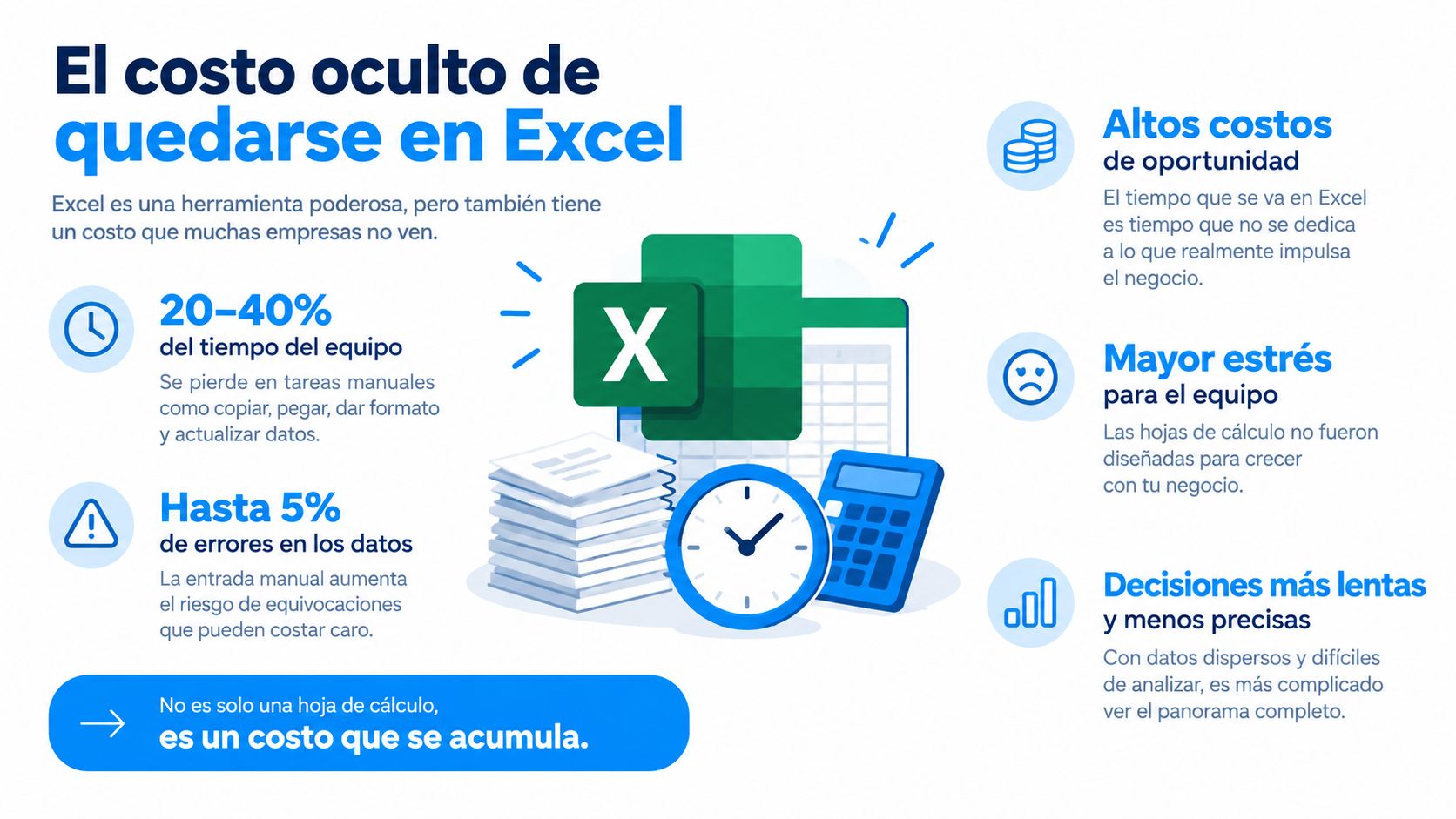
Practical calculation: the cost of Excel is not the file. It is the time the team loses keeping it alive and the sales it cannot explain or win back.
The right comparison is not a free sheet versus paid software. It is manual control versus a scalable process. To bring order to this decision, it is useful to document the return on investment of a tool with hours of work, errors detected, customers recovered, and attributable sales.
How to migrate from the spreadsheet to CRM without losing data
Migrating is not about copying all columns from Excel to another platform. It is about deciding which data actually helps to sell, retain, and serve better. If the migration is done poorly, you only transfer the clutter and start campaigns with unreliable information.
The first step is to clean up duplicates and normalize fields. Names must follow the same criteria, phone numbers must keep a uniform format, and emails must be checked before importing. It is also useful to separate from the start name, branch, purchase date, product, channel, and communication consent.
The single profile
Next, the business must define a single customer profile. This profile will be the common source for sales, service, and marketing. To structure it well, review how to build a clean and actionable customer database before importing. There is no need to upload everything that once appeared in a sheet. Only migrate the fields that the team will actually use.
Then, it is time to map the events that actually matter. A coffee shop may need visit, product purchased, and branch. A barbershop may require service, professional, date, and frequency. A restaurant may prioritize order, spend, visit date, and recurrence.
Multichannel capture comes next. Point of sale, forms, bookings, and conversations should not create isolated files. If each channel feeds a different database, the business repeats the same problem with another interface. Spreadsheets do not solve data governance or integrations.
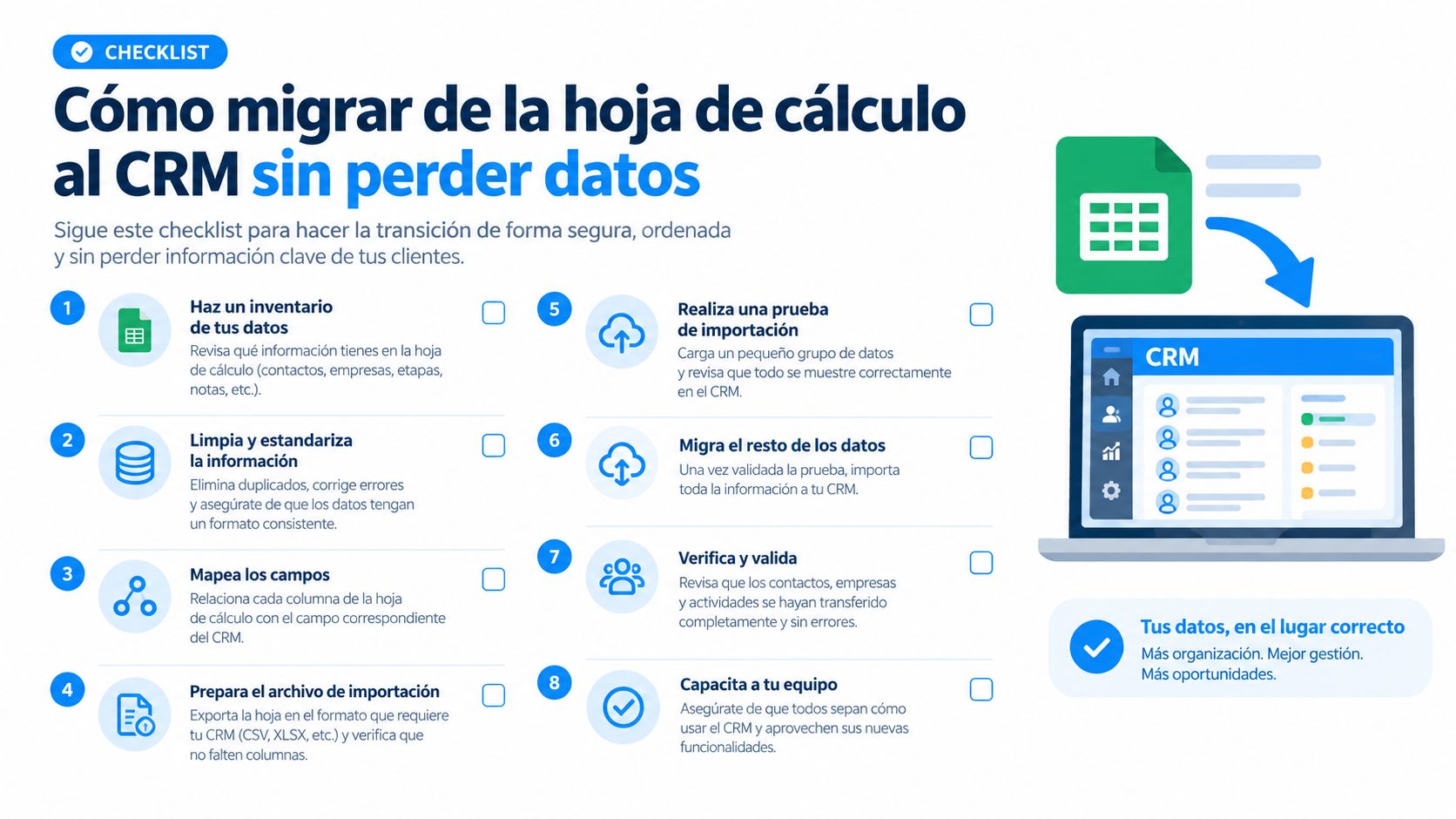
Checklist before activating the database
Duplicates: unify repeated customers before importing.
Fields: define allowed names and formats.
Profile: establish a unique record per customer.
Events: select purchases, visits, and actions that will actually be measured.
Channels: connect capture points that feed the relationship.
Audit: review data quality on a weekly basis.
The most important tip is not to migrate everything. It is best to move only what the business is going to use to serve, segment, and measure from day one. A small and clean database is worth more than a huge file that no one understands. If the information does not help make decisions, it stays out.
Final recommendations and when to go for an all-in-one platform
The recommendation for a starting SMB is to keep Excel only if the operation remains simple. There must be an owner, a unique format, frequent backups, and a constant review of duplicates. If the business already works with recurring customers, more than one branch, or WhatsApp campaigns, software stops being a luxury and becomes an operational decision.
A coffee shop needs to trigger visits and rewards. A barbershop needs to connect frequency, history, and booking capacity. A restaurant needs to segment habits, recognize recurrence, and raise the average ticket. A generic CRM can solve contacts and follow-ups, but an all-in-one platform oriented to physical businesses can also unite sales, loyalty, segmentation, coupons, rewards, and campaigns.
In this scenario, Swirvle centralizes customer information, segments by consumption habits and branch, and allows running campaigns via WhatsApp, push notifications, and email. It also integrates a point of sale with the customer database, incorporates dynamics of visits, points, or purchases, and offers dashboards to connect campaigns with sales and measure ROI.
Three actions for this week
Audit the sheet: remove duplicates, identify inconsistent fields, and separate useful information from abandoned data.
Define the goal: choose a specific priority, such as winning back inactive customers, increasing visits, or understanding the ticket by branch.
Test the real flow: record a purchase, check the history, create a segment, and trigger a communication before committing to a platform.
The final question is not whether Excel works as a CRM for a small business. It works, but only as long as the business needs an ordered list. When it needs to convert data into recurrence, measurable campaigns, and profit, an actionable database beats an isolated sheet.
Swirvle centralizes customers, purchases, habits, and branches, and adds campaigns, coupons, and rewards for physical businesses looking for more recurrence. To leave manual control behind and evaluate a loyalty operation with ROI measurement, the next step is to visit Swirvle.
Related Blogs

Oct 5, 2026
Does Excel work as a CRM for a small business, or is it better to use a software?

Oct 4, 2026
How to organize my client information if I have a small business? Guide
Oct 3, 2026
What message should I send on WhatsApp to win back a customer who is no longer returning?

Oct 2, 2026
Grocery Store Software: 2026 Comparative Guide

Oct 1, 2026
Omnichannel CRM for Physical Businesses in 2026

Sep 30, 2026
7 sales report templates for SMBs
Try Swirvle for free
No card required · 30 days free
Start your free trial